- 252 - - 253 -
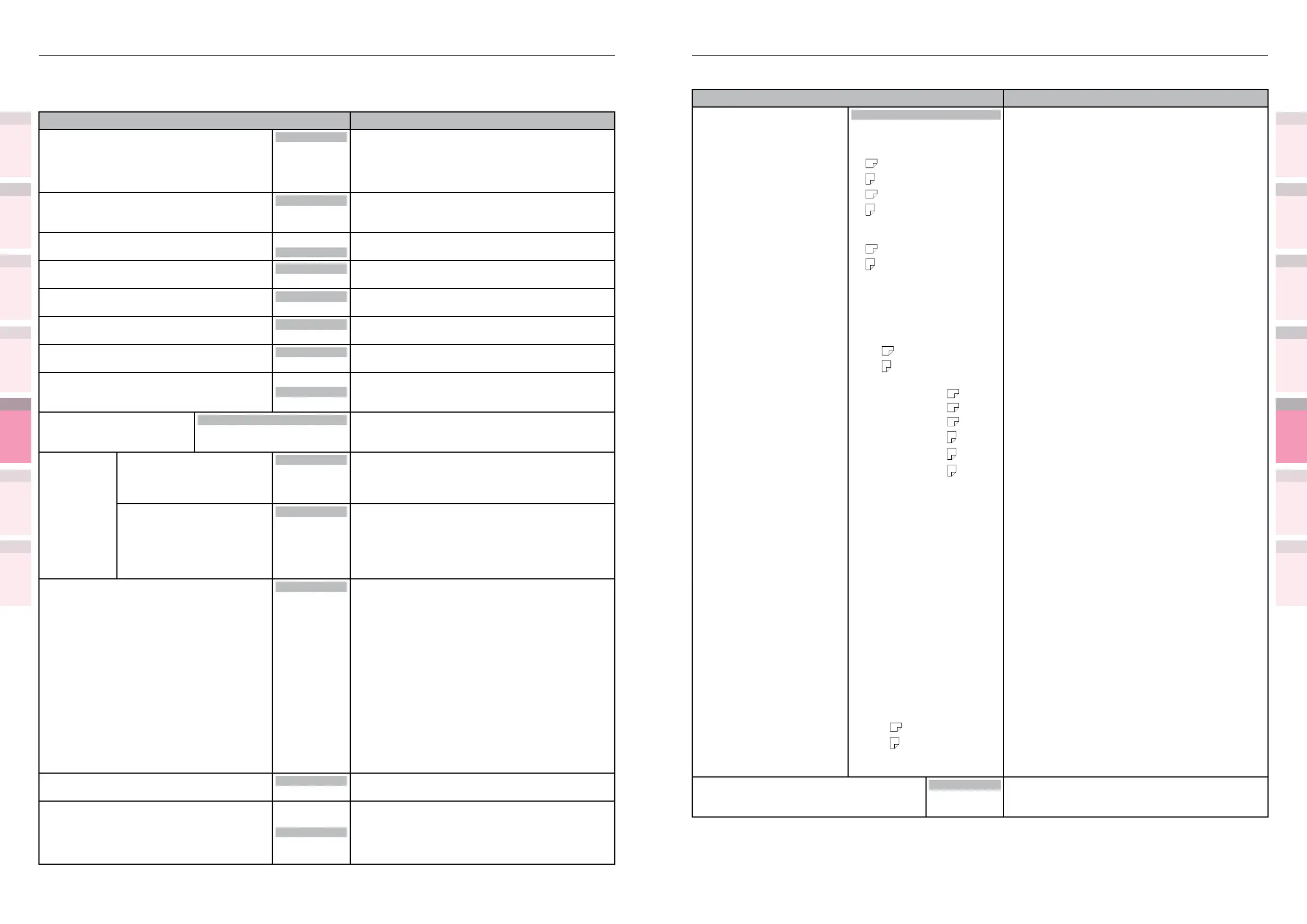
Table of setting items in the device setup screen Table of setting items in the device setup screen
1
2
3
5
4
1
2
3
5
4
Convenient print
functions
Appendix Index
Checking and
Changing Printer
Settings Using
the Control Panel
Network
Setup
Matching
Colors
Using Utility
Software
Convenient print
functions
Appendix Index
Checking and
Changing Printer
Settings Using
the Control Panel
Network
Setup
Matching
Colors
Using Utility
Software
z
Shaded areas are factory-set values.
Item Details
Edit Size Cassette size
A3Nobi
A3Wide
A3
A4
A4
A5
A5
A6
B4
B5
B5
B6
Legal14
Legal13.5
Legal13
Tabloid Extra
Tabloid
Letter
Letter
Executive
16K (184x260mm)
16K (195x270mm)
16K (197x273mm)
16K (184x260mm)
16K (195x270mm)
16K (197x273mm)
8K (260x368mm)
8K (270x390mm)
8K (273x394mm)
Statement
Sets the edit size of the paper if the paper size has
not been specied from the PC. Disabled with PS.
Com-9 Envelope
Com-10 Envelope
Monarch Envelope
DL Envelope
C4 Envelope
C5 Envelope
Nagagata #3
Nagagata #4
Nagagata #40
Yougata #0
Yougata #2
Yougata #4
Kakugata #2
Kakugata #3
Kakugata #8
Index cards
A4Wide
A4Wide
B6Half
Custom
Trapping
Off
Narrow
Wide
Sets trapping.
Print Setup
z
Shaded areas are factory-set values.
Item Details
Personality Auto
PCL
IBM PPR
EPSON FX
PostScript
Select the print language. Print language switching
is automatic when set to [Auto].
Copies
1
to
999
Sets the copy quantity.
This setting is disabled unless local print is set to
demo data.
Duplex
On
Off
Sets whether or not to implement 2-sided printing.
Binding
Long Edge
Short Edge
Sets the 2-sided print binding method.
Job Offset
On
Off
Sets whether to enable job offset.
Output Bin
Face Down
Face Up
Sets the output bin.
Media Check
Enable
Disable
Sets whether to enable the print data paper size
and the tray paper size mismatch.
A4/Letter Override
No
Yes
Sets whether to print by switching A4 to letter size
and letter to A4 size when there is no paper suited
to the print data size in the tray.
Resolution
600dpi
1200dpi
multi-level (4800)
Sets the resolution.
Toner Save Toner Save Level
Off
Low
Middle
High
Sets the toner ave quantity.
Species [Off] when toner save mode is disabled.
Color
All
Except 100%
Black
All:
All colors, including 100% black, comprise all
the target colors for toner saving.
Except 100% Black:
All colors, excluding 100% black, comprise all
the target colors for toner saving.
Mono-Print Mode
Auto
Color Mode
Normal Mode
Sets the monochrome page print mode.
Auto:
Prints using [Prioritize ID service life] mode
for monochrome pages, and using [Prioritize
productivity] for color pages.
Color Mode:
The CMYK image drum always prints down, and
the clear and white image drums print down
from where the page is, including white or clear.
Normal Mode:
K image drums are normally printed down, and
other color image drums are down when printing
pages including those colors, and up when
printing pages that do not include such colors.
However, CMY image drums are down/up using
three colors.
Default Orientation
Portrait
Landscape
Sets the print orientation.
Form Length
5 lines
to
64 lines
to
128 lines
Sets the number of printable lines per page.



 To Next Page