52 Event V3 Manual
Creating Memories & Chases
8.100Deleting a Step
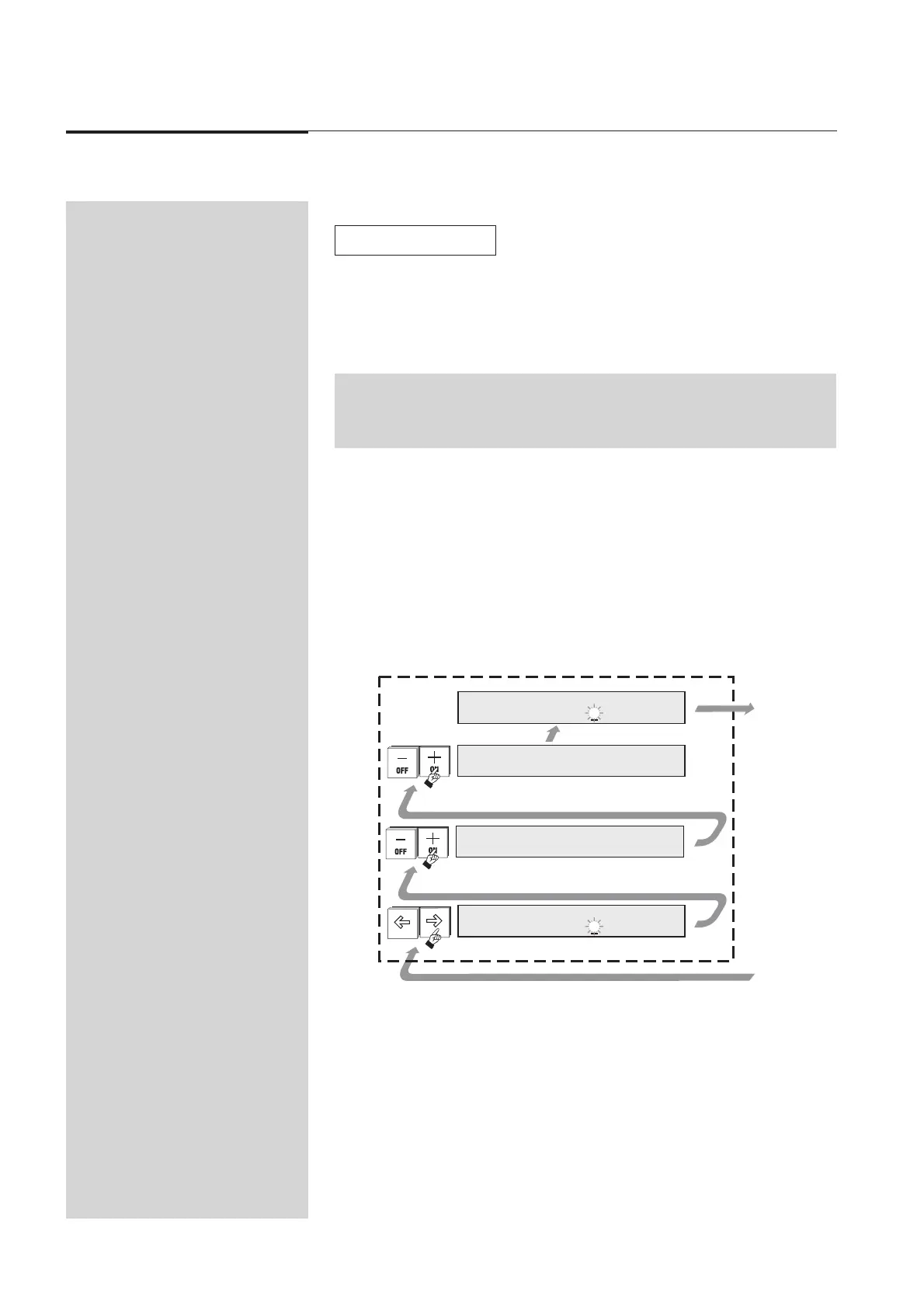
To delete a Step use the following procedure:
1. Set the ST (Step) field to the Step number that you wish to remove.
2. Move the cursor to the DEL field.
3. Press the 1 (On) button.
Diagram 8L + 8J
NOTE: The Delete and Add fields are not shown when the Edit Chase menu is opened.
Move the cursor to the More field (at the right hand end of the menu) to reveal
these fields.
☞
t
1
Sf
1
O
>
_
C
_
D
O
e
f
A
O
d
f
d
f
__
1
IDT
1
E
C
l
f
aot
S
e
%
D
0g
d
d
e
e
e
u01,f%0eere:
t
s.
l
r
_
_
C
t
1
_
1
r
5
PS
_
s+
-
et
t
e
e
D
K
o
o
s
l
e
e
p
te
t
1
Sf
0
O
>
_
C
_
D
O
e
f
A
O
d
f
d
f
__
1
IDT
1
E
C
l
f
▼
8L Deleting a Step



 To Next Page