3-31
3
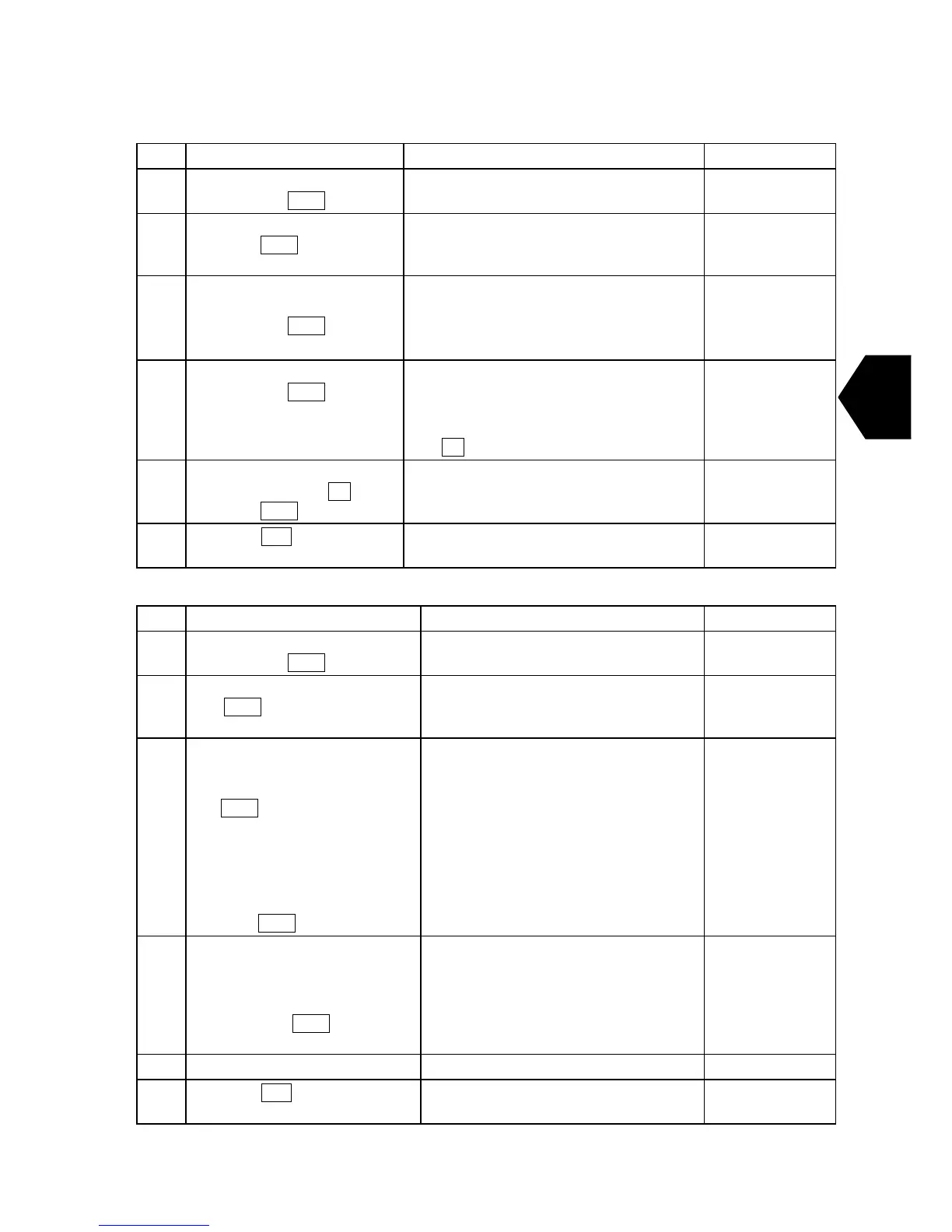
(2) Rename file
Step Operation IME/DTE Response Remarks
1 • Move the cursor to “Edit”
and press
Enter key.
• “Edit” window is displayed.
2 • Select “reName file” and
press
Enter key.
• The file list memorized in IME/DTE
and “Current file name: ” is
displayed.
3 • Select or input the file
name you want to rename,
and press
Enter key.
Example: “TEST. TLX”
• “Current file name: TEST. TLX”
“New file name: ” is displayed.
4 • Input the new file name
and press
Enter key.
EX: “ABC. TLX”
• “New file name: ABC. TLX
CAUTION.
Are you sure you want to rename the
file “TEST. TLX” To “ABC. TLX”?
Yes No” is displayed.
Blank space
cannot be used
for file name.
5 • When the file name is
renamed, select
Yes and
press Enter key.
• The selected file is renamed.
6
• Press ESC key to return
the main menu.
• Main menu is displayed.
(3) Copy file
Step Operation IME/DTE Response Remarks
1 • Move the cursor to “Edit”
and press
Enter key.
• “Edit” window is displayed.
2 • Select “Copy file” and press
Enter key.
• The file list memorized in IME/DTE
and “Current file name: ” is
displayed.
3
• Enter the file name, or move
the cursor to the file name
you want to copy, then press
Enter key.
• When you save the file to
IME/DTE from USB drive,
Enter as [E: (the file name
you want to copy)] to the
column of copy origin, then
press
Enter key.
• “Current file name: XXX. TLX”
• “New file name: ” is displayed.
4 • When you save the file to
USB drive from IME/DTE,
Enter as [E: (new file name)]
to the column of copy origin,
then press
Enter key.
• “New file name: ABC. TLX” is
displayed.
Input file name
within 8
characters and
input the
extension within
3 characters.
5 • The new file is duplicated.
6
• Press ESC key to return the
main menu.
• Main menu is displayed.


 To Next Page