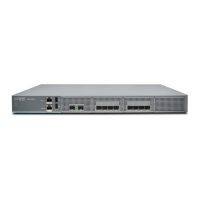
Figure 13: Location of Fan Module LED in an SRX4600 Services Gateway
1—Fan module LED
Table 11 on page 34 describes the function of the fan module LED.
Table 11: Fan Module LED
DescriptionStateColorName
The fan module is operating normally. The system has verified that the
module is engaged, that the airflow is in the correct direction, and that
the fan is operating correctly.
On steadilyGreenFan
An error has been detected in the fan module. Replace the fan module
as soon as possible. Either the fan has failed or it is seated incorrectly. To
maintain proper airflow through the chassis, leave the fan module installed
in the chassis until you are ready to replace it.
BlinkingAmber
CAUTION: The system raises an alarm if a fan module fails or if the ambient
temperature inside the chassis rises above the acceptable range. If the temperature
inside the chassis rises above the threshold temperature, the system shuts down
automatically.
Airflow Through Chassis
The direction of airflow in the chassis is from Port-to-FRU, that is, air comes in through vents on the end
with ports and air exhausts out the end with the fans (also known as front-to-back airflow). See
Figure 14 on page 35.
34



 To Next Page