A75UM3EK (Ver. E.2)
3-146
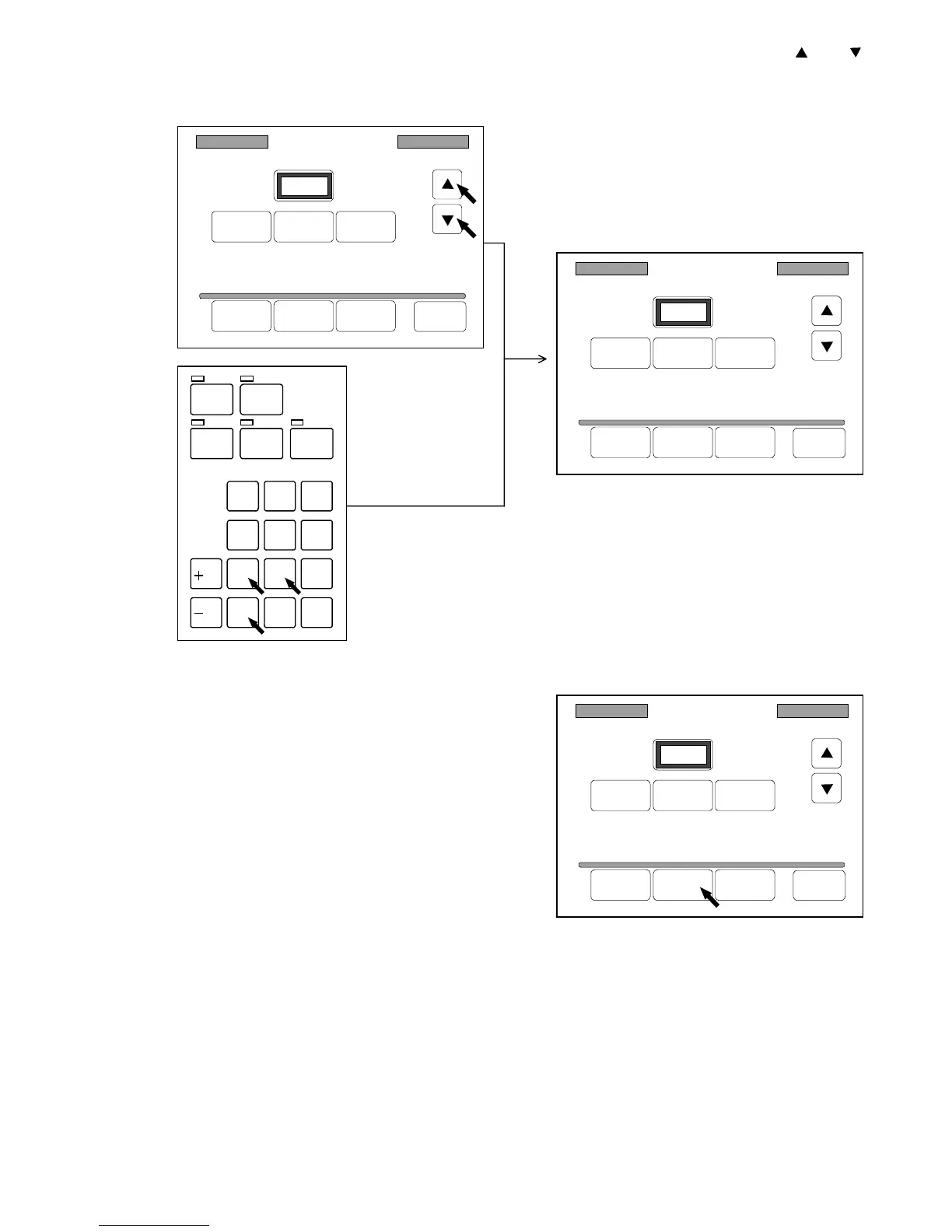
2) Indicate your preferable zoom ratio in the Register Zoom Ratio Setting Screen pressing and .
Or input the zoom ratio directly with Ten Keys.
(Example : You will register 120.0%.)
3) Press “Add” to add the indicated zoom ratio to the
Standard Zoom Frame.
If the zoom ratio is smaller than 100.0%, it is
registered to the Reduction Frame automatically.
If it is larger than 100.0%, it is registered to the
Enlargement Frame.
Note : If the Standard Zoom Frame has 10 zoom ratios already, it is impossible to register the
indicated zoom ratio unless you delete some zoom ratio.
If you would like to delete, refer to the next page.
4) If you wish to let the Register Zoom Ratio be valid later on even if you turn off the machine,
register it making reference to “How to register the setting” on the page 3-143.
/
L
/
R
SET COPY
ROTATE
AUTO ZOOM AUTO PAPER
CON CURRENT
PRINT
0
1
4
7
.
2
5
8
C
3
6
9
Register Zoom Ratio
Reduce 100% Enlarge
100.0%
Delete Add Reset Back
Register Zoom Ratio
Reduce 100% Enlarge
120.0%
Delete Add Reset Back
Register Zoom Ratio
Reduce 100% Enlarge
120.0%
Delete Add Reset Back



 To Next Page