12
4
Quadrant
Energy Analyzer
4
Quadrant
Energy Analyzer
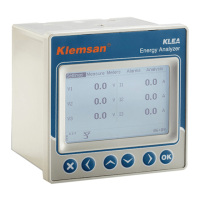
1.6 KLEA Front Panel
Measure
Meters
Alarms
Analysis
Settings
Fig. 1-1 KLEA Display
1 Menus
2 L-N voltages belonging to three phases
3 Currents of three phases
4 Presence/Absence of currents-voltages belonging to three phases, and phase sequence
5 Selected connection type
6 Alarm state symbol (for any alarm)
7 Temperature alarm state symbol (displayed only with a temperature alarm)
8 Alarm relay symbol (If 1st and/or 2nd alarm relay is assigned to any alarm and also
if there is an alarm in the system at the same time, this symbol shall appear on the
screen. “1” stands for 1st Alarm Relay and “2” stands for 2nd Alarm Relay)
9 KLEA digital output symbol ( “1” indicates, digital output 1; and “2” indicates digital
output 2. This symbol shall be displayed as long as width of the output pulse.)
10 KLEA digital output symbol (if there is an output from optional output3,
output4, output5, output6 and output7, this symbol shall be displayed.)
11 RS485 communication symbol
12 Klea system time
13 X Key (in order to cancel any change or to return to the upper menu)
14 Left key
15 Up key
16 Down key
17 Right key
18 OK key (pressed in order to save any change or to access submenus)
SECTION 1 GENERAL INFORMATION


 To Next Page