63
4
Quadrant
Energy Analyzer
4
Quadrant
Energy Analyzer
SECTION 3 MENUS
KLEMSAN
KLEA - Network Analyzer
Model
Serial number
Language
Firmware version
PCB version
Build date
Temperature
Battery voltage
606130
2555953
English
1.00
1.1.e0
29 October 2012
26.5 °C
3.30 V
V1
V2
V3
V
V
V
A
A
A
I1
I2
I3
17:22
0.0
0.0
220.0
5.0
5.0
5.0
V
1 23
I
12
12 E
Setup
Date / Time
System info
Password
Restart
Default settings
Settings
Measure
Meters
Alarms Analysis
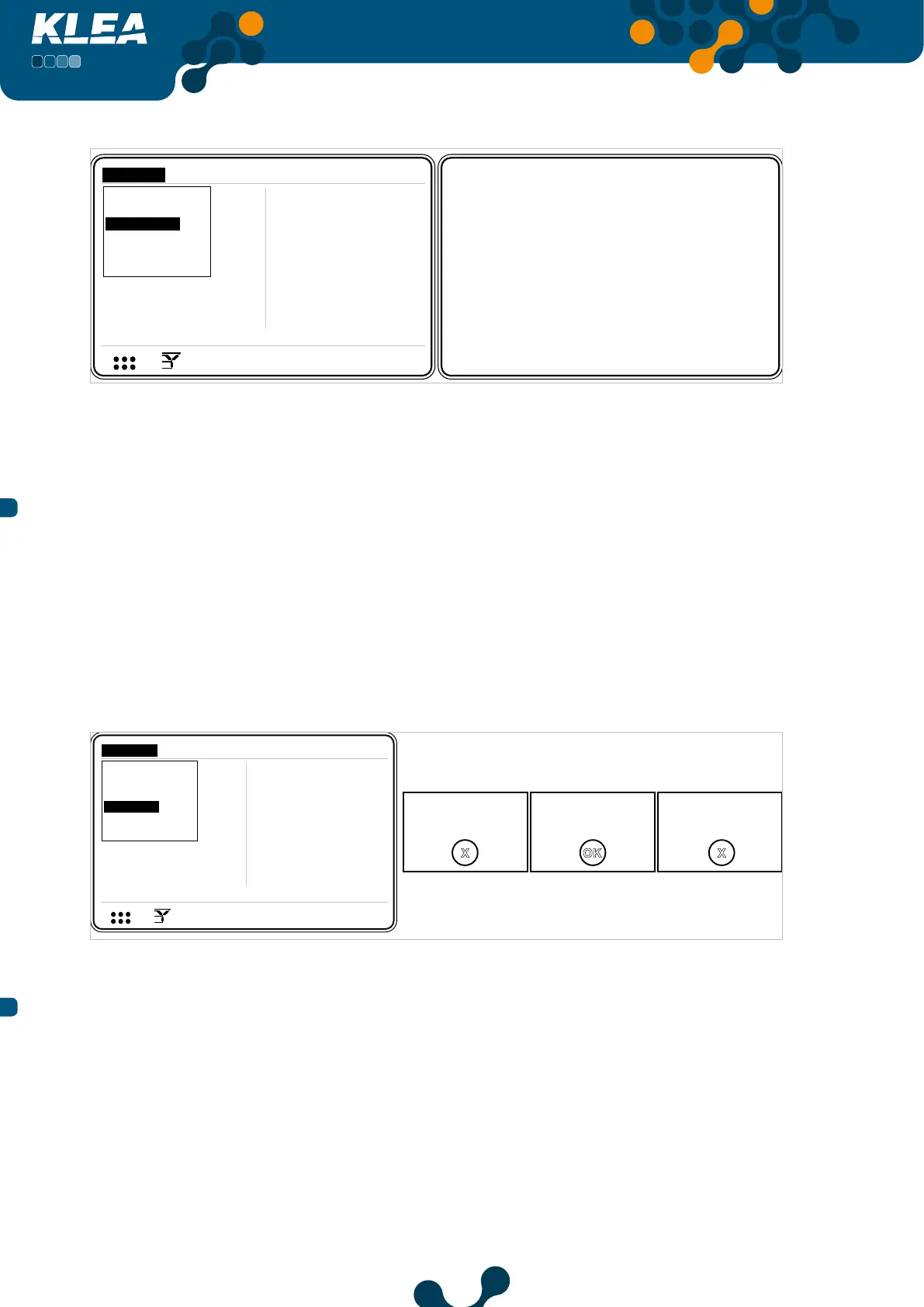
Fig. 3-63 System Info
Temperature and battery voltage values can be reached via RS485.
3.2.1.4 Password Menu
If operator have not entered password; only Date/Time, System Info and Password
tabs are active inside settings menu. In order for the remaining tabs to be activated,
operator should login via ‘Password’ tab.
If the entered password is correct, “Login success” message appears on the screen.
Otherwise, “Password mismatch” message will be displayed on the screen.
(For Virtual Keyboard Refer to 3.1.4 E.g.).
Login required! Login success. Password mismatch.
V1
V2
V3
V
V
V
A
A
A
I1
I2
I3
17:22
0.0
0.0
220.0
5.0
5.0
5.0
V
1 2 3
I
1 2
1 2 E
Setup
Date / Time
System info
Password
Restart
Default settings
Settings
Measure
Meters
Alarms Analysis
OK
X X
Fig. 3-64 Password
3.2.1.5 Restart Menu
If OK key is pressed on the restart tab, “Are you sure?” message appears on the screen.
Press again OK key to restart Klea.


 To Next Page