M A E D A Crawler Crane 4.8 CONTROL LEVERS AND PEDALS
5/2020 CC1908S-1 4-45
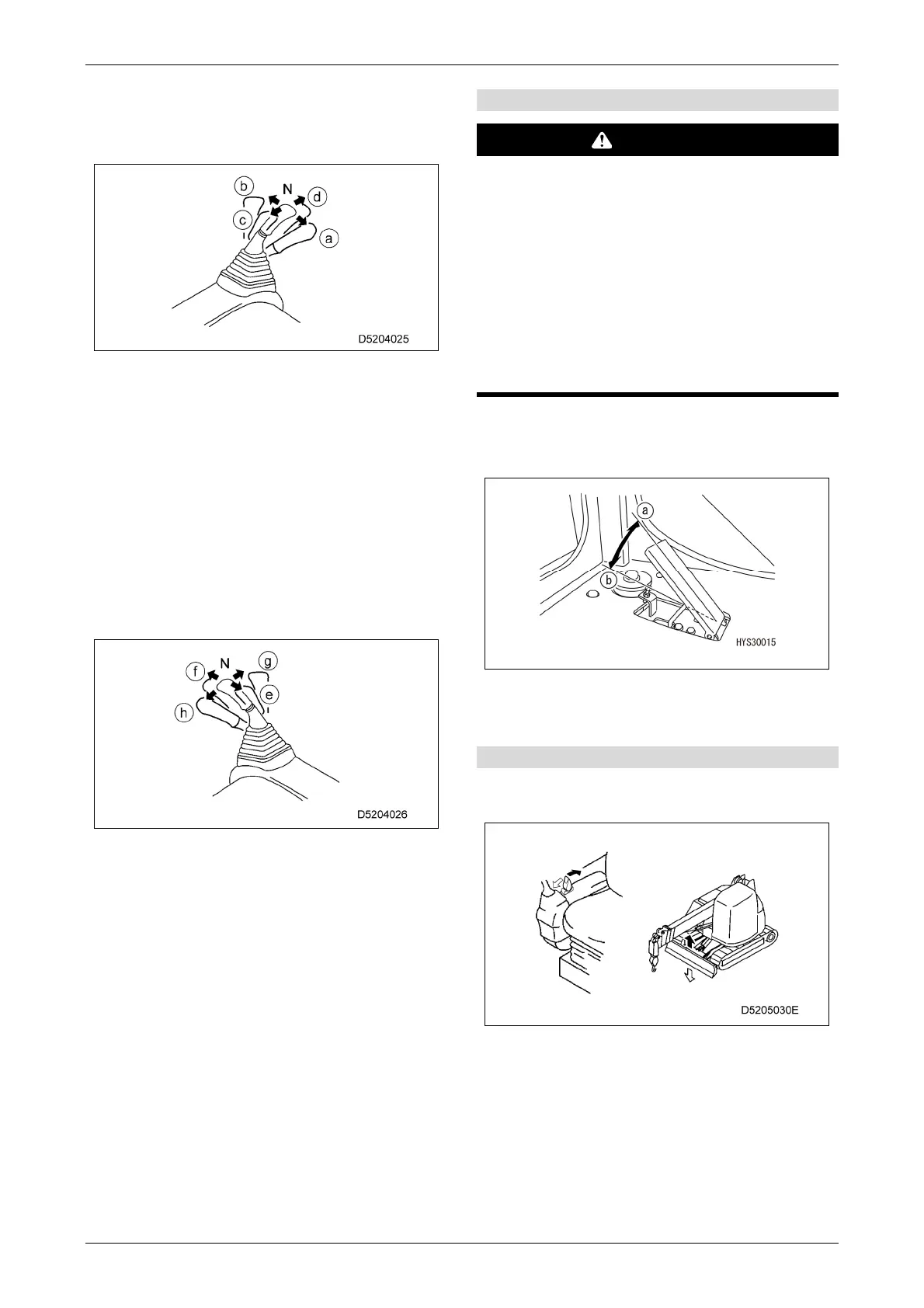
[Left-hand control lever]
Use this lever to slew the upper slewing body and
to extend and retract the boom.
• Slewing operation
(a) Right slewing: Pull the lever to the right.
(b) Left slewing: Push the lever to the left.
• Boom extension and retraction
(c) Boom retraction: Pull the lever backward.
(d) Boom extension: Push the lever forward.
(N) Neutral: Release your hand from the lever.
The upper slewing body and boom length
hold their positions when they are stopped.
[Right-hand control lever]
Use this lever for winching and boom derricking
operations.
• Winch operation
(e) Hoisting: Pull the lever backward.
(f) Lowering: Push the lever forward.
• Boom derricking operation
(g) Boom lowering: Push the lever to the right.
(h) Boom raising: Pull the lever to the left.
(N) Neutral: Release your hand from the lever.
The hook block and boom angle hold their
positions when they are stopped.
[5] Accelerator pedal
WARNING
Depress the pedal slowly and operate
carefully while the machine is travelling, as
there is a risk of inadvertent operation if the
speed is changed suddenly.
Depress the pedal slowly and operate
carefully, as there is a risk of incorrect
operation due to sudden acceleration while
operating the crane.
Depress the pedal slowly and operate
carefully, as there is a risk of incorrect
operation due to sudden acceleration while
operating the crane.
Use to adjust the engine speed or output while
operating the crane or travelling.
(a) Low idling: Release the pedal.
(b) Full power: Depress the pedal fully.
[6] Blade control lever
Used when raising the blade from the ground or
lowering it to the ground.
• Blade raising: Pull the lever toward you.
• Blade lowering: Push the lever forward.
For details on operation using the blade, refer to
"5.8 BLADE (OPTION)" on P.5-57.



 To Next Page