5.9 FLY JIB (OPTION) M A E D A Crawler Crane
5-70 5/2020 CC1908S-1
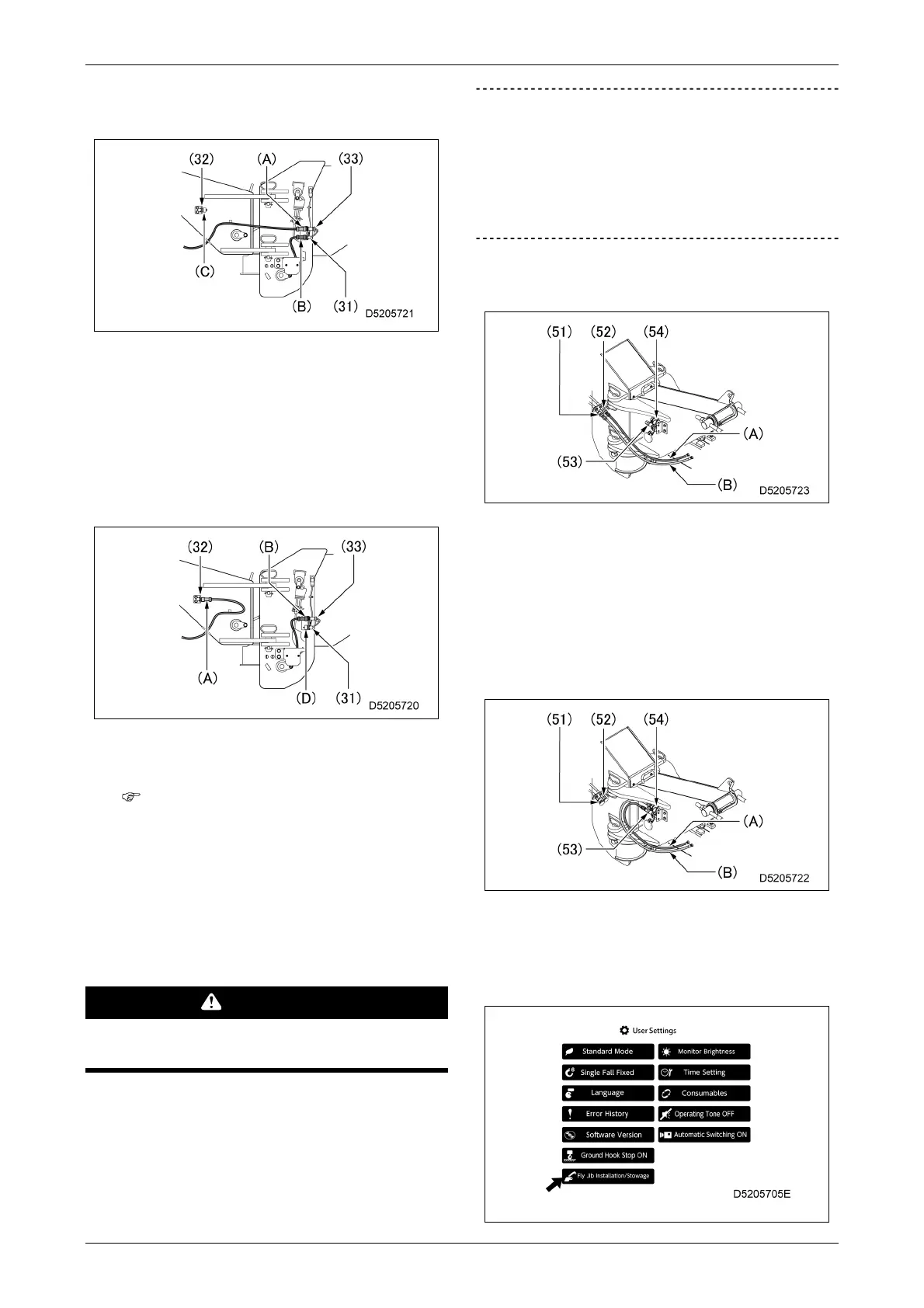
1. Remove the plug (C) from the connector
(32) on the fly jib side.
2. Disconnect the connector (A) from the
connector (33) on the boom side, and
disconnect the connector (B) from the
connector (31) on the boom side.
3. Connect the connector (A) to the
connector (32) on the fly jib side, and
connect the connector (B) to the
connector (33) on the boom side.
4. Connect the plug (D) to the connector
(31) on the boom side.
The harness will be temporarily
electrically disconnected until
reconnection is complete.
A fly jib error will be displayed here, but
this is not a fault.
7.
Reconnect the hydraulic hoses on the right
side of the main boom tip and on the right
side of the fly jib base using the following
procedure:
WARNING
Be sure to check that the engine has been
shut down before starting work.
IMPORTANT
• Be sure to reconnect the hydraulic hoses.
The machine will not operate correctly
unless the hydraulic hoses are reconnected.
• Check that the hydraulic hose couplers are
securely inserted after reconnecting.
1. Remove the caps from the couplers (53)
and (54) on the fly jib side.
2. Disconnect the hydraulic hose (A) from
the coupler (52) on the boom side, and
disconnect the hydraulic hose (B) from
the coupler (51) on the boom side.
3. Connect the hydraulic hose (A) to the
coupler (53) on the fly jib side, and
connect the hydraulic hose (B) to the
coupler (54) on the fly jib side.
4. Attach caps to the couplers (51) and
(52) on the boom side.
8.
Select "Fly Jib Installation/Stowage" mode
on the User Settings screen.



 To Next Page