Section 5 – PERIODIC MAINTENANCE
Mini-Crawler Crane M A E D A
5-38 3/2019 MC305C-3
Maintenance Every 50 Hours
Drain Contaminant Water/Deposits in
Water Separator
WARNING!
• The water separator pot has fuel (diesel oil)
inside. Be extremely careful of fire such as
cigarette when cleaning the water separator
pot.
• If the fuel spills when the water separator
pot is removed, thoroughly wipe it off.
CAUTION: Water or dust accumulated inside
the water separator pot will cause engine
failure. Check inside the pot and remove any
water or dust accumulated inside.
If water remains in the water separator pot, too
much water may be mixed in the fuel tank. See
"Maintenance Every 250 Hours" and eliminate
water and dust mixed into the fuel tank.
1. Place the machine on a level surface.
2. See "OUTRIGGER SETTING" on page 4-36
and rotate the outriggers outward.
3. See "Removing Machinery Cover" on page
5-18 and remove the machinery cover.
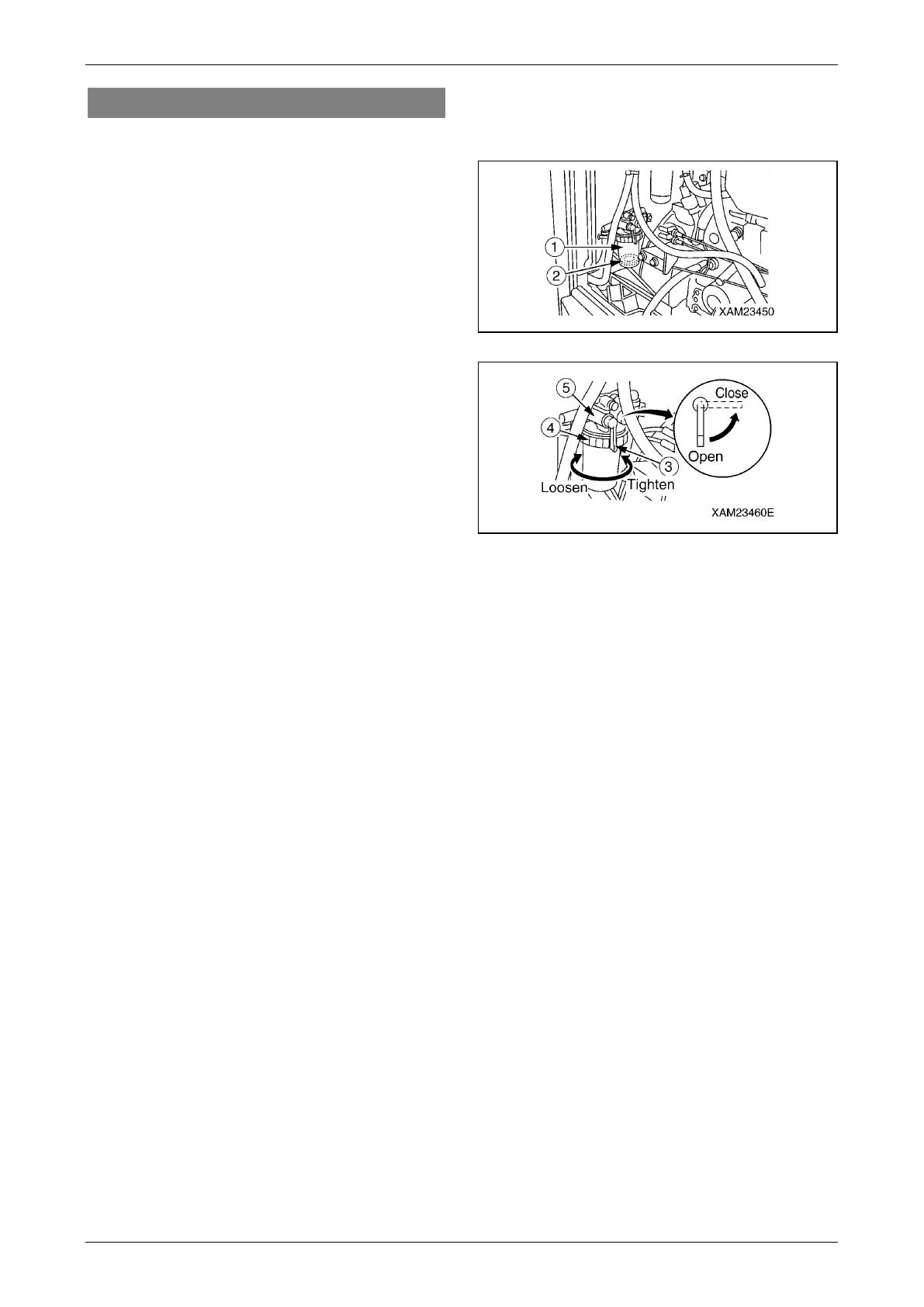
4. Set the fuel lever (3) on the water separator
pot (1) to a horizontal position (Close
position) to stop fuel supply.
5. Turn the retaining ring (4) counterclockwise
(left) to loosen it, and remove the water
separator pot (1).
6. Clean the inside of the pot (1) and element
with light oil. Blow dry compressed air on the
inside of the pot at 0.20 to 0.29MPa (2 to
3kg/cm
2
) to remove impurities from the
internal surface.
7. Put the pot (1) in place, and turn the retaining
ring (4) clockwise (right) to tighten it.
8. Set the fuel lever (3) to a vertical position
(Open position).
NOTICE: Wipe off fuel completely if spilled.
Fig. 5-59
Fig. 5-60
9. Use the following procedure for air bleed of
the fuel system.
(1) Turn ON the starter switch to supply fuel, and
wait until the pot (1) is filled up.
(2) Upon fill-up of the pot (1), turn OFF the starter
switch.
NOTICE: Ensure that a red float (2) in the pot
remains on the bottom. If the red float (2) is raised,
water is present in fuel.
10. See "Installing Machinery Cover" on page
5-18 and install the machinery cover.
11. See "OUTRIGGER STOWING" on page 4-45
and rotate the outriggers inward to stow
them.



 To Next Page