M A E D A Mini-Crawler Crane Section 5 – TROUBLESHOOTING
3/2019 MC305C-3 5-87
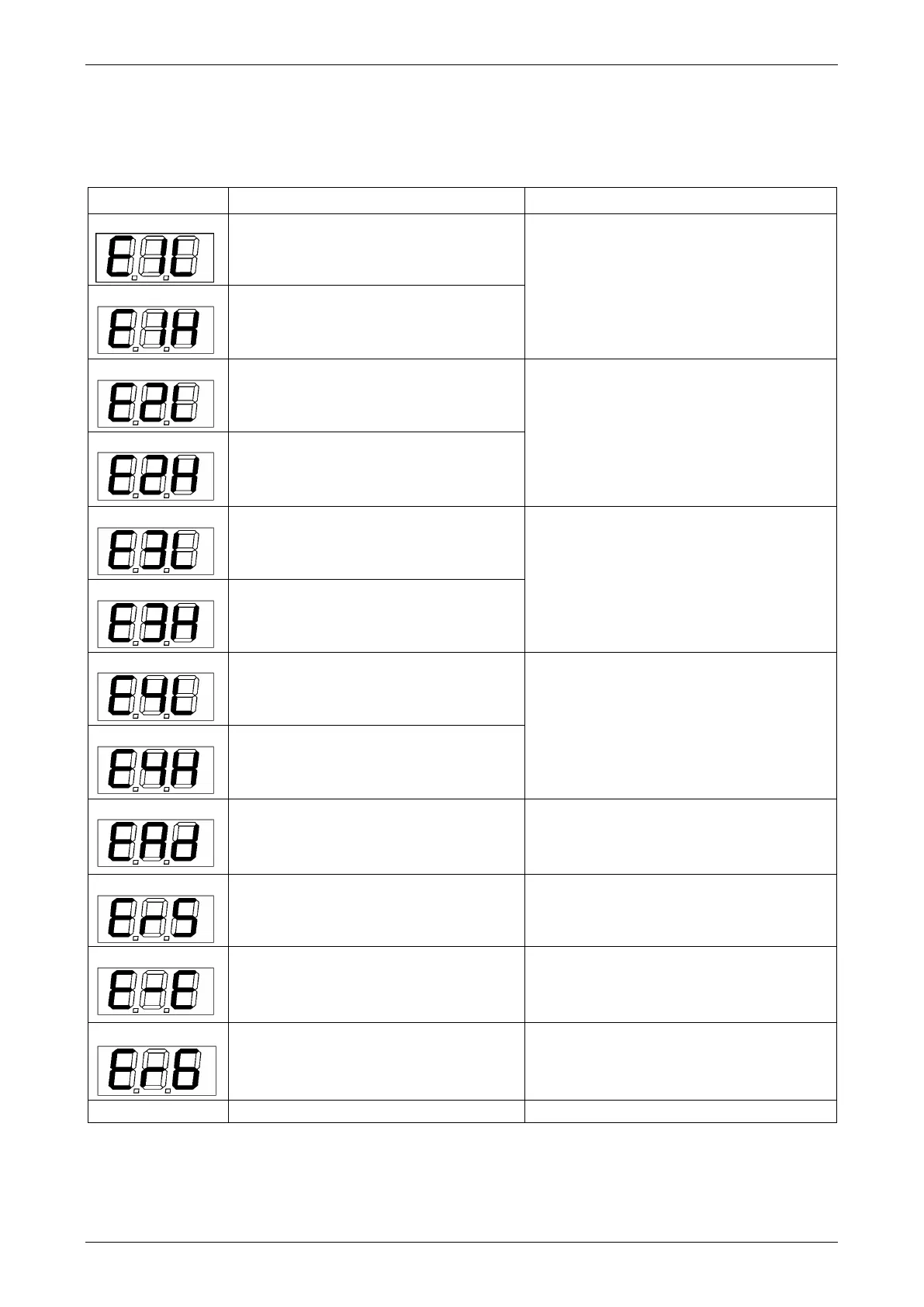
Moment Limiter Error Causes and Actions to Be Taken
The moment limiter displays an error code at the "rated total load" display section on the display panel to
notify the error.
If an error code shown in the table below was displayed, contact us or our sales service agency.
The input to pressure sensor 1 is lower
than the specified value.
Check the installation of the pressure
sensor 1.
The input to pressure sensor 1 is higher
than the specified value.
The input to pressure sensor 2 is lower
than the specified value.
Check the installation of the pressure
sensor 2.
The input to pressure sensor 2 is higher
than the specified value.
The input to angle detector is lower
than the specified value.
Check the installation of the angle
detector.
The input to angle detector is higher
than the specified value.
The input to length detector is lower
than the specified value.
Check the installation of the length
detector.
The input to length detector is higher
than the specified value.
The AD converter at the converter
section is not functioning properly.
Turn the starter switch to the "OFF"
position and then to the "ON" position
again. If an error is displayed again,
change the converter.
The communication between the
converter section and the indicator is
not carried out properly.
Check the cable between the indicator
and the converter. If the cable is normal,
change the converter.
Error with calibration memory.
This error is also issued when
calibration has not been done yet.
Turn the starter switch to the "OFF"
position and then to the "ON" position
again. If an error is displayed again,
change the indicator.
Slewing detection limit switch
disconnected or improperly adjusted.
Adjust and check the slewing detection
limit switch.
Check the fuse built-in the display unit.



 To Next Page