VM600 networking manual MAVM600-NET/E 10 - 15
Edition 9 - February 2018
Configuring a VM600 system for operation as a PROFINET IO-Device
SETTING UP A PROFINET CONNECTION (CPUM SW VERSION 081 OR LATER)
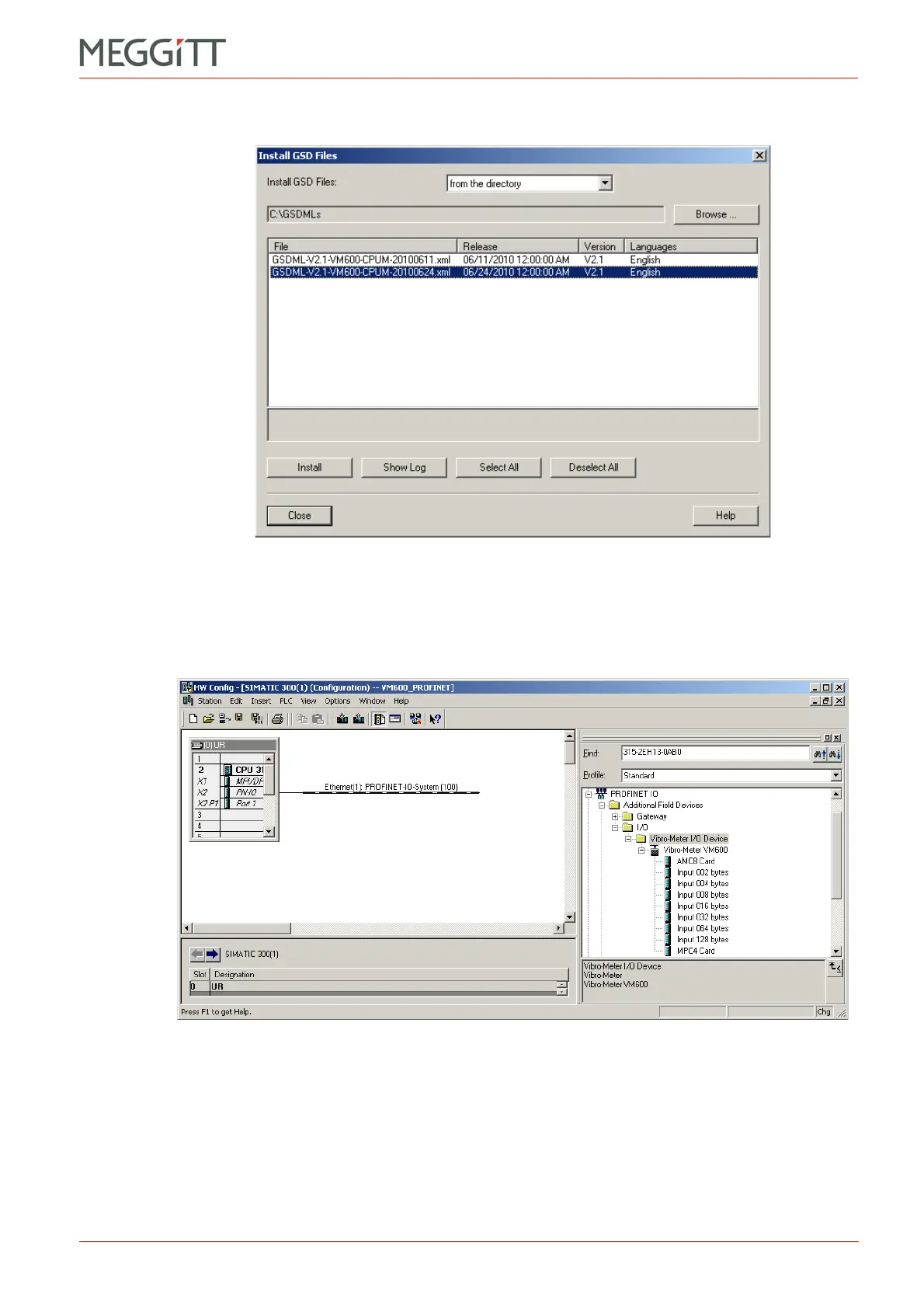
A list of all GSD files available in the folder are presented in the dialog box.
2- Select the required GSD file from the list and click Install. Then click Yes to confirm the
installation of the GSD.
The Vibro-Meter device is added to the SIMATIC STEP 7 software and can be found in
the Hardware Catalog under: PROFINET IO – Additional Field Devices – I/O –
Vibro-Meter I/O Device – Vibro-Meter VM600.
Installing a GSDML file (.xml) will add a copy of the GSDML file to the repository of GSD
and GSDML files that the SIMATIC software maintains on the computer. The location of
Figure 10-12: HW Config – installing GSDML files
Figure 10-13: HW Config – with VM600 rack and cards available


 To Next Page
 Loading...