VM600 networking manual MAVM600-NET/E 4 - 11
Edition 9 - February 2018
Ethernet redundancy
SETTING UP AN ETHERNET CONNECTION
Then complete the procedure by restarting the rack: turn off the VM600 rack, wait for 2 to 3
seconds, and turn on the VM600 rack. If you are unable to physically power down the rack,
you can use the shutdown command instead.
After the CPUM card is correctly configured, the IP addresses of the two computers
connected to the two Ethernet ports must be set as described in Section 4.2.2 Configuring a
computer’s network adapter.
NOTE: Each computer’s IP address must be chosen in the same subnet as the
corresponding CPUM card’s IP address.
For example, the first computer IP address corresponding to the primary CPUM address
(10.10.56.56) can be set to 10.10.56.55 and the second one set to 10.10.57.55.
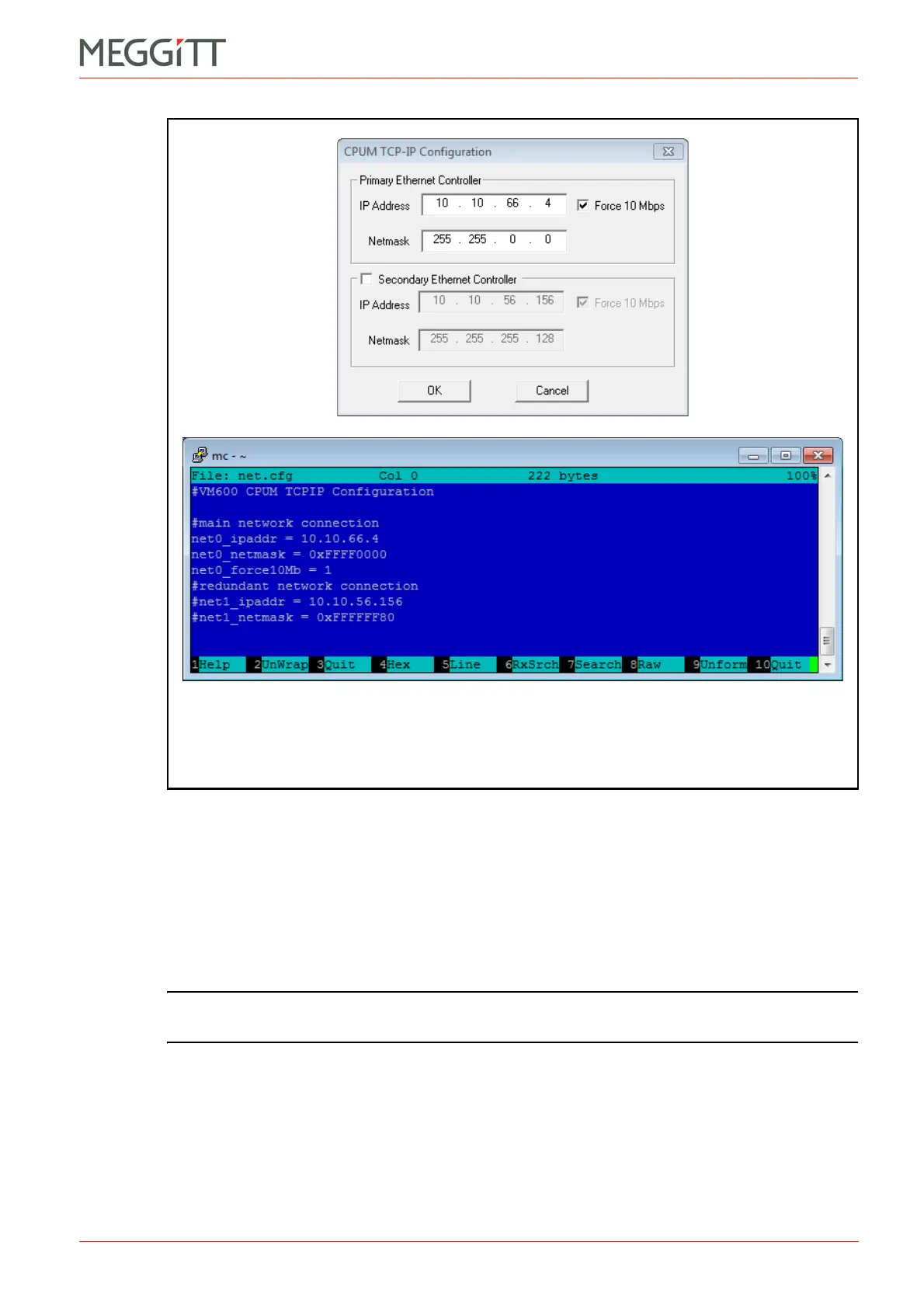
Figure 4-6: Network interface (IP addressing) information from the net.cfg
file of a CPUM card displayed in CPUM Configurator (top)
and in Midnight Commander (bottom)



 To Next Page