21
Calibration
1
2
3
The position
memorized
Setting position
Step
3
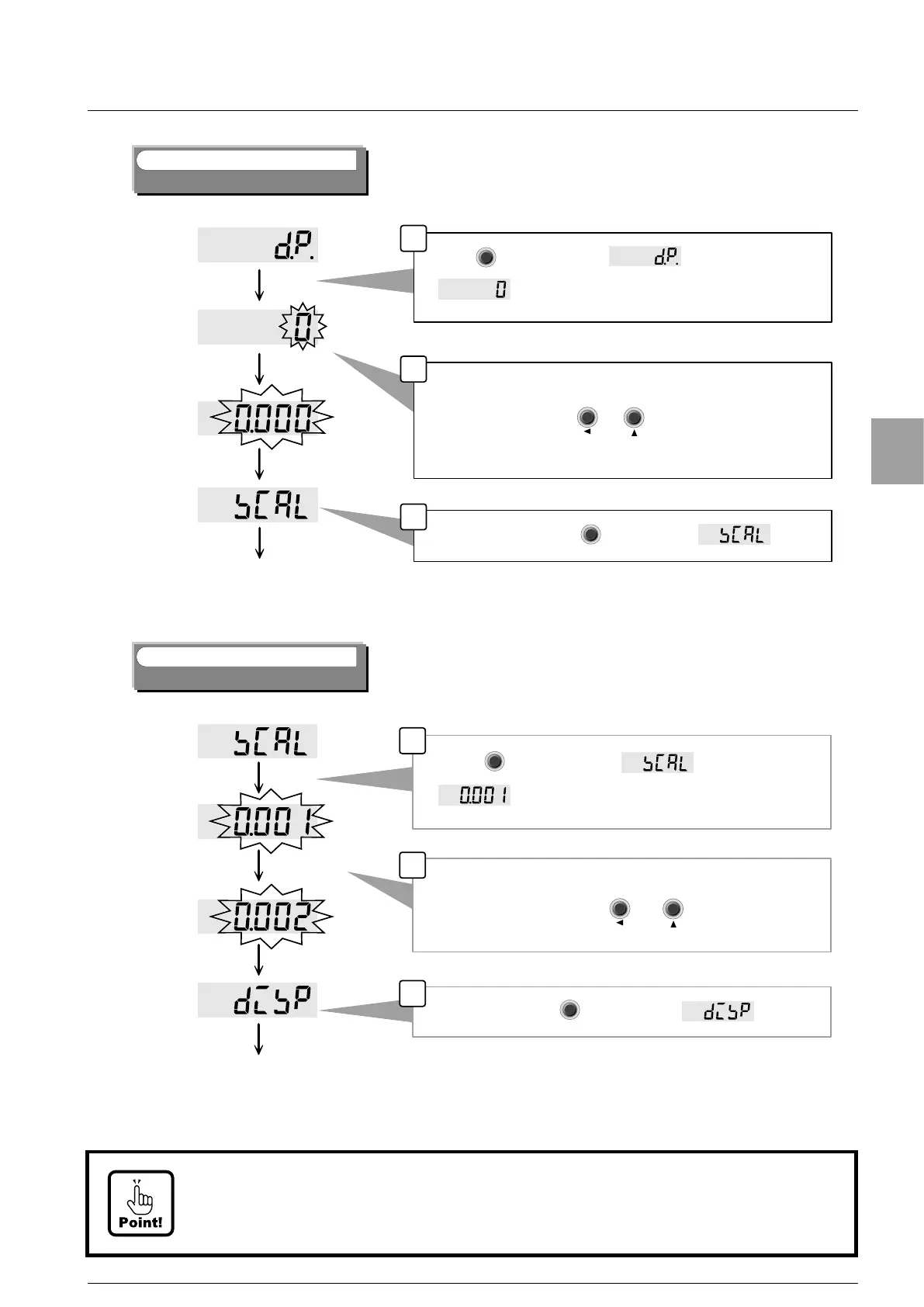
Set of decimal point display position
t
t
* The position of decimal point memorized now is displayed.
Select the position of decimal point.
After the setting, push key to display .
Select the position by or key.
1
2
3
記憶されて
いる目量
設定した目量
The scale interval
memorized.
Setting scale
interval
Step
4
Set of the scale interval
t
t
* The scale interval memorized now is displayed.
After setting, push key to display .
Please set the scale interval.
Select the scale interval by or key.
Set of the scale interval
Set weighing capacity
▲
▲
When key is pushed at ,
is displayed.
When key is pushed at display,
is displayed.
The position of decimal point changes as [0(non)], [0.0],
[0.00], [0.000] and [0.0000]
Lower 2 digit changes as [01], [02], [05], [10], [20] and [50].
F
ENTER
F
ENTER
CAL-ZCAL-Z
CAL-SCAL-S
F
ENTER
F
ENTER
CAL-ZCAL-Z
CAL-SCAL-S
Example of display changes by setting scale interval.
• The load display changes with 0.002 t → 0.004 t → 0.006 t, when the scale interval
is set to [02]. (Set Decimal point [0.000] and Unit [t])


 To Next Page