31
Calibration
4-10. Simple calibration
Each item can be immediately shifted to a set screen and the calibration screen by pushing
FUNC.FUNC.
,
CAL-ZCAL-Z
or
CAL-SCAL-S
key for about 2 second or more.
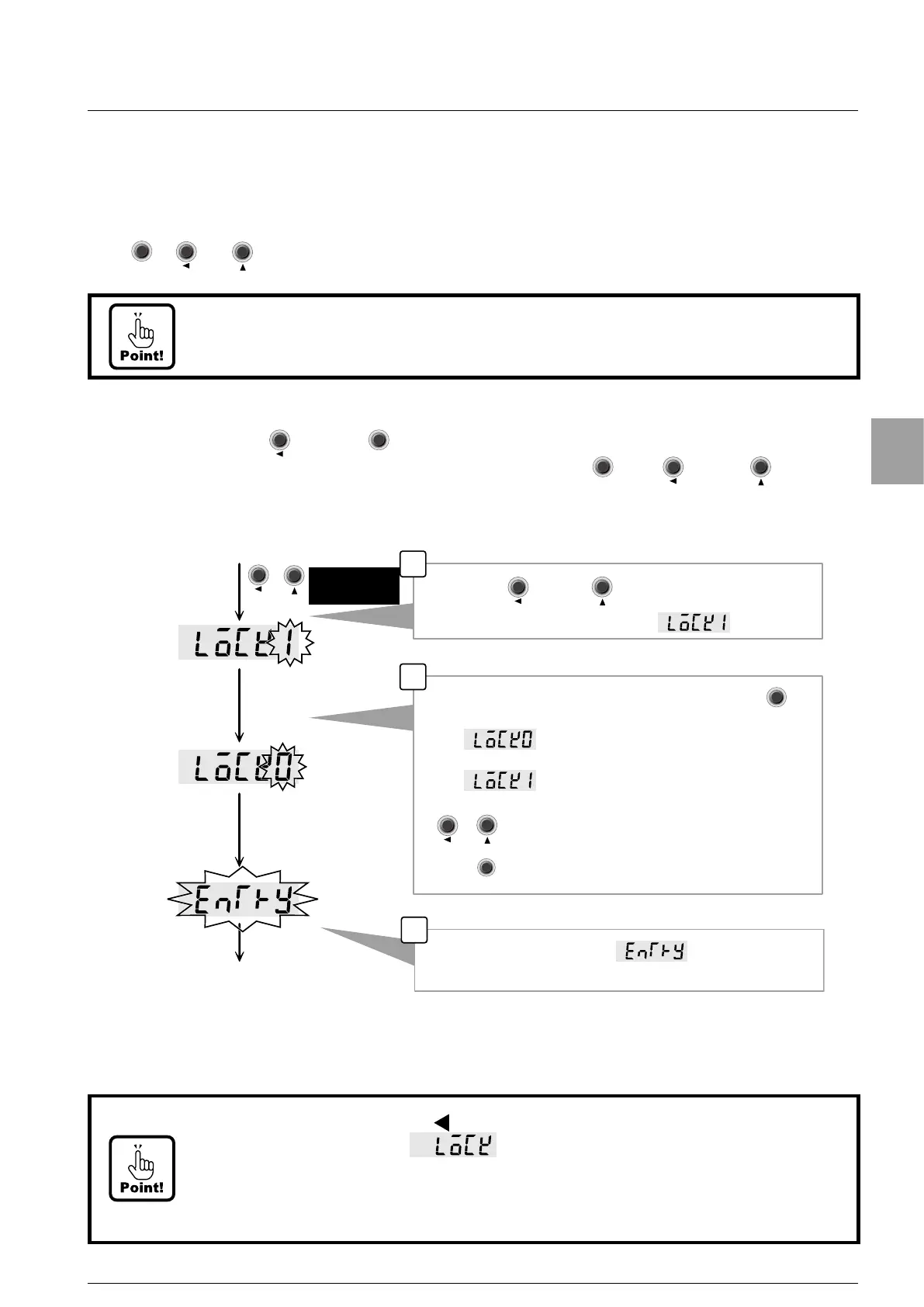
4-10-1. Simple calibration lock
By pushing
CAL-ZCAL-Z
key and
FUNC.FUNC.
key at the same time for two seconds or more, a simple
calibration is prohibited or can be released by pushing
FUNC.FUNC.
key,
CAL-ZCAL-Z
key or
CAL-SCAL-S
key for a
while.
1
By pushing key and key at the same time for a while
from the normal measurement mode, displays.
Change the set value.
Interrupt the setting, and return to the measurement
mode.
2
Please select the lock release or the lock, and push the key.
(LOCK0):Lock release
(LOCK1):Lock
3
The setting is memorized after blinks, and you
return to the measurement mode.
Pushing at the
same time for 2
second or more.
Measurement mode
▲
CAL-ZCAL-Z
CAL-SCAL-S
CAL-ZCAL-Z
CAL-SCAL-S
CAL-ZCAL-Z
CAL-SCAL-S
ENTERENTER
FF
FUNC.FUNC.
• When [FUNC.] key, [CAL-Z/ ] key, or [CAL-S/ ▲ ] key is pushed for a while in the
simple calibration mode,
blinks and you cannot enter into the screen of
setting mode, ZERO mode or SPAN mode.
• Please return this function to the condition of the lock to prevent the operational
error after using a simple calibration.
• Please use the simple calibration function after releasing the lock referring to [4-
10-1. Simple calibration lock] because that function is locked when the factory is
shipped.


 To Next Page