11-2-3. Simple comparison batching mode
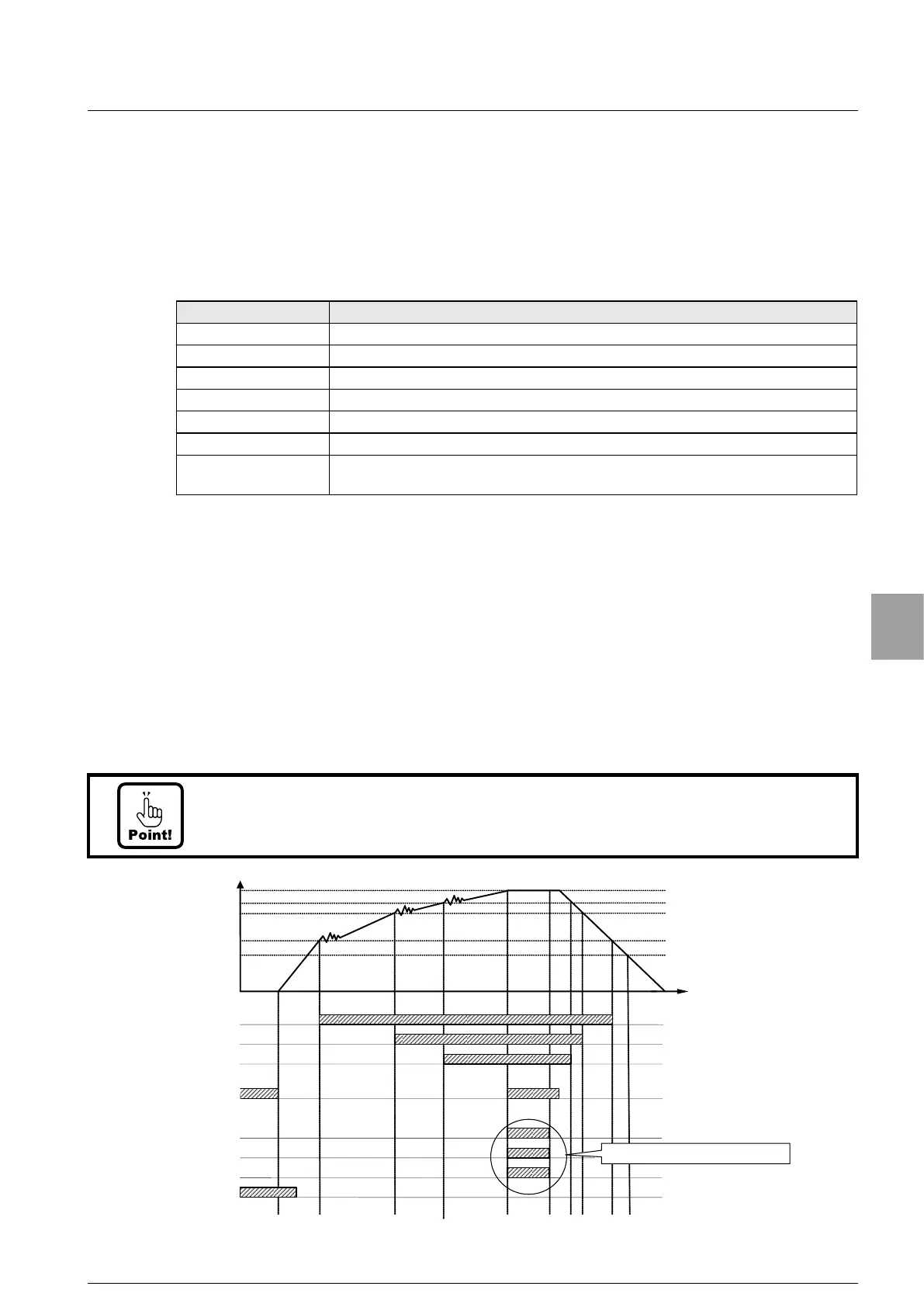
The simple comparison batching mode is an output mode when the result of comparing
the increasing amount of measurement value in batching the measuring material with the
set value meets the judgement condition.
The set value : [0] (Batching mode) is selected by the setting of S function SF-02.
Judgement condition
Condition display Judgement condition
NEAR ZERO | Gross value or Net value | <= NEAR ZERO (SET7)
FULL FLOW Net value >= [FINAL(SET1) - PRELIMINARY2 (SET4)]
MEDIUM FLOW Net value >= [FINAL(SET1) - PRELIMINARY1 (SET3)]
DRIBBLE FLOW Net value >= [FINAL(SET1) - FREE FALL (SET2)]
UNDER Net value < [FINAL(SET1) - UNDER (SET6)]
OVER Net value > [FINAL(SET1) + OVER (SET5)]
OK
[FINAL(SET1) - UNDER (SET6)]
<= Net value +
[FINAL(SET1) + OVER (SET5)]
Operating explanation
(1) The output of FULL FLOW turns on when Net value becomes [FINAL -
PRELIMINARY2].
(2) The output of MEDIUM FLOW turns on when Net value becomes [FINAL -
PRELIMINARY2].
(3) The output of DRIBBLE FLOW turns on when Net value becomes [FINAL - FREE FALL].
• The comparative target of NEAR ZERO and the comparative target of FULL is
selectable from [
GROSS] or [NET].
• UNDER, OVER and OK can be operated with NET weight. The comparative operation
can be changed to simple comparison.
• At the time of setting [PRELIMINARY2] = [0], the FULL FLOW becomes OFF and at the
time of setting [PRELIMINARY1] = [0], becomes MEDIUM FLOW to OFF.
• The update of the output to each condition display synchronizes with A/D sampling
rate or the display. This selection
is executed by C function CF-04 (Comparative
operation display synchronization.
Time
0
Changeable to simple comparison mode.
Final
Final - Free Fall
Final - Preliminary1
Final - Preliminary2
ZERO band
Full Flow
Medium Flow
Dribble Flow
Stable
Over
OK
Under
Near ZERO
65
Setting of Comparator


 To Next Page