106/128
T25 System Manual Part 2: System Expansion with MxEasy
© MOBOTIX AG • Security-Vision-Systems • Made in Germany
www.mobotix.com • sales@mobotix.com
Step3: Assign Static IP Address to Computer (at the Computer)
If a computer already integrated into the network is used to set up the T25, proceed
directly to Step4.
The MOBOTIX T25 and Grandstream telephones are set up for operation using a com
-
puter, the network parameters of which must be set up in the same IP address range. The
computer's network parameters usually have to be changed for this purpose.
Windows
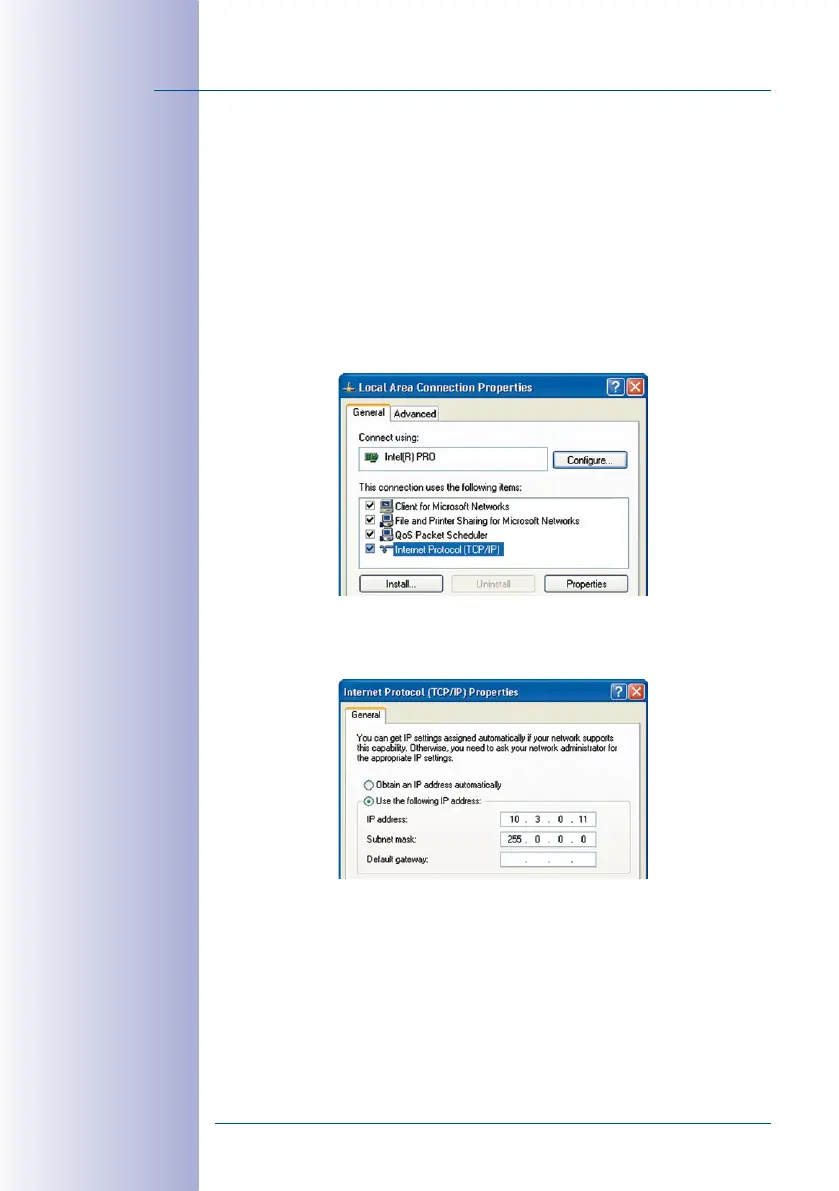
1. Open Start> Settings> Control Panel> Network Connections. Clicking Properties
opens the dialog shown.
2.
Double-click Internet Protocol (TCP/IP). Select the option Use the following IP address
under General and enter a static IP address (e.g. 10.3.0.11) with the subnet mask
255.0.0.0.
3. After closing all dialogs, the computer will now use the 10.0.0.20 IP address.
Caution: Values specied
are only placeholders
or examples



 To Next Page