● Black Stick or flat-tip screwdriver
Procedure:
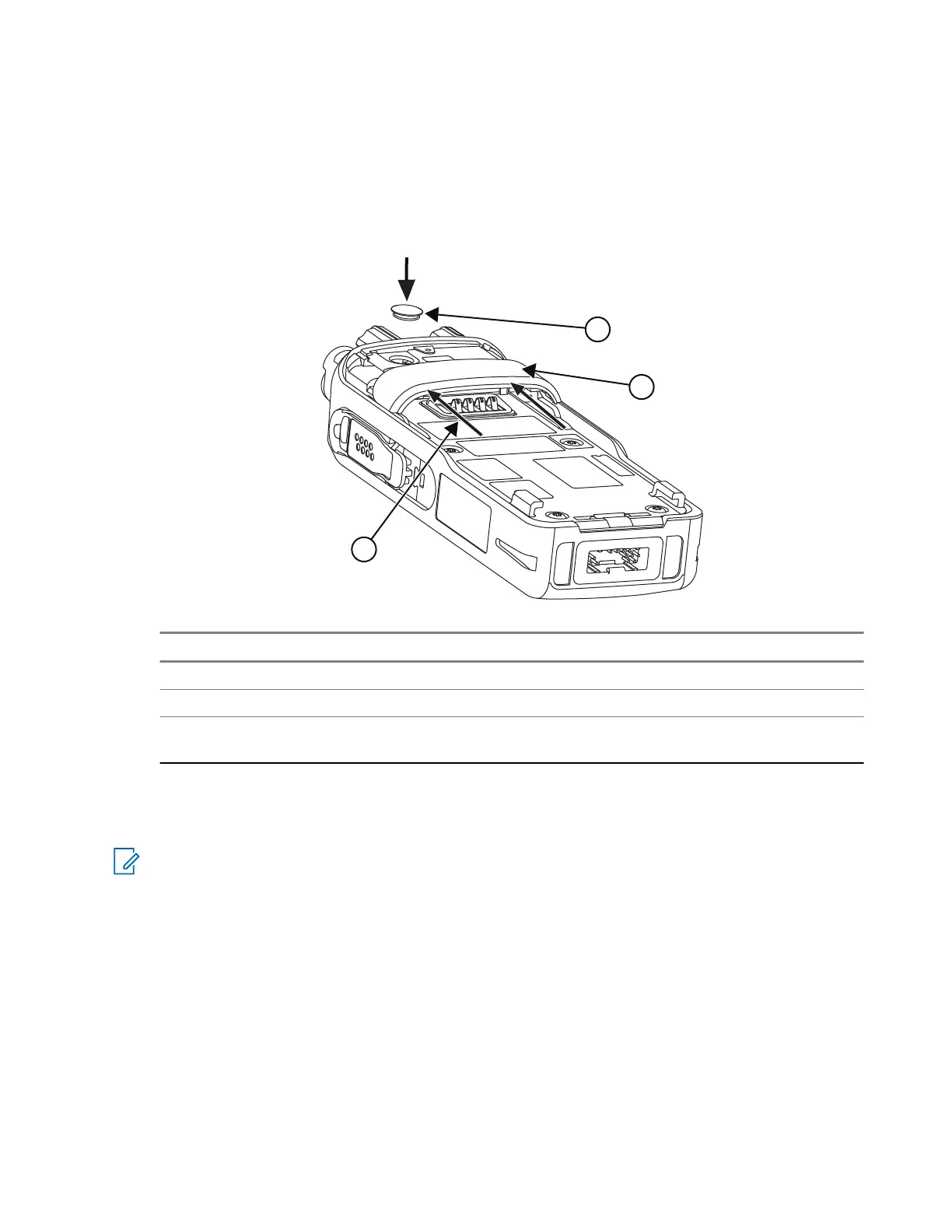
1. Attach the RF Switch Seal on the Back Chassis.
2. Slide the Back Cover upwards along the grooves on the Back Chassis.
Figure 45: RF Switch Seal and Back Cover Installation
No. Description
1 Back Cover
2 RF Switch Seal
3 Slide the Back Cover upwards along the
grooves to install
5.10.2.10
Installing the RFID Knob
NOTE: The Volume Knob can be removed using the knob opener or through a manual removal method.
However, it is recommended to replace the Volume Knob with the RFID Knob using a fixture, to avoid
any cosmetic damage that may occur after removing the knob. Purchase the Volume Knob Opener and
RFID Knob assembly fixture from the following supplier:
Supplier
ACCESS HITECH AUTOMATION SDN BHD (592024-U)
Website
www.accesshitech.com
Contact Number
604-6261699
Model Description
Volume Knob Opener and RFID Knob assembly fixture (Supplier part number: MT076/14)
There are two options that you can use to install the RFID Knob.
68015000841-EL
Chapter 5: Maintenance
117



 To Next Page
 Loading...


