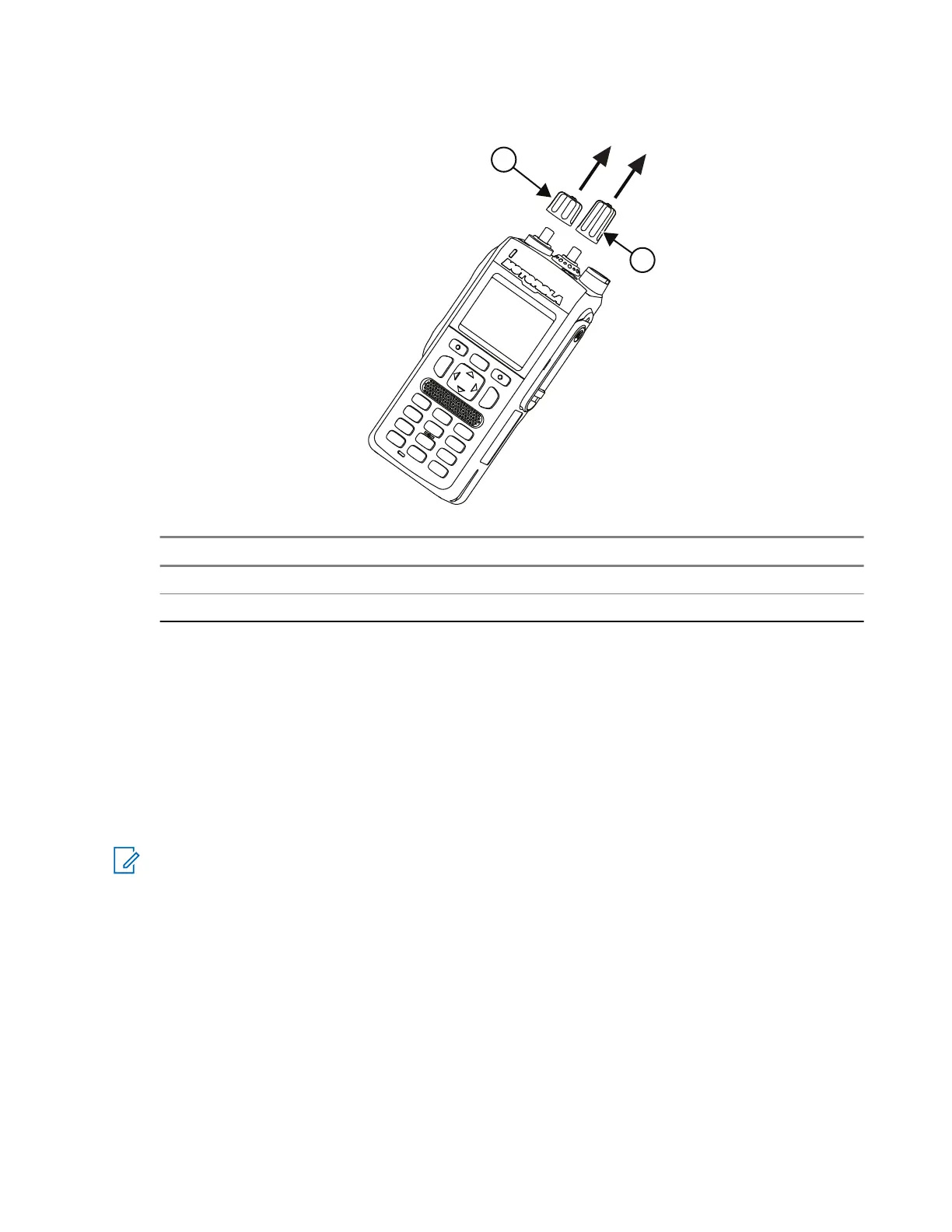
Figure 21: Volume and Frequency Knob Removal Using Hand
No. Description
1 Volume knob
2 Frequency knob
5.10.1.3.3
Using the Fixture Removal Method
Prerequisites: Recommended tools: Volume Knob Opener and RFID Knob assembly fixture (Supplier part
number: MT076/14).
The fixture can be purchased from the following supplier:
ACCESS HITECH AUTOMATION SDN BHD ( 592024-U )
Website: www.accesshitech.com
Contact Number: 604-6261699
NOTE: The Volume Knob can be removed using the knob opener or through a manual removal method.
However, it is recommended to replace the Volume Knob with the RFID Knob using a fixture, to avoid
any cosmetic damage that may occur after removing the knob.
Procedure:
1. Move the fixture handle (1) to the right, away from the nest, and move the handle (2) up.
2. Place the radio into the fixture nest, with the back chassis facing up and the knob facing right.
3. Move the fixture handle (1) to the left, towards the nest, before moving the handle (2) down to clamp
the knob.
4. Move the fixture handle (1) to the right, until the Volume Knob is free from the volume switch.
5. Move the fixture handle (2) up, and remove the Volume Knob.
68015000841-EL
Chapter 5: Maintenance
95



 To Next Page
 Loading...


