Menu Key 5
Pulse Laser Station NPL-302 Series Instruction Manual 121
3.
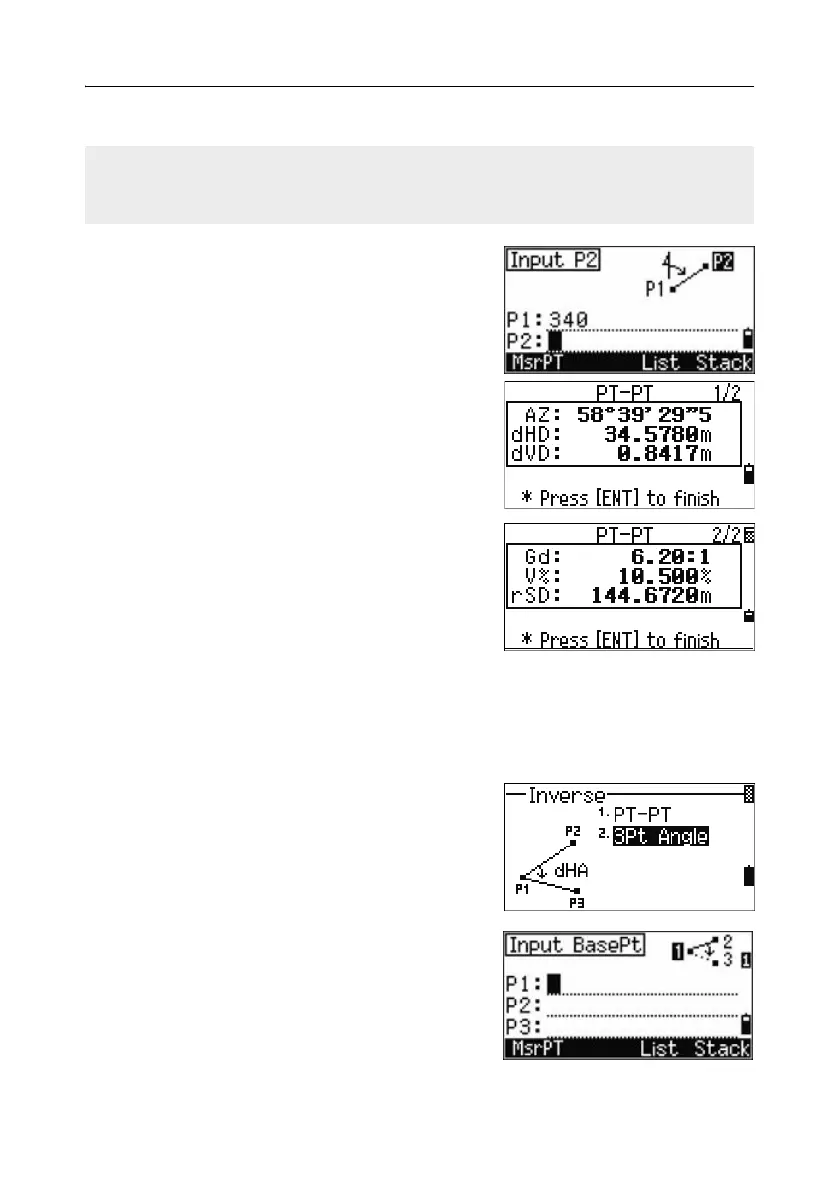
Type the second point number/name and press
[ENT]. The MSR softkey allows you to shoot the
point on the spot to use it in the calculation.
The azimuth, horizontal distance, and vertical
distance from the first point to the second
point are displayed.
4. Do one of the following:
– To return to the PT input screen, press
[ESC].
– To return to the COGO menu, press
[ENT].
– To change the contents of the result screen,
press
[DSP].
Gd Grade (HD/VD)
V% 100/Gd
rSD Slope distance PT1 to PT2
3Pt angle
The 3Pt Angle function calculates the angle
between two lines defined by three points.
To calculate a 3Pt angle:
1. Press [2] or select 3Pt Angle in the Inverse
menu.
P1 is the base point. Two lines are to be
defined by P2 and P3, both from P1.
2. Enter the point name, or use the MSR softkey
to take a measurement to the point.
If you press [ENT] without entering a point name, a coordinate input screen appears,
and you can enter coordinates. These coordinates are not stored to the database. If
you want to store the point, specify a new point name.



 To Next Page