5 Menu Key
132 Pulse Laser Station NPL-302 Series Instruction Manual
Calculating a distance-distance intersection
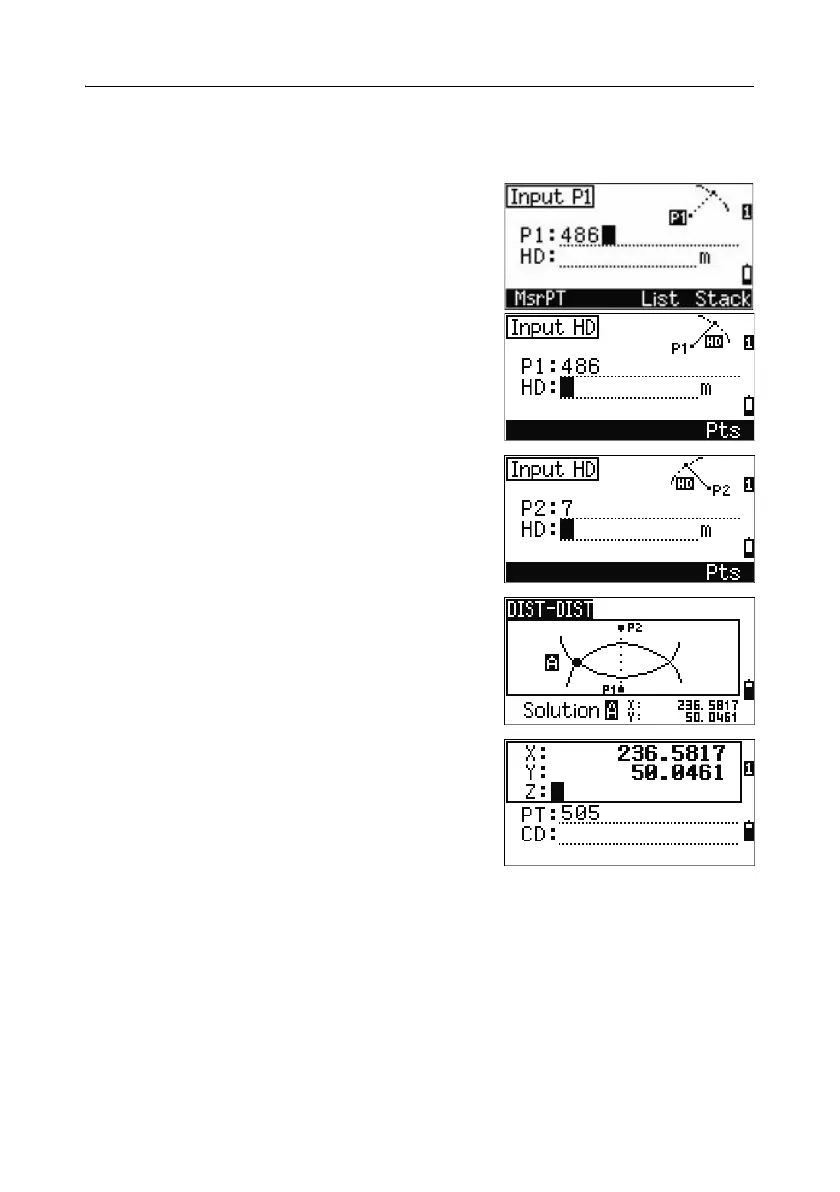
1.
Press [3] or select Dist-Dist in the Intersection menu.
2. Enter the first point name and press [ENT], or
press the
MSR softkey to measure directly to
the point.
3. Enter the distance from P1 and press [ENT].
4. To define the distance (HD) by two points,
press the
Pts softkey.
5. Enter P2 and the distance from P2 (HD).
6. To calculate the coordinates of the intersection
point, press
[ENT] in the HD field.
7. Press [<] or [>] to display the second solution.
8. To record the point, press [ENT] when the
required solution appears.
9. Enter a Z coordinate if necessary. Press [ENT] to
move to the PT and CD fields.
Sample records
CO,Int DD P1:486 HD:330.6020
CO, P2:7 HD:100.0000
CC,505,,236.5817,50.0461,0.0000,



 To Next Page