Menu Key 5
Pulse Laser Station NPL-302 Series Instruction Manual 131
2.
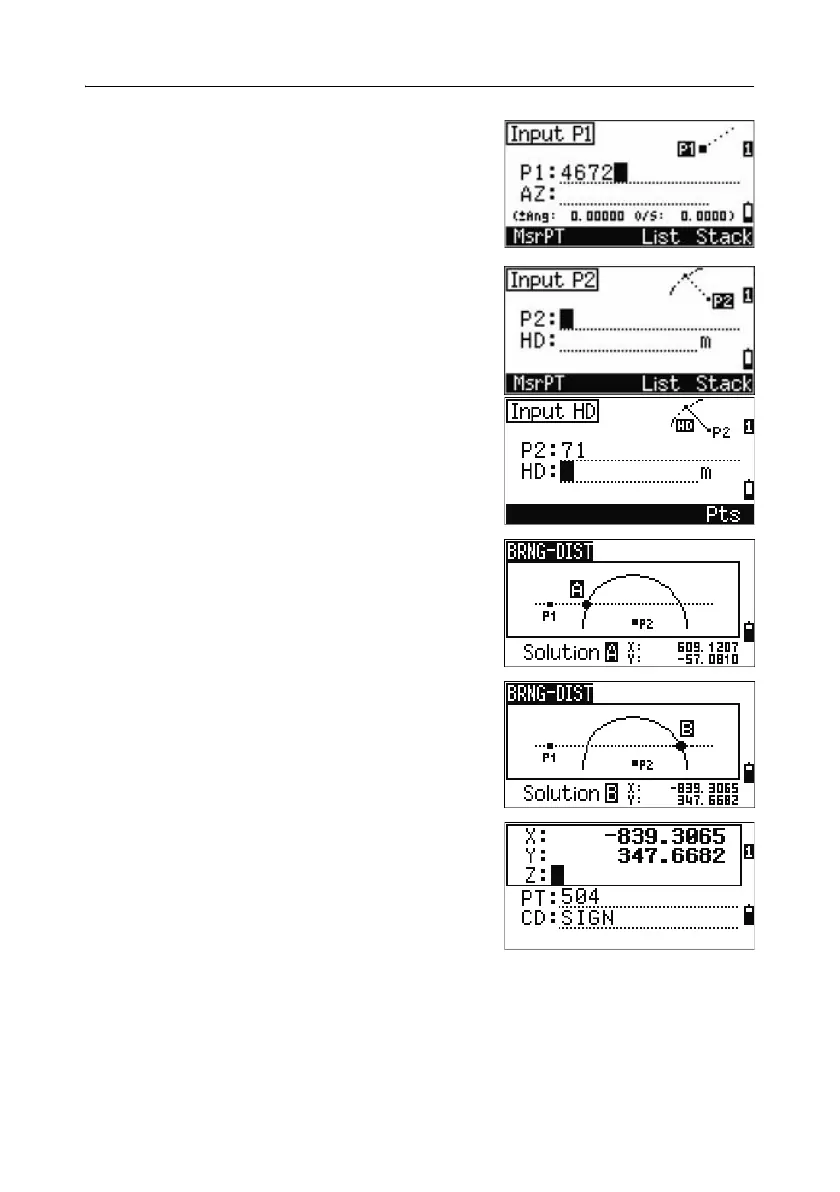
Enter a point on the line.
The line can be defined by two points or by a
point and an azimuth.
3. Enter the second point (P2) as the center of the
circle.
4. Enter the distance from P2.
– To define the distance (HD) by two points,
press the
Pts softkey.
– To calculate the coordinates of the
intersection point, press
[ENT] in the HD
field.
5. If there are two results, the first solution
appears graphically relative to the P1-P2 line.
To display the second solution, press
[<] or [>].
6. To record the point, press [ENT] when the
required solution appears.
7. Enter a Z coordinate if necessary.
8. To move to the PT and CD fields, press [ENT].
Sample records
CO,Int BD P1:4672 AZ:330.54175+0.00000
CO, P2:71 HD:100.0000
CC,504,,-839.3065,347.6682,,SIGN



 To Next Page