Applications 4
Pulse Laser Station NPL-302 Series Instruction Manual 73
7.
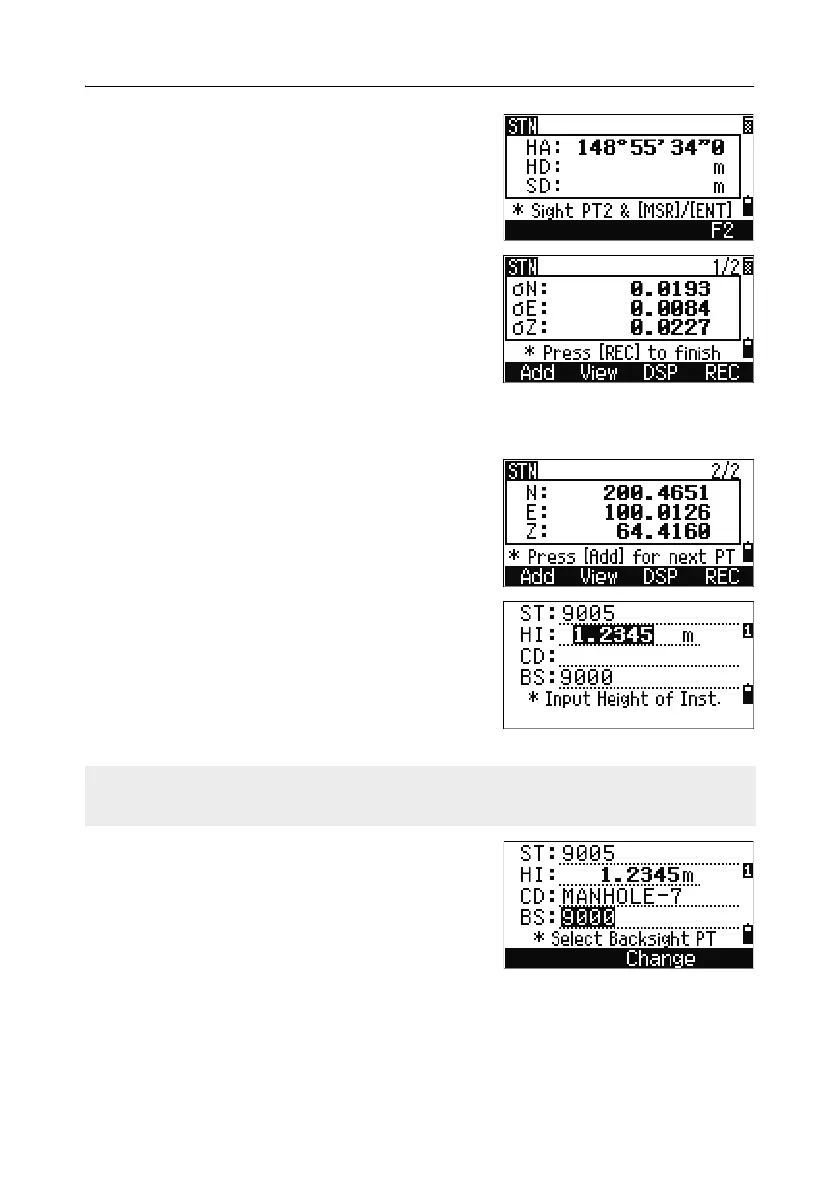
Measure to PT2 and press [ENT].
When the instrument has enough data, it
calculates the station (STN) coordinates.
– If more than the minimum required data is
available, a standard deviation screen
appears.
– To take measurements to strengthen
geometry of the resection, press the
Add
softkey. For information about the
View
softkey, see Advanced feature: Viewing
and deleting a measurement in resection, page 74.
8. When the results are satisfactory, record the
station. To do this, press
[ENT] or the REC
softkey.
9. Enter the height of instrument, if required.
Press
[ENT]. The ST field defaults to the last
recorded PT + 1.
10. To change the station name, move to the ST
field and edit or replace the text.
BS defaults to the first observed point.
11. To change the BS, press the Change softkey.
If you have set Split ST to Yes, the ST field defaults to the last recorded ST
value + 1. For more information, see Others settings, page 140.



 To Next Page