DMTA-20015-01EN [U8778402], Rev. J, January 2014
Chapter 7
80
7.1.8 Parameter Keys
The Parameter keys are labeled F7, F8, F9, F10, F11, and F12 ( to ), and are
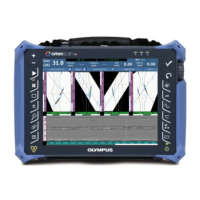
located on the bottom of the OmniScan MX front panel. These keys are used to select
parameters for specific submenus.
Each of these keys is used to select the parameter displayed above it.
7.1.9 Indicator Lights
There are four types of indicator lights on the OmniScan MX front panel: keypad,
power, acquisition, and alarm. Each indicator light is described below.
7.1.9.1 Keypad Indicator Light
The keypad indicator light is located to the right of the Acquisition/Print key ( ).
Its color identifies the status of the keypad (see Table 17 on page 80).
7.1.9.2 Power Indicator Light
The power indicator light is located to the left of the Power key ( ). Its color
indicates the power status of the OmniScan MX (see Table 18 on page 81).
Table 17 Keypad indicator light statuses
Off Function mode
Green Numeric keypad
Orange Alphanumeric keypad
Red Keypad locked


 To Next Page