116
Initial Setup Examples Section 6-4
6-4 Initial Setup Examples
On previous Controllers, the sensor input type, alarm type, and control period
were set on DIP switches. These hardware settings are now set using the
setup menus of the E5ZN-SDL. The Level and Mode Keys are used to switch
between setup menus, and the amount of time that you hold the keys down
determines which setup menu you move to.
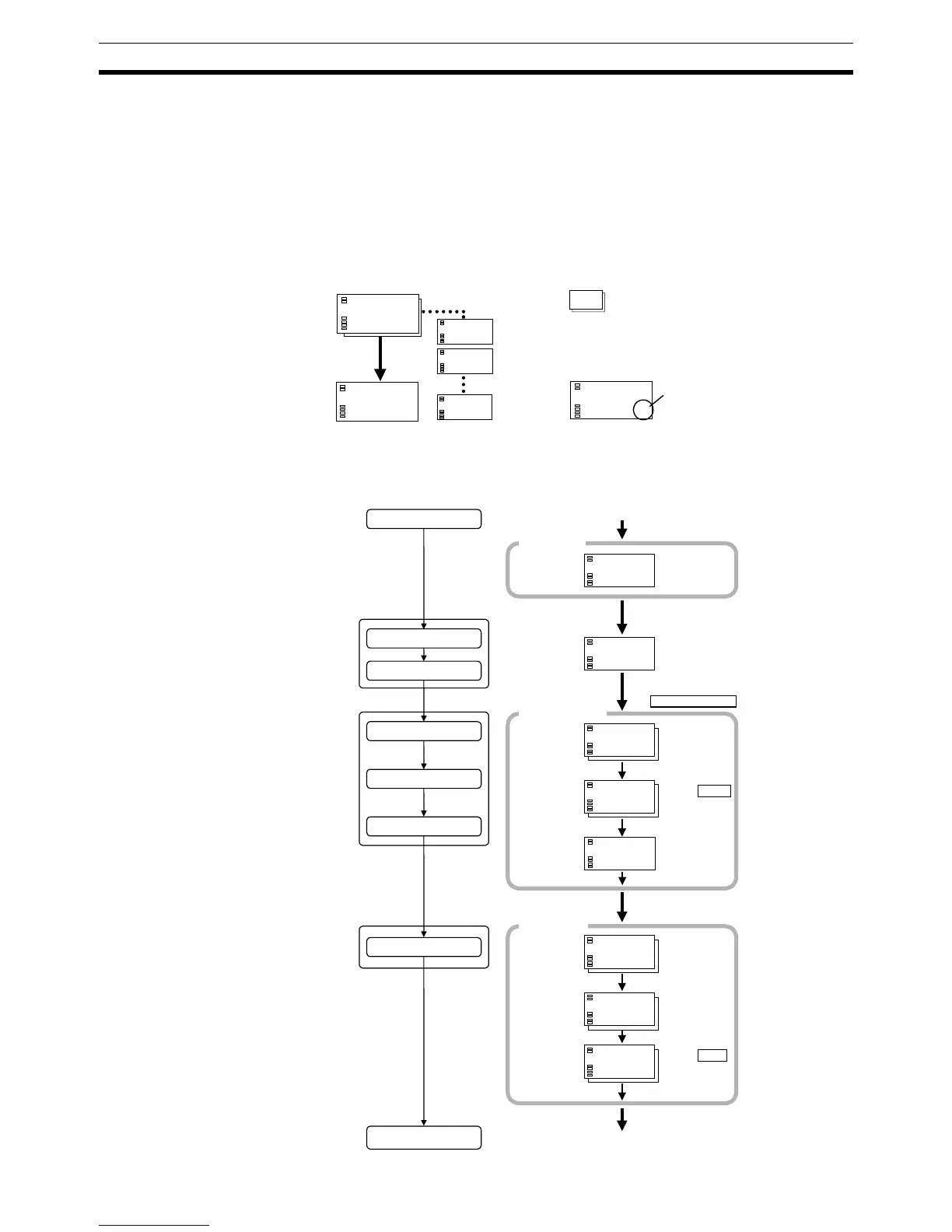
Typical Usage Example
Typical Example 1
Changing parameters
: indicates that there are more parameters.
Continue to press the Mode Key until the
desired parameter is reached.
Changing numerals
Use the Up and Down Keys
to change numeric data.
in-t
0
Mode Key
Mode Key
Mode Key
in-h
100
in-l
0
cntl
pid
cntl
pid
25
0
°c
Setup procedure
Input type: 0 (K thermocouple −200 to 1,300°C)
Control method: ON/OFF control
Alarm type: 2 (upper limit)
Alarm value 1: 20
°C
SP: 100
°C
E5ZN unit number: 3
Channel No.: 1
Power ON
Set unit
Set channel No.
Initial setting level
Set input specifications
Set control specifications
Set alarm type
Operation level
Set alarm values
Start operation
Power ON
Operation level
PV/SP
Match UNIT/CH using
the UNIT and CH Keys.
Press Level Key for at
least three seconds.
Control stops.
Initial setting level
Check input
type.
Input type
Use the Up and
Down Keys to
select ON/OFF
control.
In ON/
OFF
control
In PID
control
Check alarm
type.
Alarm 1
type
Press Level Key for at
least one second.
Operation level
Press Up and
Down Keys to
set the SP to
100
°C.
PV/SP
Press Up and
Down Keys to
set alarm
value to 20
°C.
Alarm
value 1
During run
During stop
Start operation
Use the Up and
Down Keys to
select “RUN.”
run
stop
31
r-5
run
31
°c
al-1
20
25
100
31
°c
20
100
2
pid
onof
0
31
alt1
2
31
cntl
onof
3u
in-t
0
25
0
31
°c
25
0
01
°c
Mode Key
Mode Key
Mode Key
Mode Key
Mode Key
Mode Key



 To Next Page