18
Using the I/O Section Section 2-2
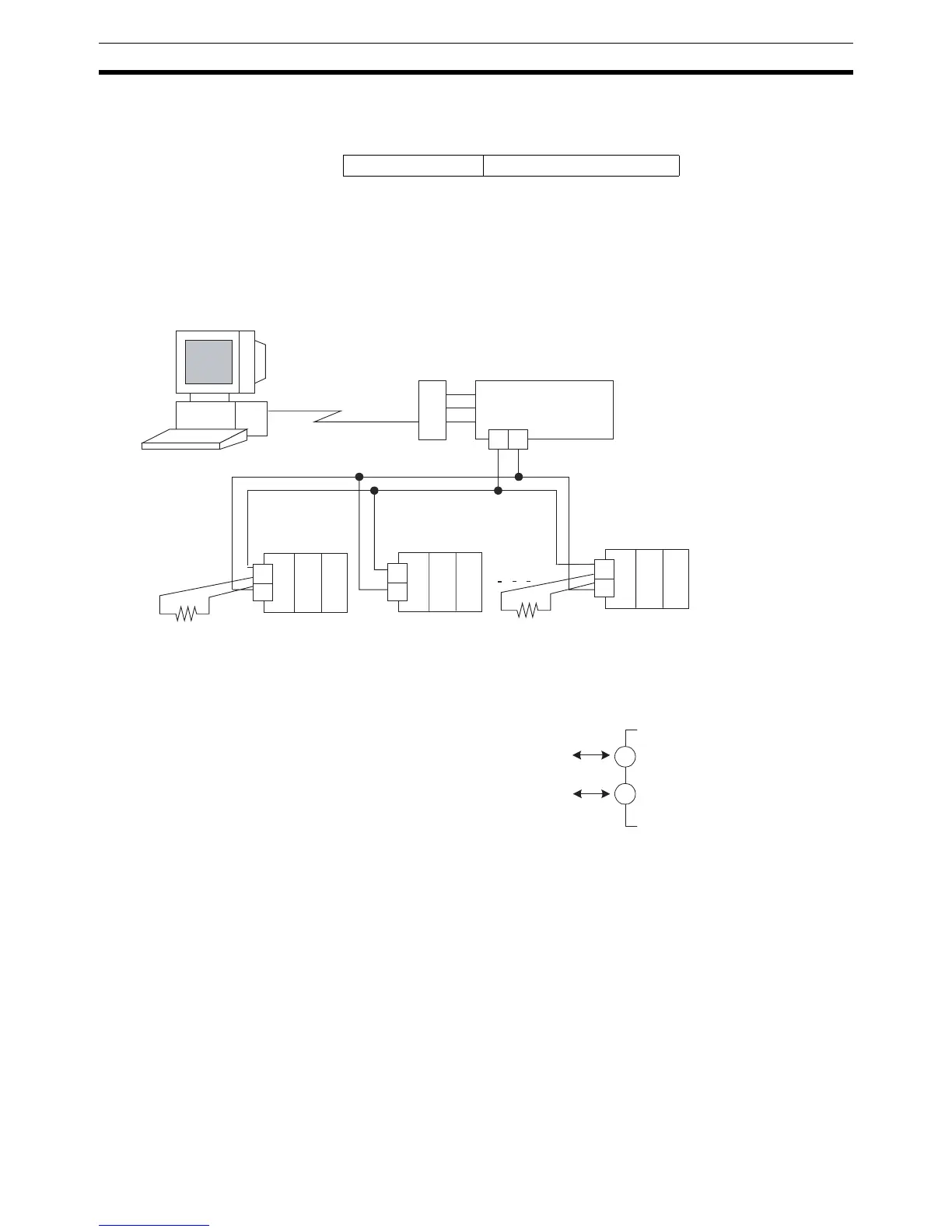
• Attach a terminator to both ends of the transmission path, including the
host.
• The terminator specifications are as follows:
• Use an RS-232C/RS-485 Converter when connecting personal comput-
ers with an RS-232C port.
Recommended Adapter: K32-23209 (OMRON)
Recommend Interface Converter: K3SC (OMRON)
(The K3SC is available in models with 100 VAC power supplies and mod-
els with 24 V, AC/DC power supplies. Specify the required type of power
supply when ordering.)
• When using an E5ZN-SDL Setting Display Unit, connect across terminals
21 and 22. Refer to Section 6 Using the E5ZN-SDL for information on
how to use the Setting Display Unit.
Terminator 100 to 125 Ω (1/2 W)
E5ZN
(No.0,1,2)
E5ZN
(No.3,4,5)
(B)
(A)
24
23
(B)
(A)
24
23
E5ZN
(No.13,14,15)
+ -
RS-232C/RS-485
Converter
K3SC-10
RS-232C
(B)
(A)
24
23
Adapter
K32-23209
Terminator
100 to 125 Ω
(1/2 W)
Terminator
100 to 125 Ω



 To Next Page