Manual Version e1-4.3.0.ae-R3. Page
5.2 Main menu
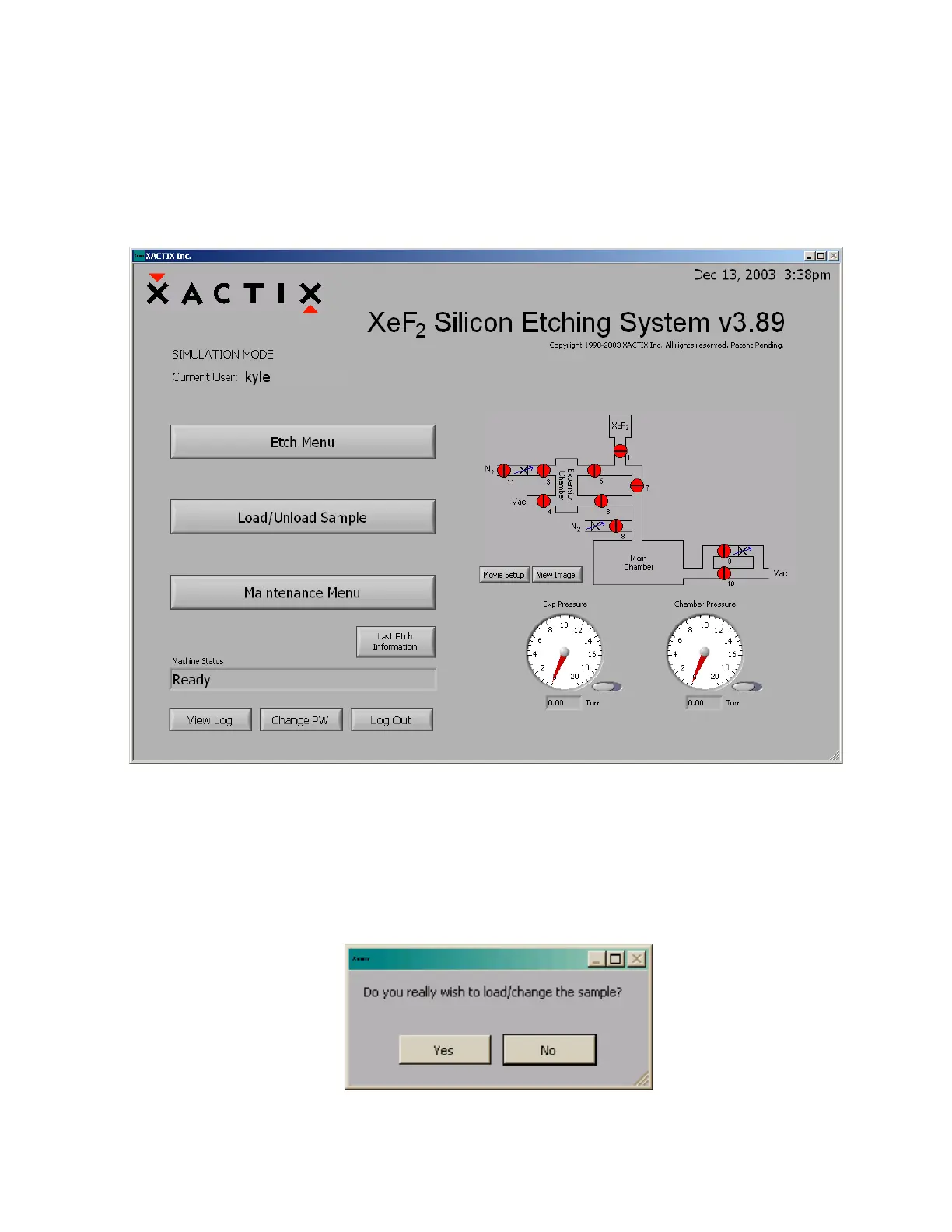
Upon a successful login, the main menu will be displayed as shown below which also indicates the
software version number. The software version number may be newer than that shown in this manual.
The machine status is shown in the bottom left corner. When the main menu is displayed, the chamber
is under vacuum and ready for use. A schematic for the machine is shown on the right. Red dots
denote closed valves, while green dots represent open valves. Pressure gauges for the main chamber
and the expansion chamber are at the bottom right. The three options available on the main menu
consist of performing an etch, loading/unloading a sample, and accessing the maintenance menu.
5.2.1 Sample Loading
To load/unload a sample:
1. Press “Load/Unload sample” on LCD screen. The system will go through prompts to ensure a
correct decision: Are you sure? Press YES if you’re sure, NO if you’re not. This prompt is
provided since the load/unload process can be time consuming and is inconvenient if
accidentally started. The system begins chamber purges and flushing cycles to evacuate the
chamber, shown below.



 To Next Page