Manual Version e1-4.3.0.ae-R3. Page
5.4 Maintenance Menu
MAINTENANCE MODE SHOULD ONLY BE USED BY
INDIVIDUALS WHO UNDERSTA
EXPOSURE TO XeF2 AND ARE FULLY TRAINE
USE OF THE MAINTENANCE ACTIVITIES FOR TH
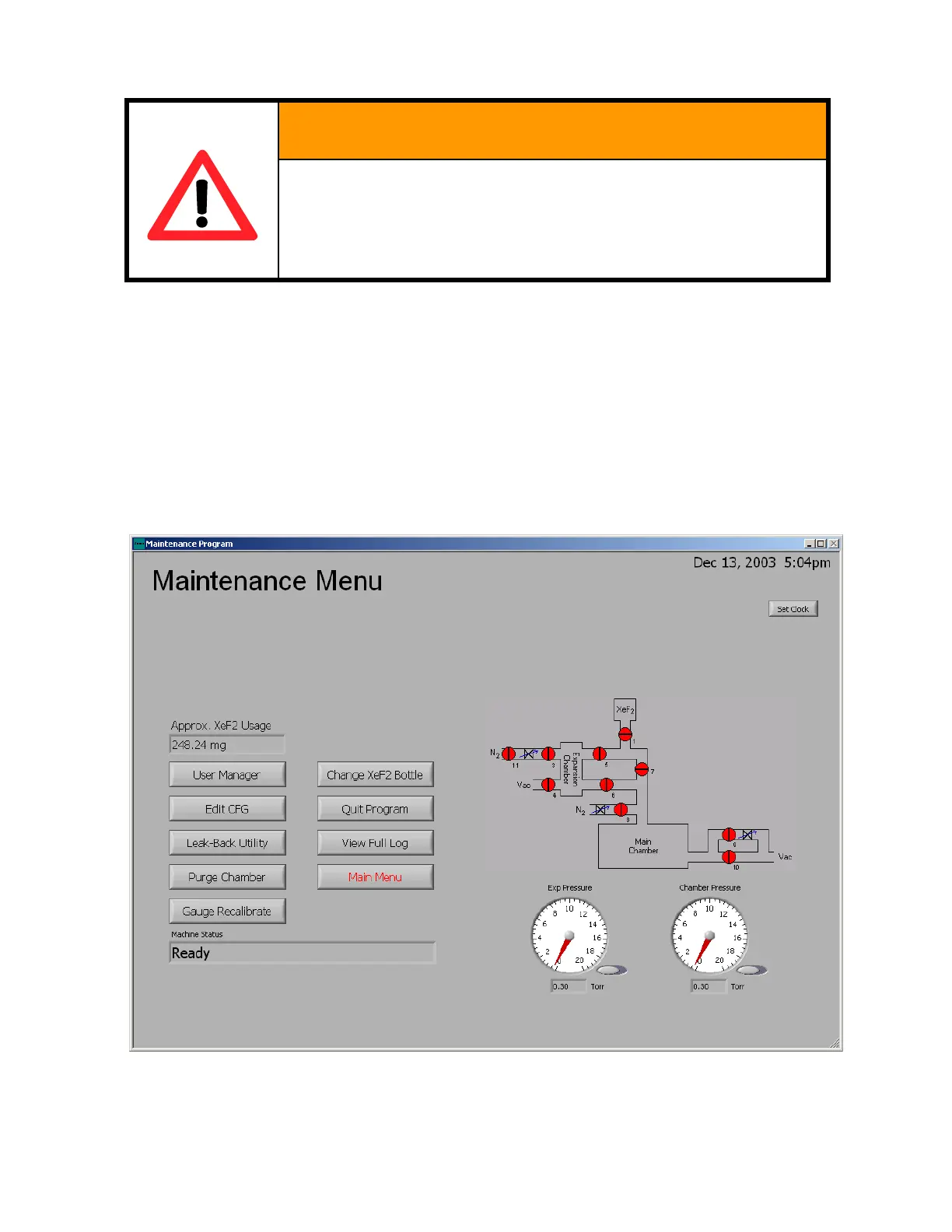
The Maintenance Menu may be accessed via the “Maintenance Menu” button found on the main menu
screen. For users without maintenance privileges the maintenance menu will not be accessible.
The Maintenance Menu allows for the individual control of the system valves. Clicking on valve icons
changes the color between red and green corresponding to closed and open, respectively.
Also, within the maintenance menu there are nine options. These options consist of adding and deleting
users, editing the configuration menu, leak-back checking the system, purging the main chamber,
gauge recalibrating, changing the xenon difluoride bottles (see page 85), exiting the e1 Series software,
viewing the full e1 Series log, and returning to the main menu. Each of these operations will be
discussed in the following sections. In addition to the nine options available in the maintenance menu,
the approximate amount of xenon difluoride consumed from each bottle is displayed in the middle left
section of the screen.



 To Next Page