Manual Version e1-4.3.0.ae-R3. Page
5.3.4 Etch Menu Features
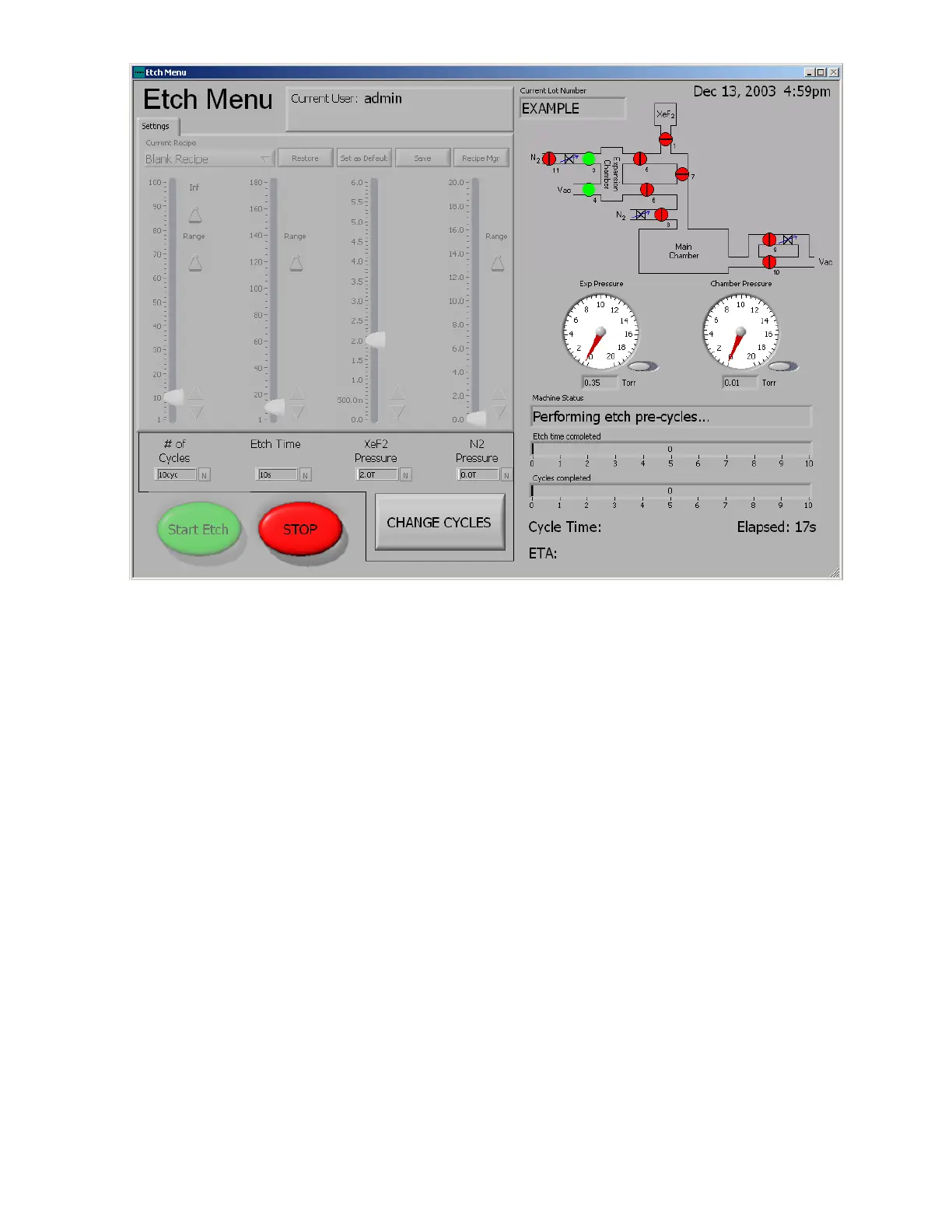
On the right side of the “perform etch” screen a valve schematic of the e1 Series is shown so that the
user can monitor the machine operation.
In addition to this, at the bottom of the right side of the screen are two counters. The first counter
displays how much time has transpired during the etch portion of the cycle. The second counter shows
the number of cycles completed.
At the very bottom of the screen; “START ETCH”, this is used to begin the etching process; “STOP”,
this is used to end the etch prematurely; “CHANGE CYCLES” button which at any time during an etch
can be used to add cycles to the etch in-progress. Once selected, the “Change # of Cycles” menu on
next page, is prompted. The top row of arrows will add cycles in this order, (right to left); ones, tens,
hundreds, and thousands; the lower row of arrows, having the same values, will remove cycles. All the
user has to do is click on the designated arrow for the desired number of cycles needed to be added to
the etch in-progress. For an example, an extra 125 cycles have been added to the etch by clicking the
right most arrow (ones) five times, the next right most arrow (tens) twice, and the 2
nd
from left most
arrow (hundreds) once.
NOTE: The “CHANGE CYCLES” button will only appear on the etch screen, if the etch parameter
“Soft Stop” is set to “TRUE”, and only once etching has been started.



 To Next Page