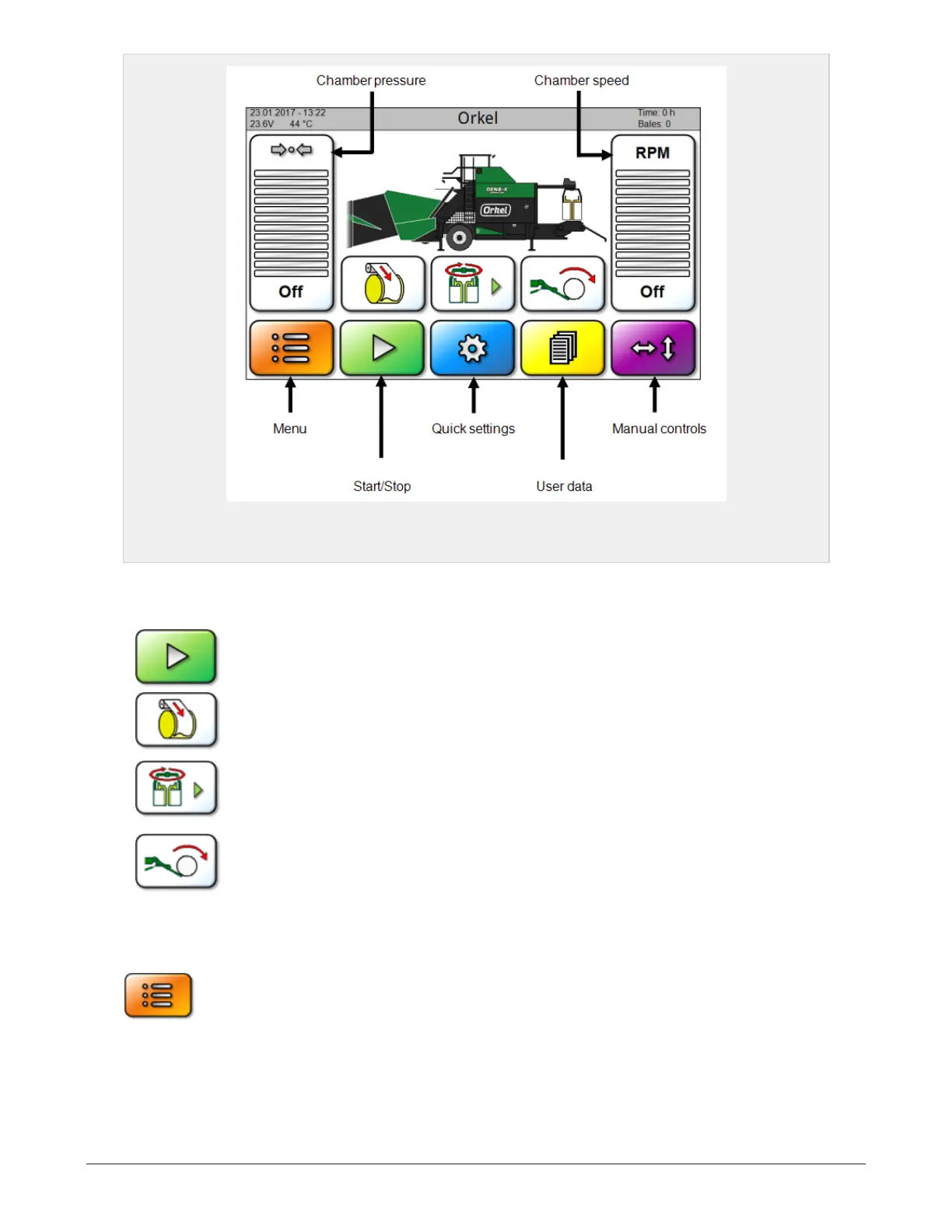
Figure 6.1 :
Main page with icon names
6.1.2 Icons for starting program sequences
Start auto mode / stop
This icon starts the machine in automatic mode. The machine can be stopped by press-
ing the icon again (red symbol).
Start net/film system
This icon starts a complete sequence in which the net/film system lays net or film on
the bale in the chamber. Afterwards, the machine continues in auto mode.
Start wrapping
This icon starts a complete sequence in which the bale is wrapped.
Start bale drop
This icon starts a complete sequence in which the bale is loaded off the table. The
sequence can be cancelled by pressing the icon again. Afterwards, automatic bale
drop can be activated in a popup window.
6.1.3 Menu
Pressing the Menu button on the front screen will display the Menu, see Figure 6.2
6 CONTROL SYSTEM 51


 To Next Page