Before the software update, the new software must be copied onto the display unit by the following steps:
l Place the software (zip archive) on an empty USB stick and insert the stick in the USB port on the
back of the display. Use a mini-USB-USB-adapter. The USB port is behind the black cap to the far
left.
l Reboot the display unit by turning off the main power breaker at least 3 seconds. When the Orkel
logo shows, press and hold the lower right corner until ”Application Loader” is shown.
l Press ”Update Software”, choose the software from the list and press ”Copy to Display”. Wait until
the status line shows ”Done”.
l Press ”Run current Software”.
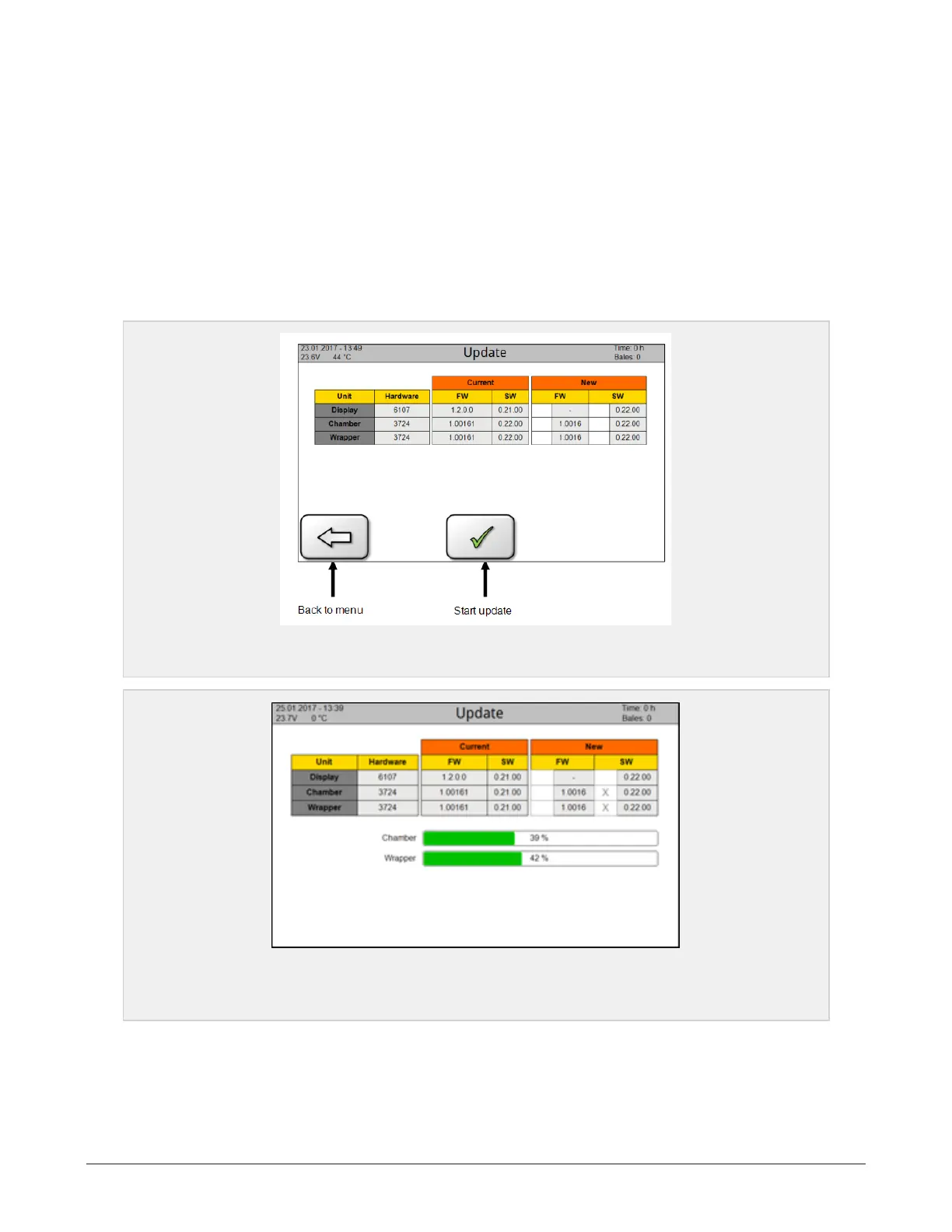
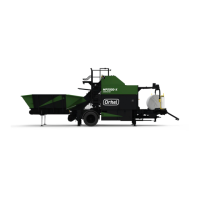
Tick off the boxes as shown to the right, and then click on the icon to start the update. When both green
progress bars show 100 %, restart the system by turning off the main power switch for at least 3 seconds.
The installation is now complete.
Figure 6.15 :
Software screen
Figure 6.16 :
Software screen. The green bars show that update is installing
6 CONTROL SYSTEM 62


 To Next Page