Service Manual 4 Cutting Mechanism
4.2 Non-repeat device
1/09 PERFECTA 115 / 132 / 168 / 225 – TS 28
PERFECTA Schneidemaschinenwerk GmbH D-02625 Bautzen Schäfferstr. 44 Tel.: +49-3591-556-131 to -133 Fax: +49 3591-556-139
4.2 Non-repeat device
Stopping the knife beam at its upper dead centre and verifying this condition is effected by
control switches S52 and S54 and is monitoring by the safety module control which will
immediately stop the knife movement should any irregularities occur. Please refer to
"Adjusting automatic stopping".
In addition, all PERFECTA guillotines are equipped with a mechanical non-repeat
device (safety latch/locking pin), a third way not to overrun the upper dead centre,
which locks the knife beam to the machine frame.
If this non-repeat device comes into effect as a result of excessive overrun you will
have to bring the knife beam back to its upper dead centre by hand. Please refer to
"Manual Cranking" in the Operating Manual.
If the anti-rupture device responds please refer to "Knife Drive Anti-Rupture Device" in
the Operating Manual.
4.2.1 Adjusting instructions
76 cm machines
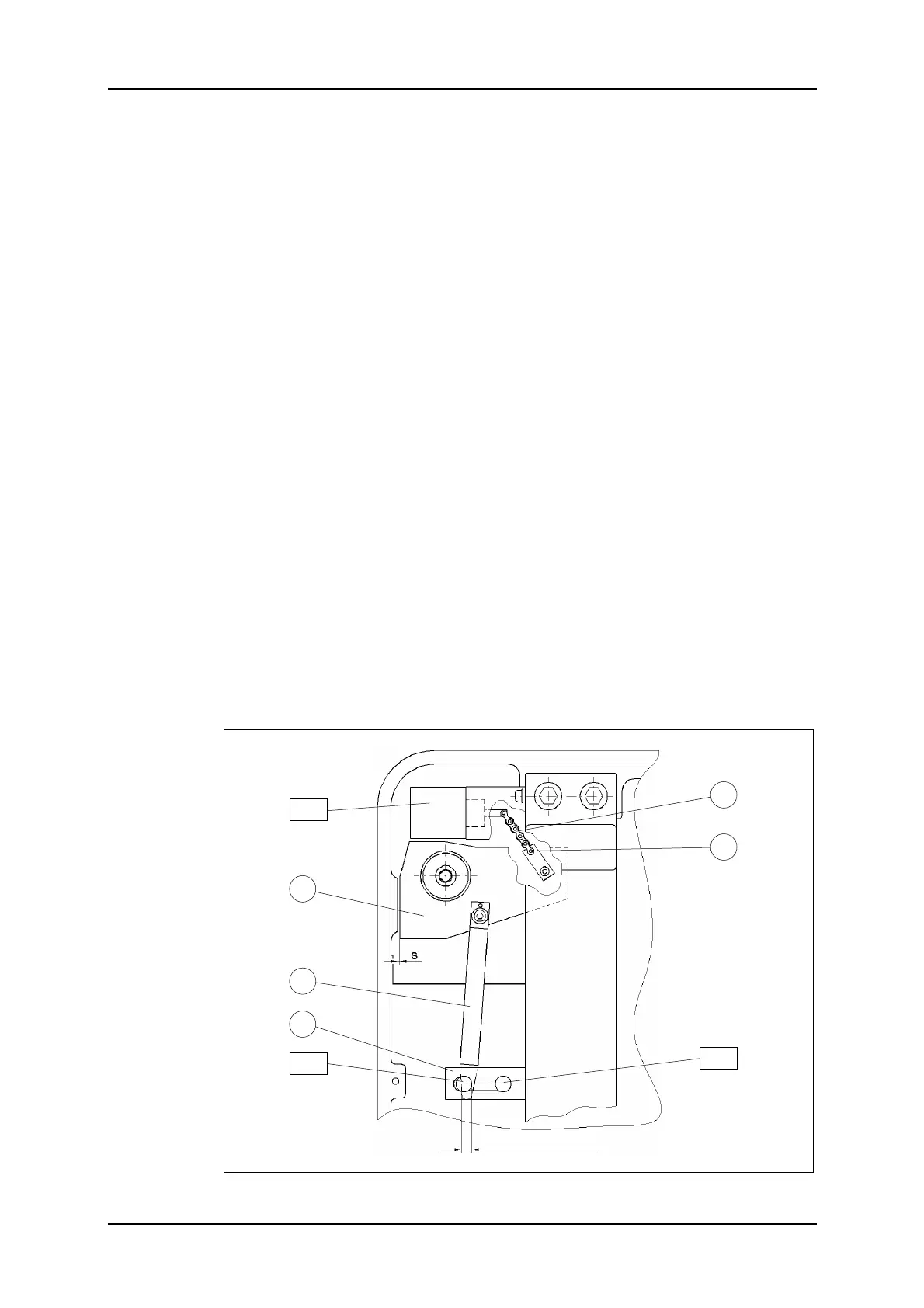
Chain 1 between solenoid Y80 and safety latch 3 has been set by a screw 2 to such a
length as to obtain a gap s = 0.6 – 1.0 mm between safety latch 3 and the contact surface
of the machine frame.
The distance between the proximity switch and switching vane 4 must be 1.5 + 0.5 mm.
When the solenoid is in its de-energized state switching vane 4 must overlap proximity
switch B81 by at least 50 %.
When the solenoid is ON (after actuating the manual clutch switch – refer to "Manual
Cranking" in the Operating Manual) proximity switch B82 must also be overlapped by at
least 50 %.
For this purpose, you can loosen the locking nuts in the slots of holder 5 to shift proximity
switches B81 and B82.
The switching state is, in each case, indicated by an LED integrated in the neck of the
proximity switch.
Figure 20: PERFECTA 76 non-repeat device – rear view.
2
1
3
B 81
B 82
Y 80
4
5
Overlapping > 50 %



 To Next Page