CRANKSHAFT ASSEMBLY 14
To fit and remove a "Speedi-Sleeve"
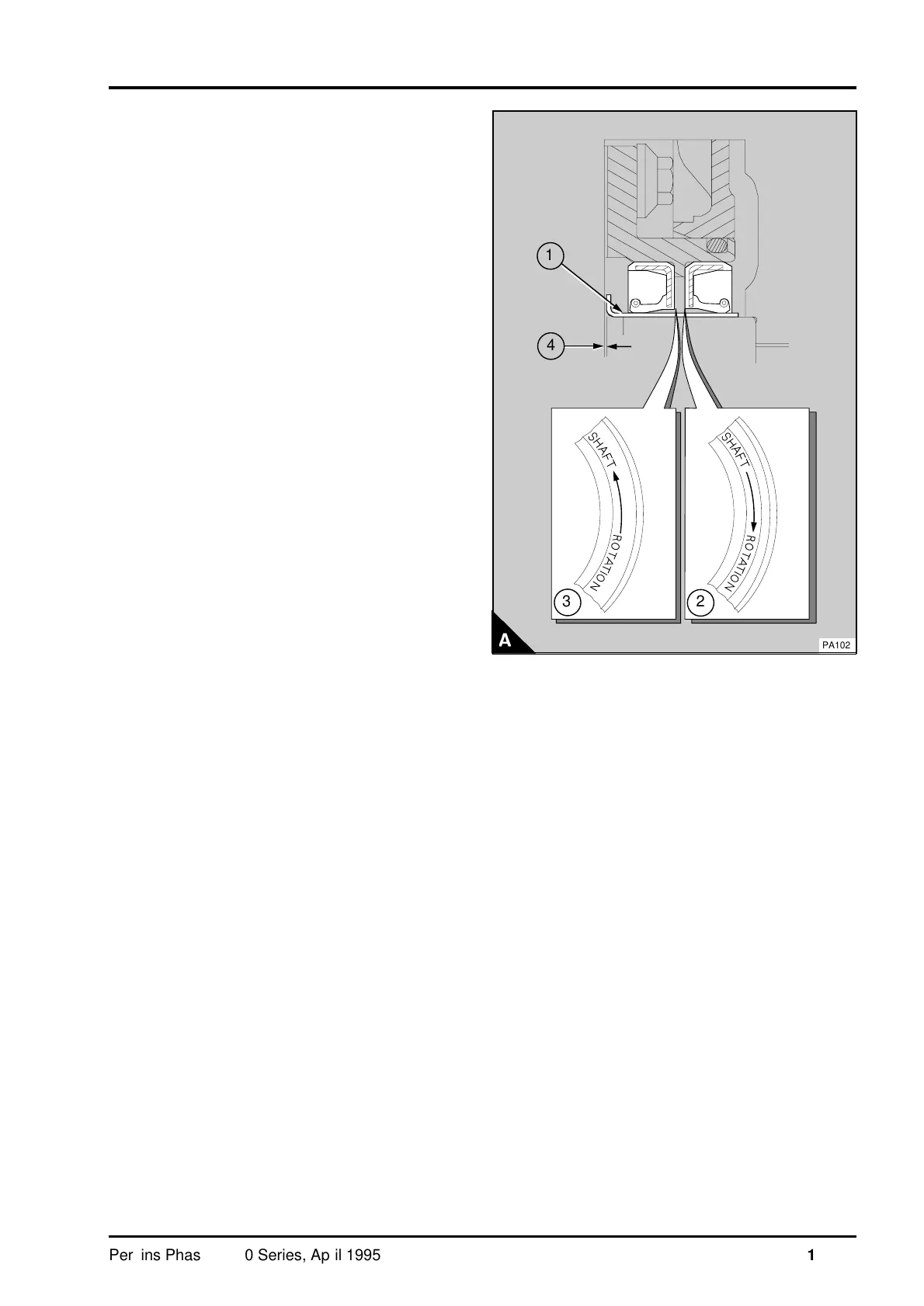
1 Clean the crankshaft palm and remove sharp
edges or rough areas from the crankshaft palm.
2 Ensure that the sleeve (A1) is clean. Apply a
narrow bead of POWERPART Liquid gasket around
the bore of the sleeve 5 mm (0.2 in) from the front
face of the flange. The sleeve must be fitted not
more than five minutes after the Liquid gasket has
been applied.
3 Ensure that the crankshaft is fully forward. Use a
suitable adaptor and a hammer to carefully drive the
sleeve onto the crankshaft palm. The sleeve must
be fitted with a clearance of 0,4/0,6 mm
(0.016/0.024 in) between the rear face of the
cylinder block and the front face of the sleeve
flange (A4). Ensure that this clearance is equal all
around the flange of the sleeve. Do not try to pull
the sleeve backwards as damage could occur to
the sleeve.
4 Fit a new joint for the oil seal assembly.
Lubricate lightly the sleeve and the lip of the oil
seals with clean engine oil and fit the assembly. Fit
a new joint to the flywheel housing and fit the
cover. Fit the flywheel.
5 To remove a sleeve, make a deep scratch with a
sharp scriber along the full length of the sleeve.
Insert the edge of a thin blade at the end of the
scratch mark. Turn the blade to make a split along
the scratch mark and pull the sleeve apart. If only
the flange is removed, a recommendation of the
sleeve manufacturer is to spread the sleeve. To do
this use a small hammer and a suitable punch with
a round end. Make one or more lines of small
distortions across the full width of the sleeve. This
should increase the diameter of the sleeve enough
to enable its removal.
a
a
4
1
PA102
a
a
2
3
Perkins Phaser/1000 Series, April 1995 14A.13




 To Next Page