PLX51-PBM Diagnostics
PROFIBUS DPV0/DPV1 Master or Slave to EtherNet/IP™ or Modbus® Gateway User Manual
ProSoft Technology, Inc. Page 182 of 196
8.4 Modbus Packet Capture
The PLX51-PBM allows you to capture the Modbus traffic for analysis.
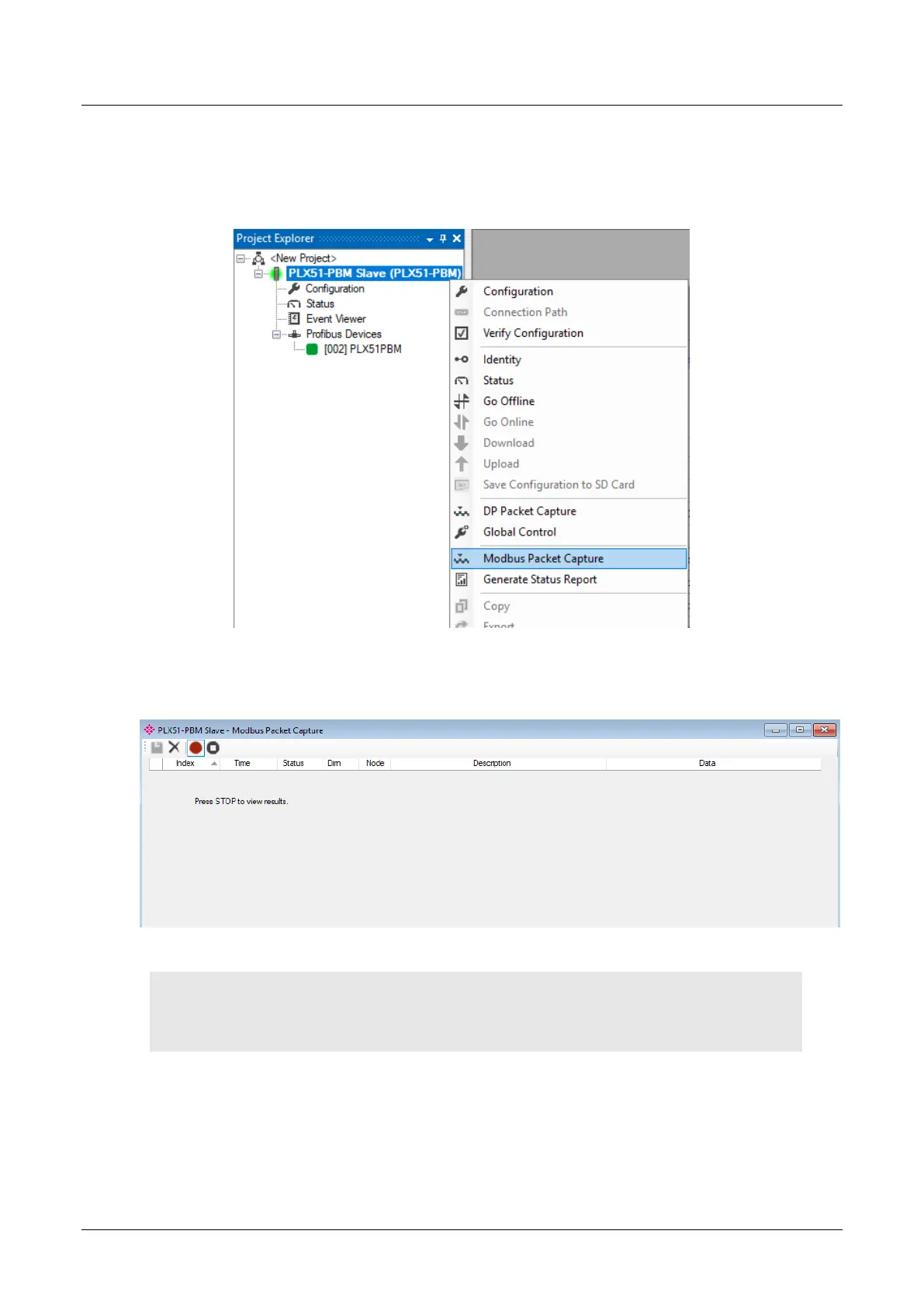
1 To invoke the capture of the module, right-click on the PLX51-PBM icon and
double-click on the MODBUS PACKET CAPTURE item in the Project Explorer tree.
Figure 8.33 - Selecting Modbus Packet Capture
2 The DP Packet Capture window opens and automatically starts capturing all
Modbus packets.
Figure 8.34 - Modbus packet capture
NOTE: The module captures packets until you press the STOP button. If the packet capture reaches
~10,000 packets, it will automatically store the capture into a file, and will keep doing so for every
10,000 packets.


 To Next Page