SECTION 22: TROUBLESHOOTING
137 of 147
22.1 Initial Checks
When encountering any abnormal operation or fault conditions of the equipment, all troubleshooting should
start with the following initial checks. If a problem is discovered in these initial checks it must be corrected
before moving on in the trouble shooting.
1. Compare voltage and phase of supply power on site with rating plate information.
2. Review wiring between remote panel and control panel. Do the electrical connections match the sup-
plied wiring diagram?
3. Compare gas type and supply pressure on site with rating plate information.
4. Check for proper blower rotation on air handler and any exhaust blowers.
•Blowers powered with a three phase motor can be reversed by swapping any two incoming power
legs. For blowers powered by a single phase motor refer to the motor rating plate for reversing
instructions.
22.2 Motor and Blower
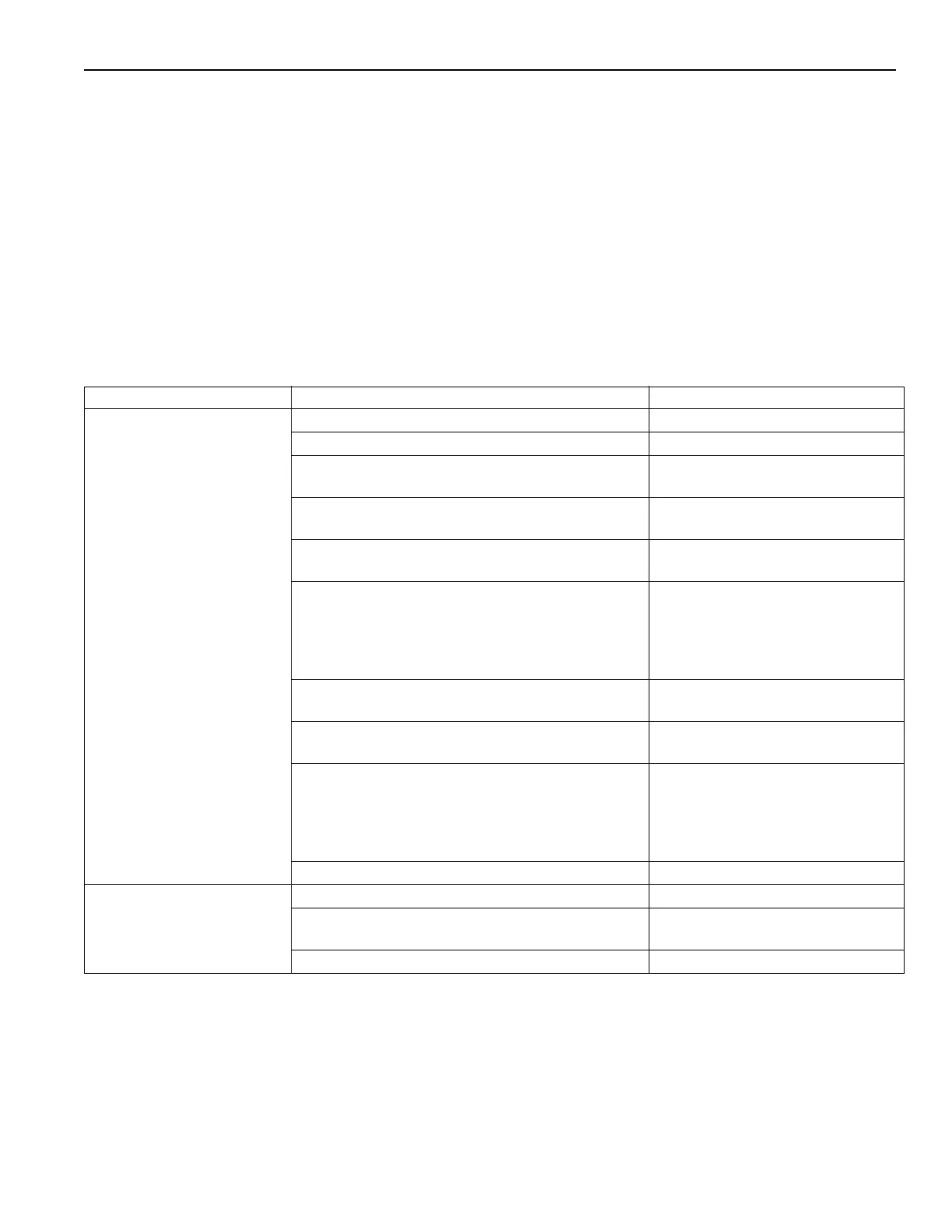
PROBLEM POSSIBLE CAUSE SOLUTION
Motor does not operate Main disconnect switch is OFF Turn disconnect to ON
Blown fuse(s) in disconnect Replace fuse(s)
Blown fuse(s)/breaker tripped in control transformer Replace fuse(s)/reset breaker (with
disconnect off)
Fan switch on, Power on terminals 3 / 3A Check wiring between remote panel
and air handler. Replace switch.
Cool down timer TD4 (if equipped) does not reset.
Power on 3A?
Replace TD4 timer
Optional: Damper does not open Check that damper is not obstructed
Check that linkage is tight and
secure
Verify that 120 V at terminal 3B
Replace damper actuator
Time delay relay defect. Power on terminal 3D after
set time delay?
Replace time delay relay TR1
Motor starter (contactor) does not operate. Power
on terminal 3D and 2?
Replace starter
Tripped motor overload. Power out to MUA motor
when motor starter is energized?
Reset
Check for proper FLA setting
Replace overload
If applicable: Tighten screws on
heater packs or overload.
Optional: Low limit switch set to high Re-adjust low limit switch setting
Blower does not operate Belts broken or loose? Replace/tighten belts
Loose motor or blower sheaves (pu
lleys) Reinstall and properly torque set-
screws
Blower bearings, do they turn freely? Replace bearing(s)



 To Next Page