109
Specify the side and amount of
the margin to be adjusted with the
[
c
] or [
d
] button.
You can shift the original image by between 0mm
and 10mm to both left and right directions.
Press the [C] key to return the margin value to [0].
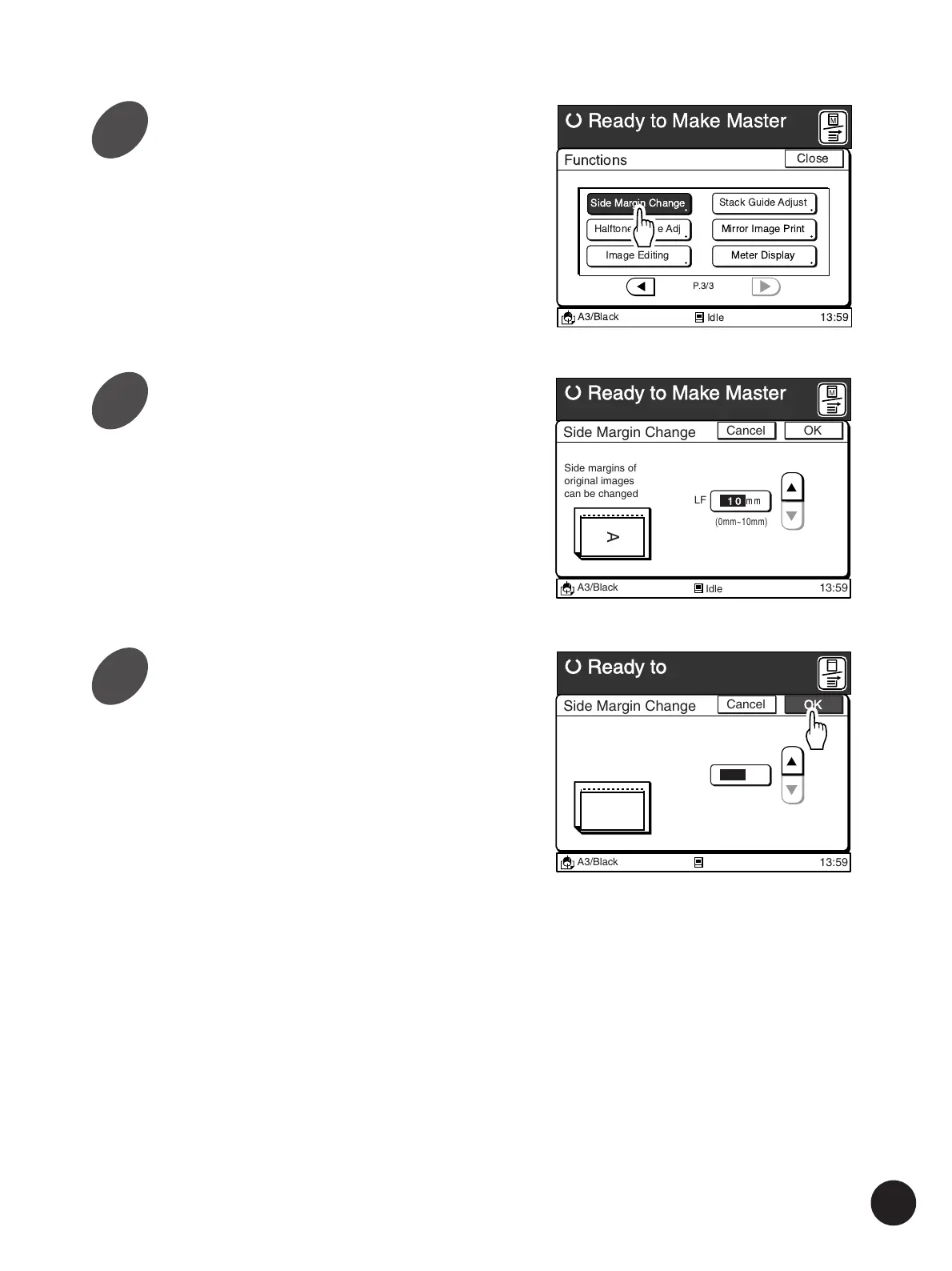
Touch the [Side Margin Change]
button.
The [Side Margin Change] window appears.
A3/Black
13:59
Functions
P.3/3
Halftone Curve Adj
Image Editing
Stack Guide Adjust
Mirror Image Print
Meter Display
Ready to Make Master
Idle
Close
Side Margin Change
M
A3/Black
13:59
Cancel OK
Side Margin Change
Ready to Make Master
(0mm~10mm)
10
mm
Side margins of
original images
can be changed
LF
A
Idle
M
A3/Black
13:59
Cancel OK
Side Margin Change
Ready to Make Master
(0mm~10mm)
10
mm
Side margins of
original images
can be changed
LF
A
Idle
M
Adusting the Side Margins
3
4
5
Touch the [OK] button.
The window returns to the [Functions] window.



 To Next Page