66
A3/Black
13:59
MULTIUP>
OFF
SORTER>
OFF
AUTO-GO>
OFF
Line
Duo
Photo
Ready to Make Master
Manual
Auto
Options
Auto
100%
Image Size Contrast Paper
Idle
Advanced
M
Manual
Auto
A 3
1
2
1
- About Feed Tray Relay feature -
You can make a large amount of prints with a single operation using Paper Feed Trays (1 and 2) in sequence.
The Standard Paper Feed Tray can be included in this feature if the [Triple-Tray Source] function is set at [ON].
☞ p.154... Customizing the Initial Settings
• Printing Paper will be supplied in the following order:
Standard Paper Feed Tray ➔ Paper Feed Tray 2 ➔ Paper Feed Tray 1
When paper in the Paper Feed Tray 1 runs out, the Standard Paper Feed Tray re-starts feeding.
• You can load paper during the printing operation as described below.
– While paper is being supplied from the Paper Feed Tray 1 or 2, you can load paper on the Standard
Paper Feed Tray.
– While paper is being supplied from the Standard Paper Feed Tray, you can load paper in the Paper Feed
Tray 1 and 2.
NOTE
You cannot open either of the Paper Feed Trays (1 or 2) while the other one is feeding paper.
Important!
• The paper with the identical size, type, finish and feed direction should be loaded on each Paper Feed Tray.
• Be sure to define the paper information correctly.
☞ p.97... Changing Printing Paper Information
Selecting Printing Paper
Selecting Paper Manually
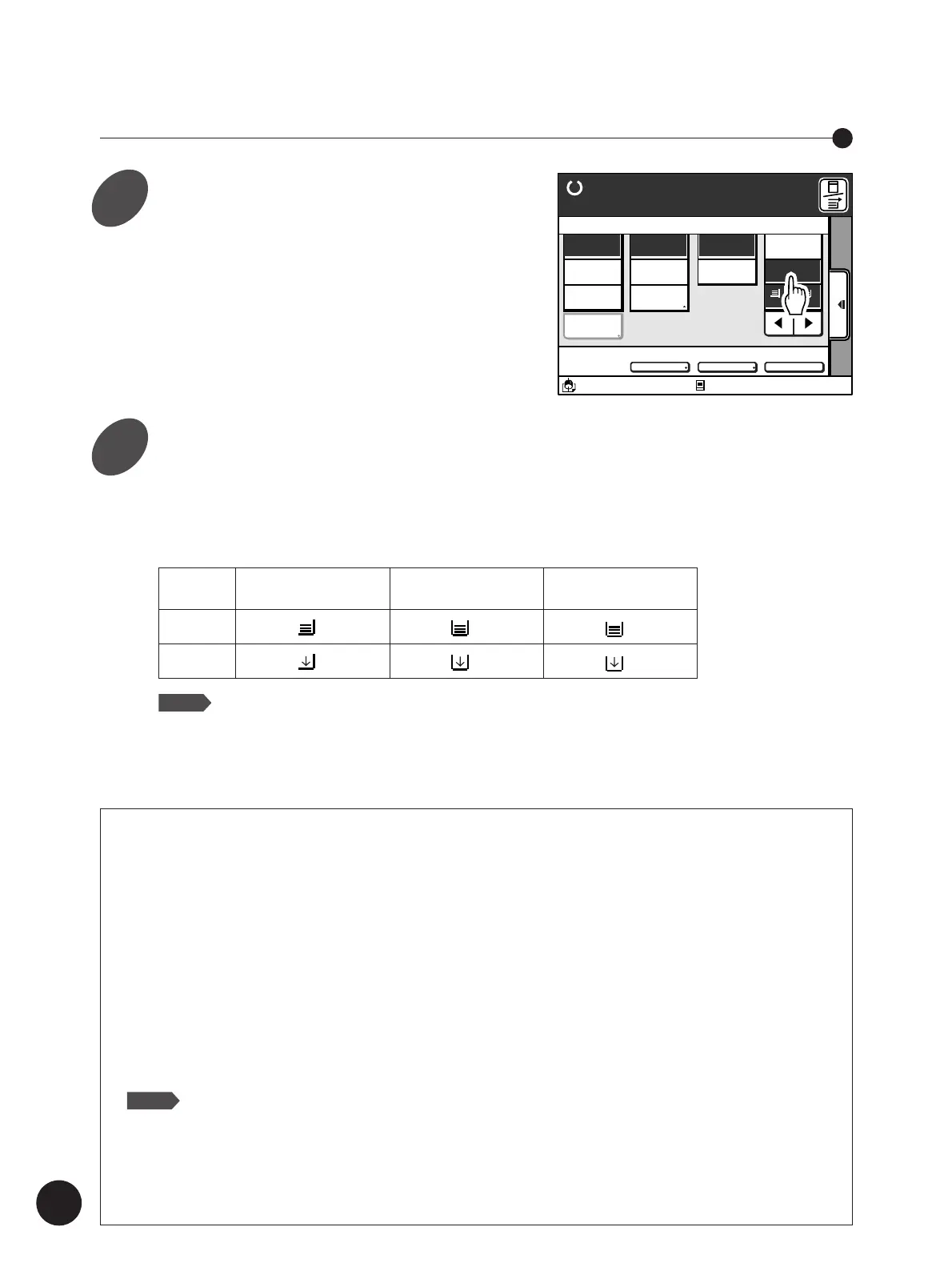
Select a desired paper size or feed
tray.
Touch the [
h
] [
j
] buttons.
You can see if paper is loaded in trays with the
icons shown in the display.
Standard
Paper Feed Tray 1 Paper Feed Tray 2
Paper Feed Tray
Loaded
1
2
Empty
1
2
NOTE
Besides the above, the paper size assigned to the relevant paper feed tray
will be displayed under the icon. If the paper size is set at other than [Auto]
in the [Paper Data Entry] window, a bar appears under the paper size
display to show you that a specific paper size is assigned to the tray.
☞ p.97... Changing Printing Paper Information
1
2
Touch the [Manual] button in the
[Paper] column on the Main-panel
window.
The [
h
] [
j
] buttons and the Paper Feed Tray
icons appear with the corresponding paper size
below the icons.



 To Next Page