77
◆Scanning Contrast
◆Sorter*
◆Print Speed
●Paper Type Entry
◆Regist. Mark Skip
●Feed Tray Relay*
◆Reproduction Size
◆Print Quantity
◆Print Density
●Paper Finish Entry
◆Side Margin Change
●Stack Guide Adjust*
◆Margin +
◆Program Printing
◆Multi-Up
◆Job Separation*
◆Halftone Curve Adj
●Paper Size Entry
●Image Editing*
◆Print Position Adj
◆Book Shadow Editor
◆D-Feed Check
◆Mirror Image Print
●Owner Name
●
Communication Status*
◆Sorter*
●Paper Type Entry
●Confidential Mode
●Page Count
◆Print Quantity
◆Print Position Adj
●Paper Finish Entry
●Feed Tray Relay*
●Current Date/Time
●Data Source*
◆Fine Adjust Mode
◆Job Separation*
●Stack Guide Adjust*
●Page Size
◆Auto Process
◆Print Speed
◆D-Feed Check
●Paper Size Entry
Confirming
Current Settings
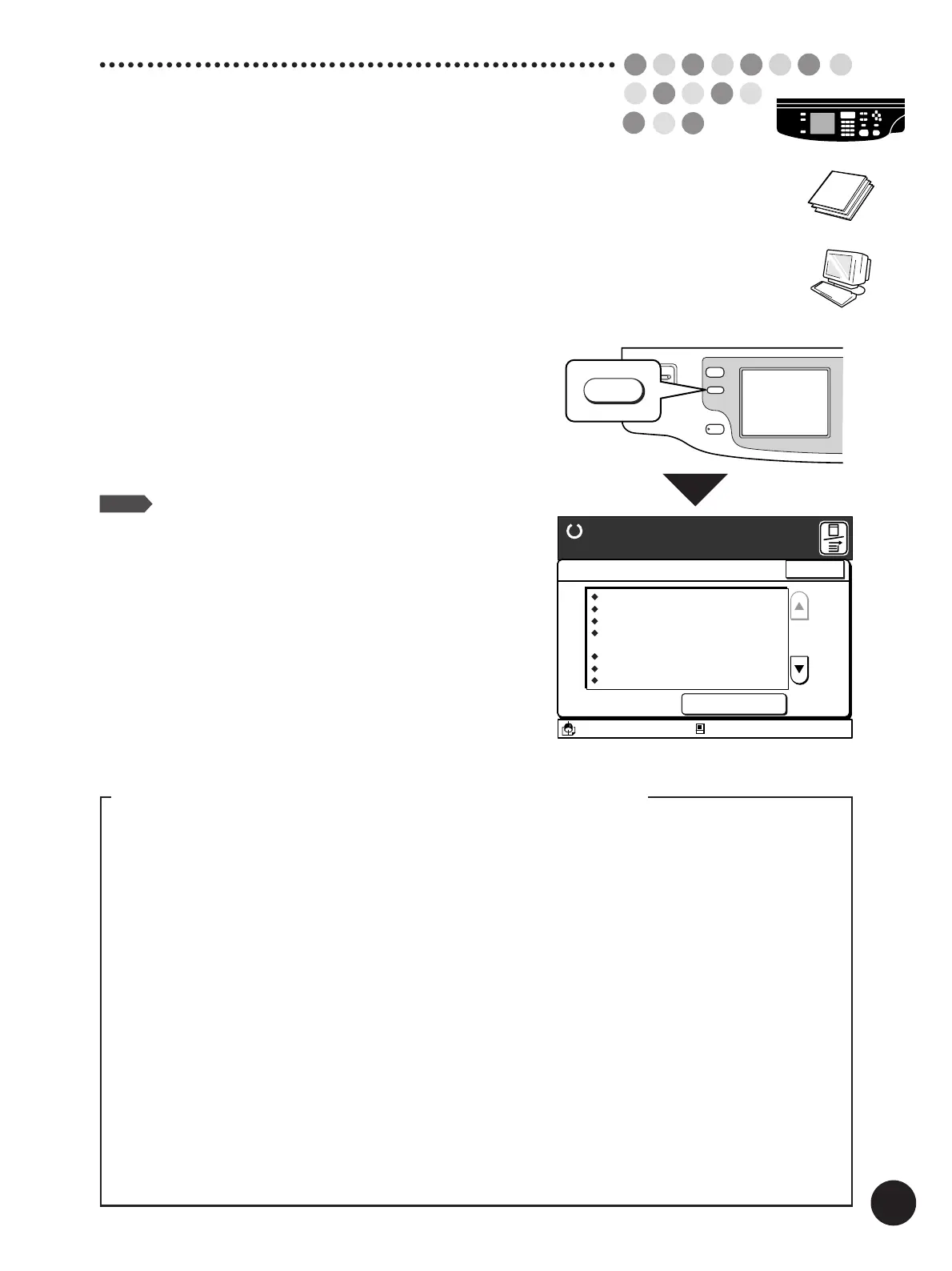
You can check the current settings of the print job.
This combination of settings can also be registered in the
memory for quick recall
.
Press the Properties key.
A list of the current settings of the print job will be
displayed.
You can scroll up and down the display by touching the
[
c
] and [
d
] buttons.
NOTE
• The combination of the current settings can be
saved in memory for later recall by touching the
[Job List Entry] button.
☞ p.124... Storing Setting in Memory
• To close the [Current Job Design] window,
touch the [Close] button.
WAKE UP
PROPERTIES
PROPERTIES
DATA/COPY
A3/Black
13:59
Close
Current Job Design
Job List Entry
Image Processing
Scanning Contrast
Reproduction Size
Margin+
Image Editing
Auto Process
Sorter
Print Quantity
Photo
Level 1
80%
x90%
ON
ON
Group
100Sheets
Idle
Job List Entry
M
Ready to Make Master
The following properties can be checked in the [Current Job Design] window
-In the Copy mode-
◆Image Processing
◆Auto Process
◆Fine Adjust Mode
◆Semi-Auto (Master)
◆Jump Wing Control
◆Feed Tray*
-In the Data mode-
●Print Job Name
●Protection Option*
●Image Rotation
◆Print Density
◆Jump Wing Control
◆Feed Tray*
*
......
These items appear in the [Current Job Design] window depending on the printer model and the
configuration of optional devices.
◆
......
These itemes can be registered on the [Current Job Design] window.



 To Next Page