89
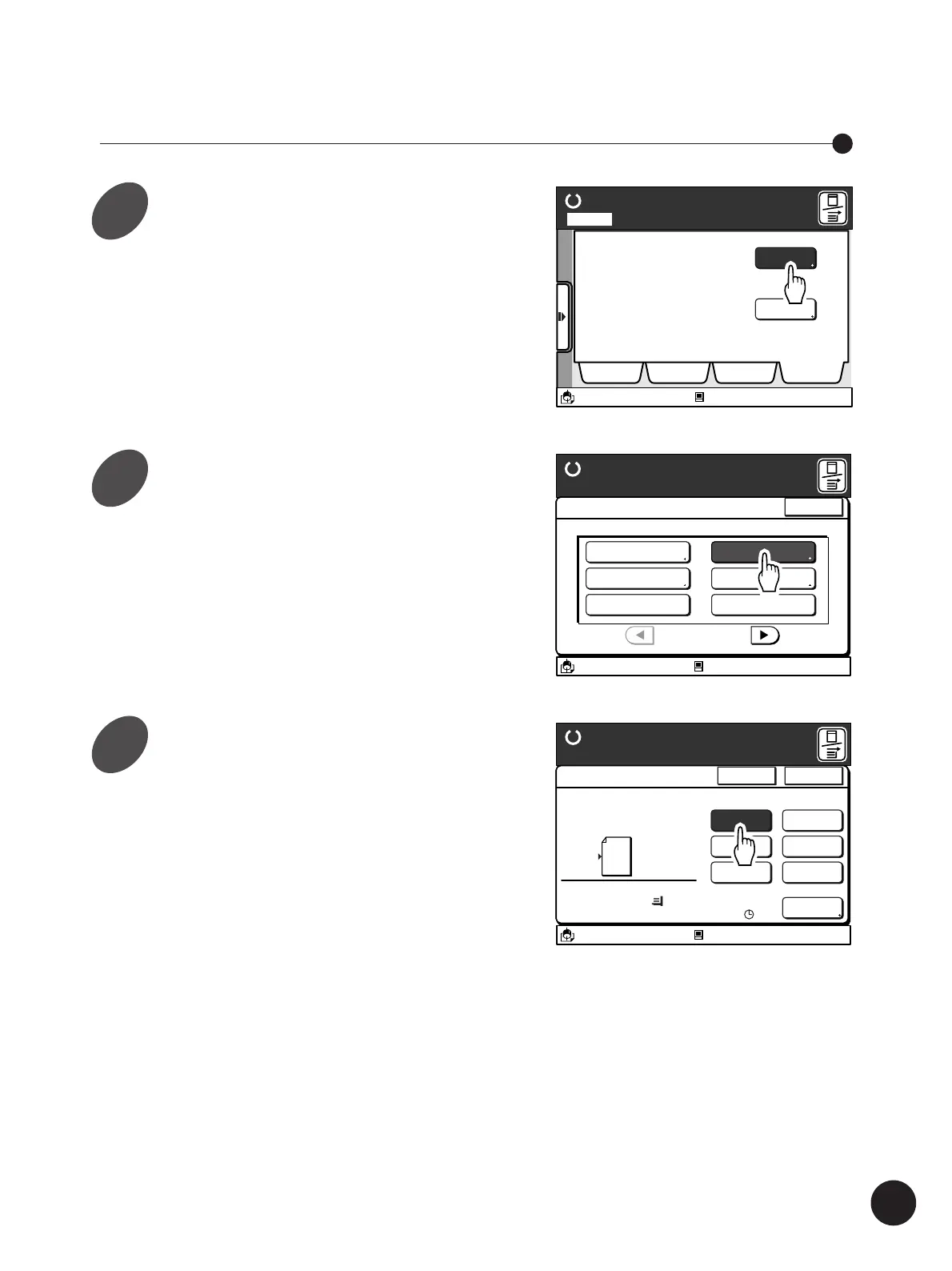
Display the [Catalog] tab on the
sub-panel window and then touch
the [Functions] button.
The [Functions] window appears.
Touch the [Multi-Up Print] button.
The [Multi-Up Print] window appears.
Printing Originals Multi-Up
Ready to Make Master
A desired function can be
selected from the list
The properties of your RISO
printer can be changed
Functions
Properties
Selections Job List Program Catalog
A3/Black
13:59
Idle
M
Page No. 1Local
A3/Black
13:59
Close
Functions
P.1/3
Confidential Mode
Renew Page
Idling Action
Multi-Up Print
Book Shadow Editor
Semi-Auto (Master)
Ready to Make Master
Idle
M
Select a desired Multi-Up pattern.
Touch the corresponding button.
A3/Black
13:59
Multiple pages can be
Printed on a sheet
[Page Direction]
Size Paper
100%
A 3
Cancel OK
Multi-Up Print
Ready to Make Master
2UP
4UP
8UP
16UP
Ticket
OFF
Interval
A
15s
Idle
M
Printing Originals Side by Side
1
2
3



 To Next Page