37
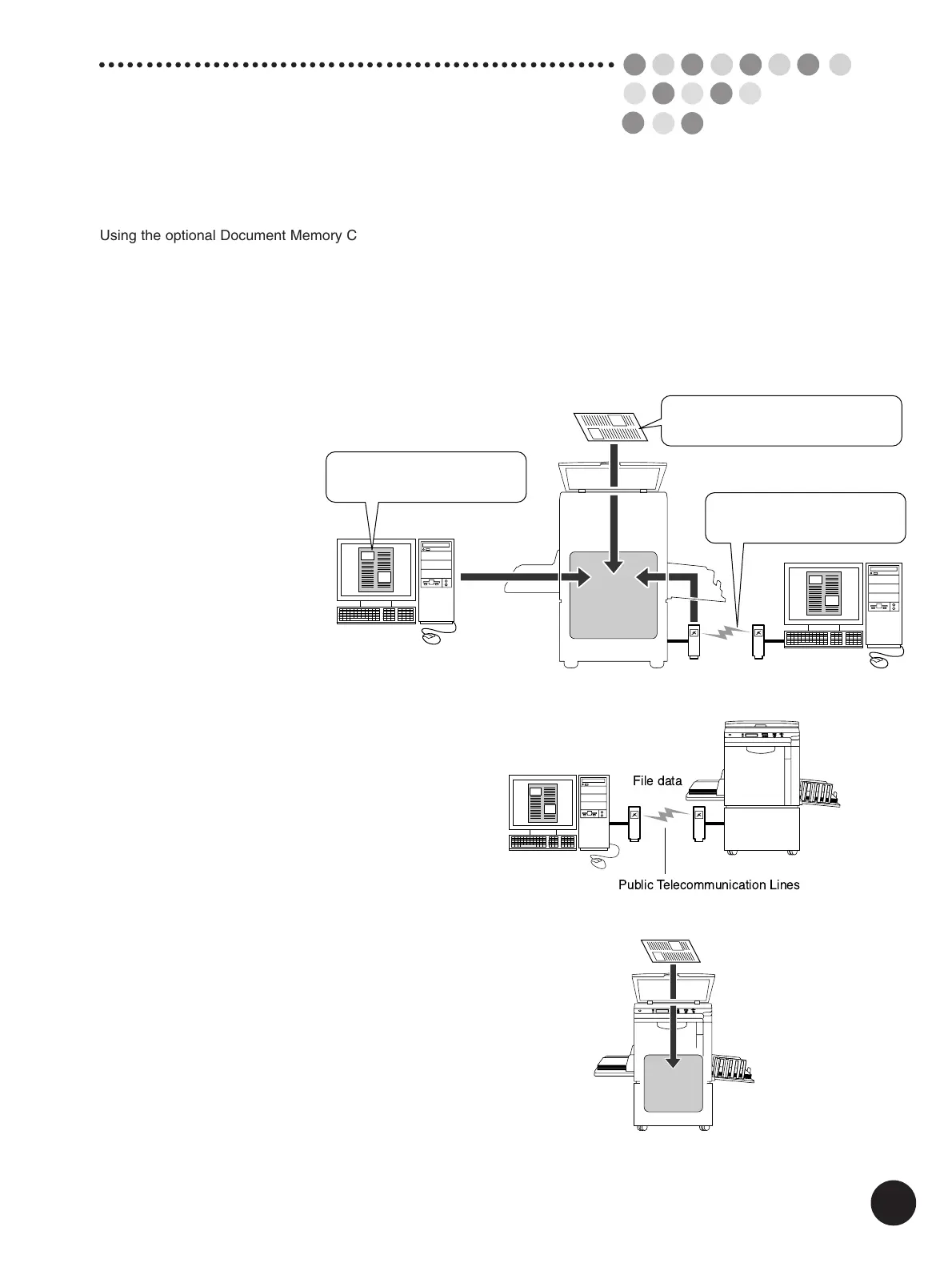
File data
Public Telecommunication Lines
Using the optional Document Memory Card DMC-32 (pre-installed in RP3790), you can
enhance the printer’s abilities in the Data mode with additional functions. This chapter
provides explanations on the usage and necessary precautions for each of these
functions, as well as explaining how to make the various settings.
By installing the Document Memory Card onto the printer, the following functions can be
used when printing in the Data mode.
Storage
memory
File data transmitted from a
personal computer in the local
connection mode
File data transmitted in the
remote transmission mode
Data scanned in the scanning
mode
●File Storage
It is possible to save the file
data received from personal
computers or scanned on the
Stage Glass in the storage
memory.
These data can be recalled
as many times as required
for printing purposes.
They will not be cleared even
if the printer’s main power
switch is turned off or the
Reset key is pressed.
●Remote Data Transmission
The Document Memory Card enables the printer to
receive file data from remote locations via public
telecommunication lines with a modem or TA.
E
xpanding Functions with
the Document Memory Card
Data
Storage
memory
●Scanning
It is possible to scan various originals with the printer’s
scanner and then save it in the storage memory. This
enables the data to be called and printed out as many
times as required.



 To Next Page