152
Printing on Envelopes
You can feed envelopes by changing the position of the Standard Paper Feed Tray.
Important!
Be sure to return the Standard Paper Feed Tray to the normal position after printing on envelopes.
Register the size of envelope.
Register the size of the envelope to be used in the
[Properties] window.
☞ p.144... Registering Custom Paper Sizes
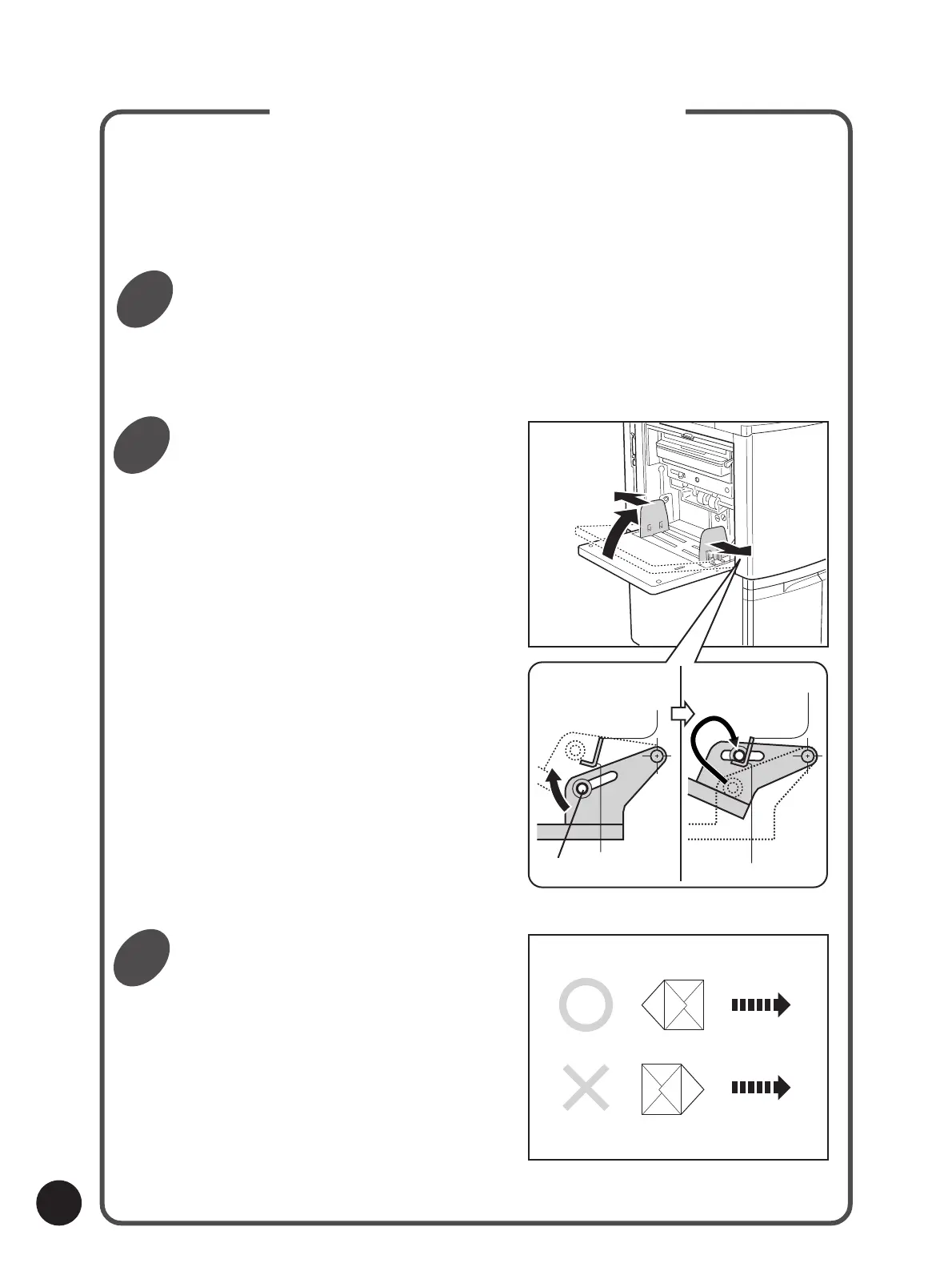
Set the Standard Paper Feed Tray
in the position for feeding
envelopes.
qLower the Standard Paper Feed Tray to the
bottom and widen the Feed Tray Paper Guides
as wide as they will go.
Set the envelopes in the Standard
Paper Feed Tray.
qFace the bottom edge of the envelope towards
the feeding entrance and set them in place in
the tray .
wLift the Standard Paper Feed Tray.
The Feed Tray Stoppers slide into the hooks
and secure the tray at an angle position.
Using Custom Paper
Hook
Paper Feed
Direction
Feed Tray Stopper
1
2
3



 To Next Page