42
Output Range Change
All Pages
Storage File Selection
Even Pages
Odd Pages /
First
➔
Last
➔
01Page
<Output Order>
<Page Selection>
The output page range
can be selected.
The output page can
be specified
A3/Black Blocked
13:59
OKCancel
2
1
(1-10Pages)
2
1
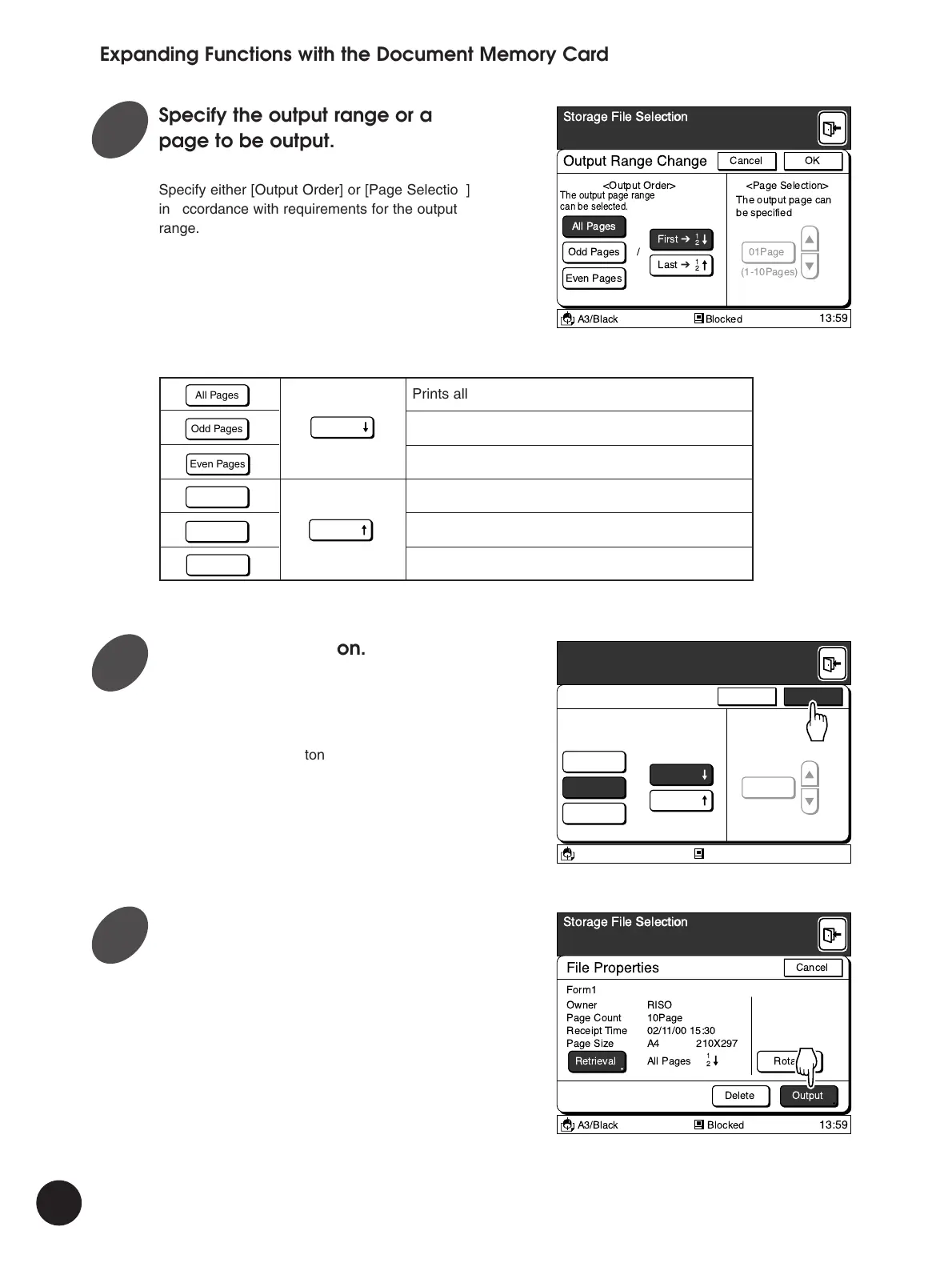
Specify the output range or a
page to be output.
Specify either [Output Order] or [Page Selection]
in accordance with requirements for the output
range.
Expanding Functions with the Document Memory Card
All Pages
Odd Pages
Even Pages
Prints all pages in ascending order
Prints only odd pages in ascending order
Prints only even pages in ascending order
Prints all pages in descending order
Prints only odd pages in descending order
Prints only even pages in descending order
All Pages
Odd Pages
Even Pages
First ➔
2
1
Last ➔
2
1
The output page can
be specified.
Output Range Change
All Pages
Storage File Selection
Even Pages
Odd Pages /
First ➔
Last ➔
01Page
<Output Order> <Page Selection>
A3/Black Blocked
13:59
OKCancel
2
1
(1-10Pages)
2
1
The output page range
can be selected.
Touch the [OK] button.
The [File Properties] window appears again.
The modified settings will be displayed in the
[Retrieval] field.
Touch the [Cancel] button to cancel the current
operation and return to the [Storage File
Selection] window.
File Properties
Storage File Selection
RotateRetrieval
OutputDelete
Owner
Form1
All Pages
2
1
Receipt Time
Page Count
RISO
02/11/00 15:30
Page Size A4 210X297
10Page
A3/Black Blocked
13:59
Cancel
Touch the [Output] button.
The selected storage file is recalled and the
Main-panel window appears.
Press the Start key to start master-making
operation.
2
3
4



 To Next Page