User name
Enter your Phits account username here. This account is
used to log into the Phits web-application for ordering
insoles.
Password Enter your password for the Phits account.
Custom design wizard
The custom design wizard is available in the Scientific package(s).
Controls whether a custom design wizard is selectable as a design option.
Name*
Enter the name of the custom design wizard (this is
mandatory).
URL Enter the url of the custom design wizard.
More information about using the custom design wizard can be found in the installation
directory of footscan 9 (see 4.6), in the subfolder "webplugin".
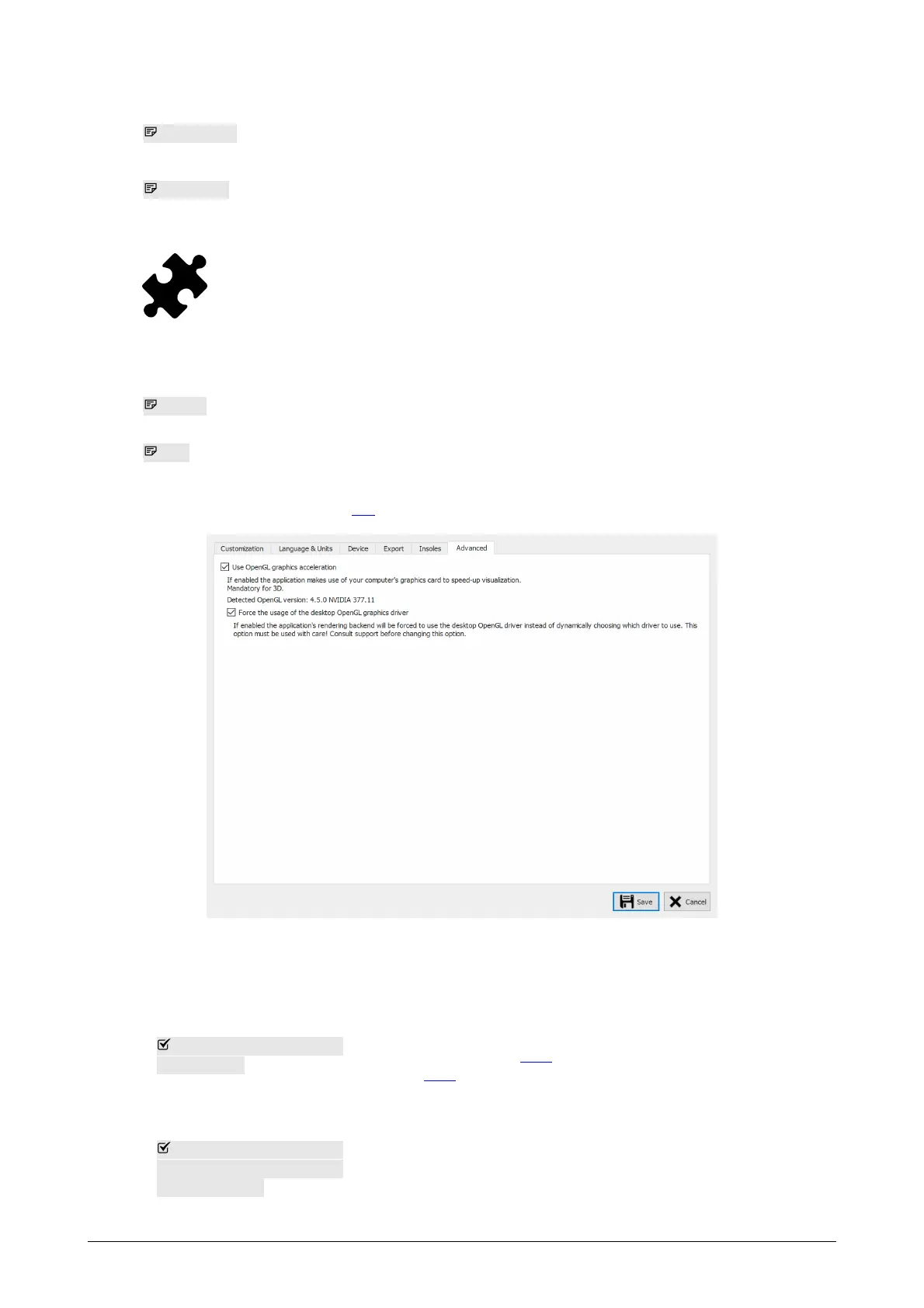
Figure 24: Settings regarding technical aspects of footscan 9.
Advanced holds settings regarding more technical aspects of footscan 9:
Use OpenGL graphics
acceleration
Uncheck if your system does not support OpenGL
adequately. Check the minimum software requirements for
footscan 9 (Section 1.10) if unsure. The 3D analysis
(Section 10.8) is not available when this setting is
disabled.
Force the usage of the
desktop OpenGL
graphics driver
When checked the application's rendering backend will be
forced to use the desktop OpenGL driver instead of
dynamically choosing which driver to use. This option
must be used with care! Consult the rs scan's support
department before changing this option.
™
™
™
®
®
®
®
®



 To Next Page