2.4 Install the Software
Do not connect the footscan system to your computer yet. This is part of the
installation procedure later on in this section.
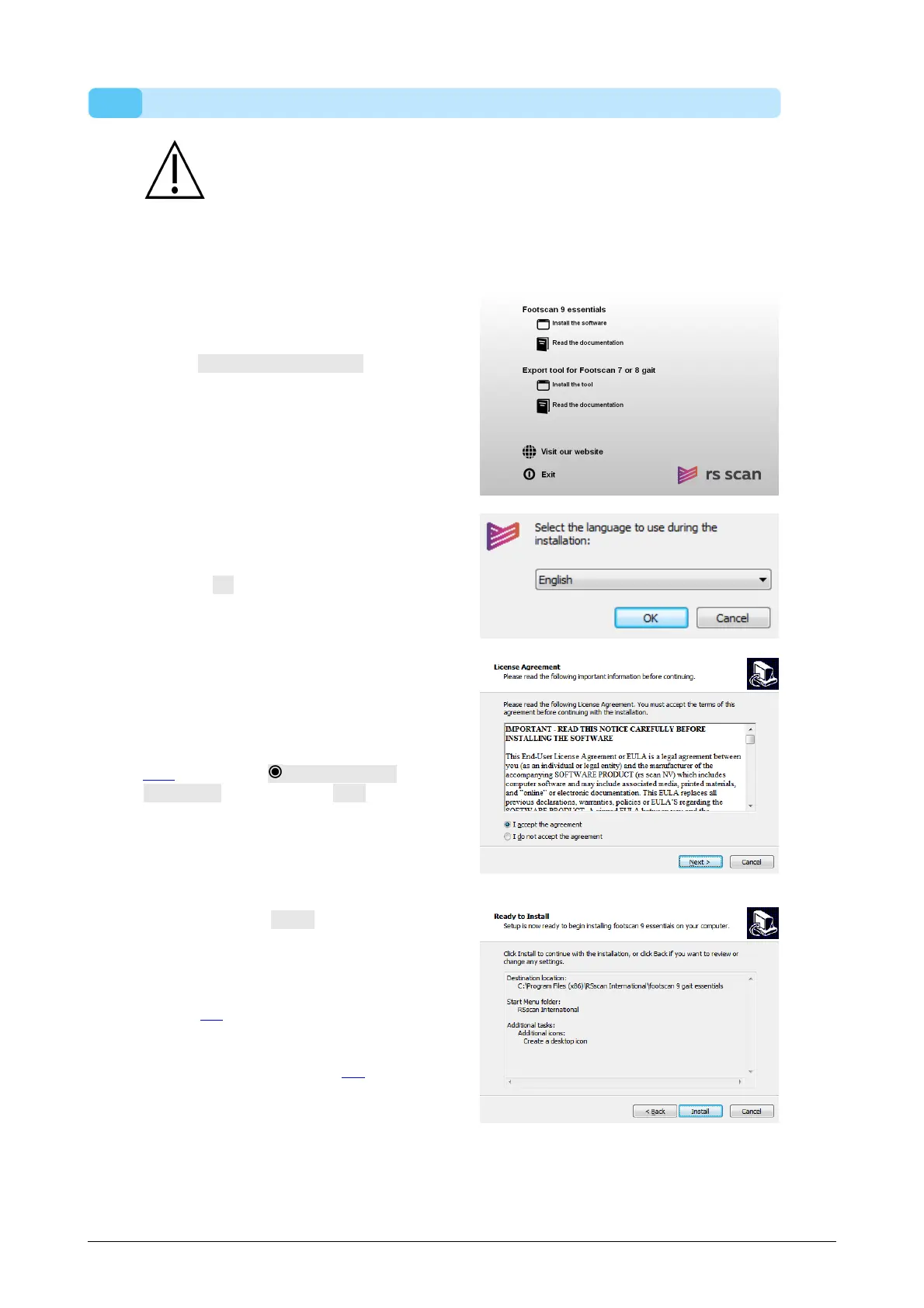
Insert the installation medium containing the installer in your computer. The installation
procedure starts automatically. If not, start autorun.hta manually.
C l i c k Install the software to
proceed with the installation. Your
computer may need your
permission to install footscan 9.
Select your preferred language
and click Ok.
The installer shows the End-User
License Agreement of the
footscan 9 software (see Section
1.12) . S e l e c t I accept the
agreement and click Next to
continue.
The installer lists details about the
installation. Click Install to start the
installation. If the installer is
accompanied with a license and
calibration file, the installer will ask
to replace your current one. See
section 2.6 for more information. If
necessary, an upgrade of the
footscan database will be
performed. See section 2.5 for
more information. If no footscan
database is present, a demo
database will be installed.
®
®
®
®
®



 To Next Page