Chapter 8
Client Screen
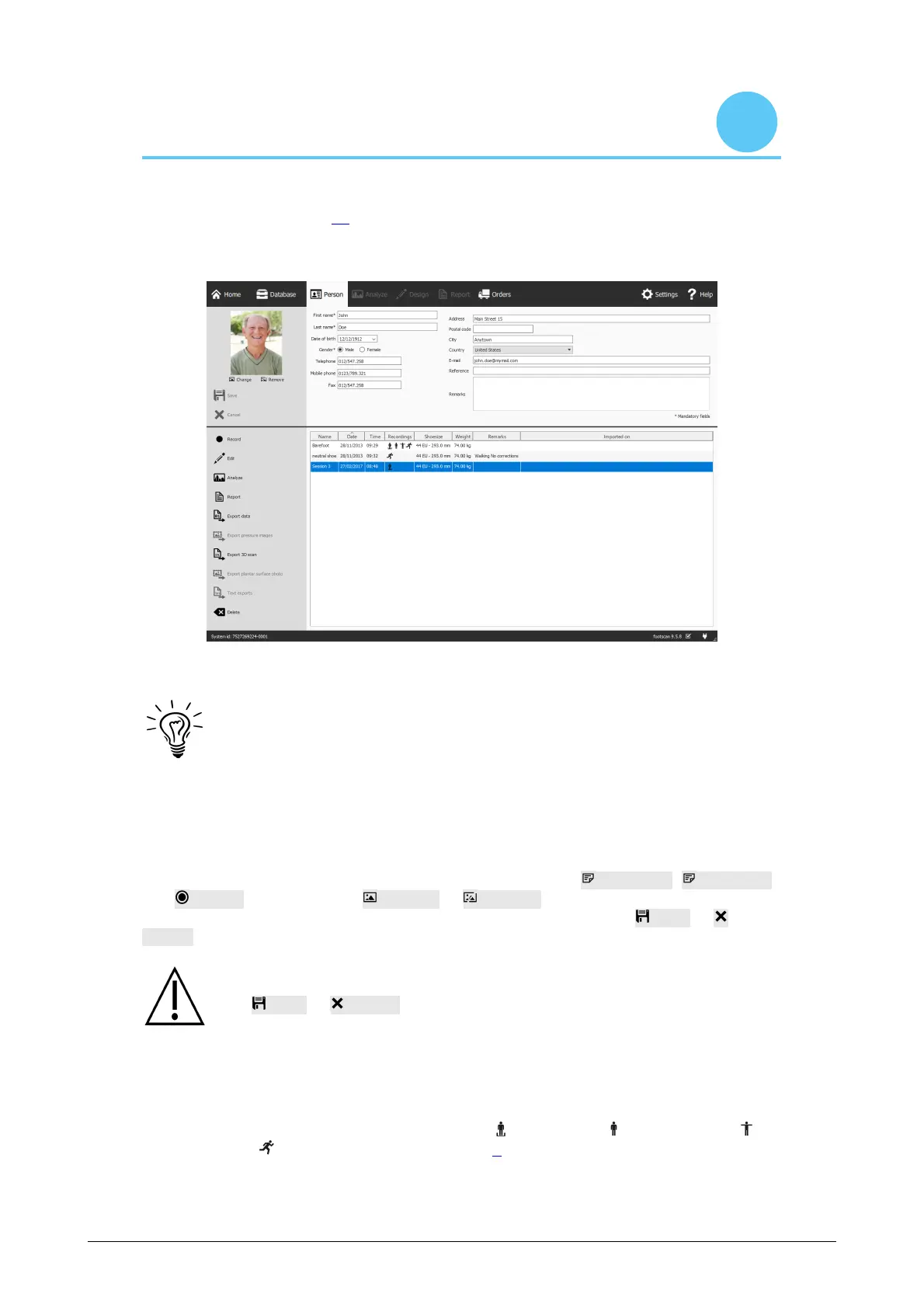
The Client screen (Figure 27) displays all information about a single client. The upper
half of the screen shows the client's personal information. The remainder of the screen
lists all recorded measurements of the client.
Figure 27: The Client screen displays all personal information about a single client, as
well as all measurement sessions belonging to that client.
Drag the dark screen separation line in the middle of the screen up and down
to resize the screen's contents.
Personal Information For each client, footscan 9 stores name, address, birth date,
gender, phone numbers, e-mail, and free-form remarks. Optionally the application may
hold client photographs.
The Client screen displays the personal information for the current client. Modify this
information in the appropriate text fields. Note that the fields First name, Last name
and Gender are mandatory. Change or Remove the client's photograph to your
liking. The application accepts a wide range of image formats. Click Save or
Cancel to finish.
While editing the personal information form the other screens are inactive.
click Save or Cancel to finish editing.
Measurements The lower half of the Client screen lists all the client's measurement
session. The listing shows per session its name, date and time when the recording was
made, shoe size and weight of the client, a field for additional remarks and if the
session was imported, the importation date. The recordings column displays the type of
measurements held by the session: 3D scanner and/or static and/or balance
and/or dynamic measurements (See Chapter 9).
®



 To Next Page