Home
Samsung
Medical Equipment
HS40
Page 216 (Report)
Samsung HS40 - Report
308 pages
Manual
Save Page as PDF
To Next Page
To Next Page
To Previous Page
To Previous Page
Loading...
6
–
16
HS
40 S
ervic
e M
anual
6.
7.
R
epor
t
6.
7.
1.
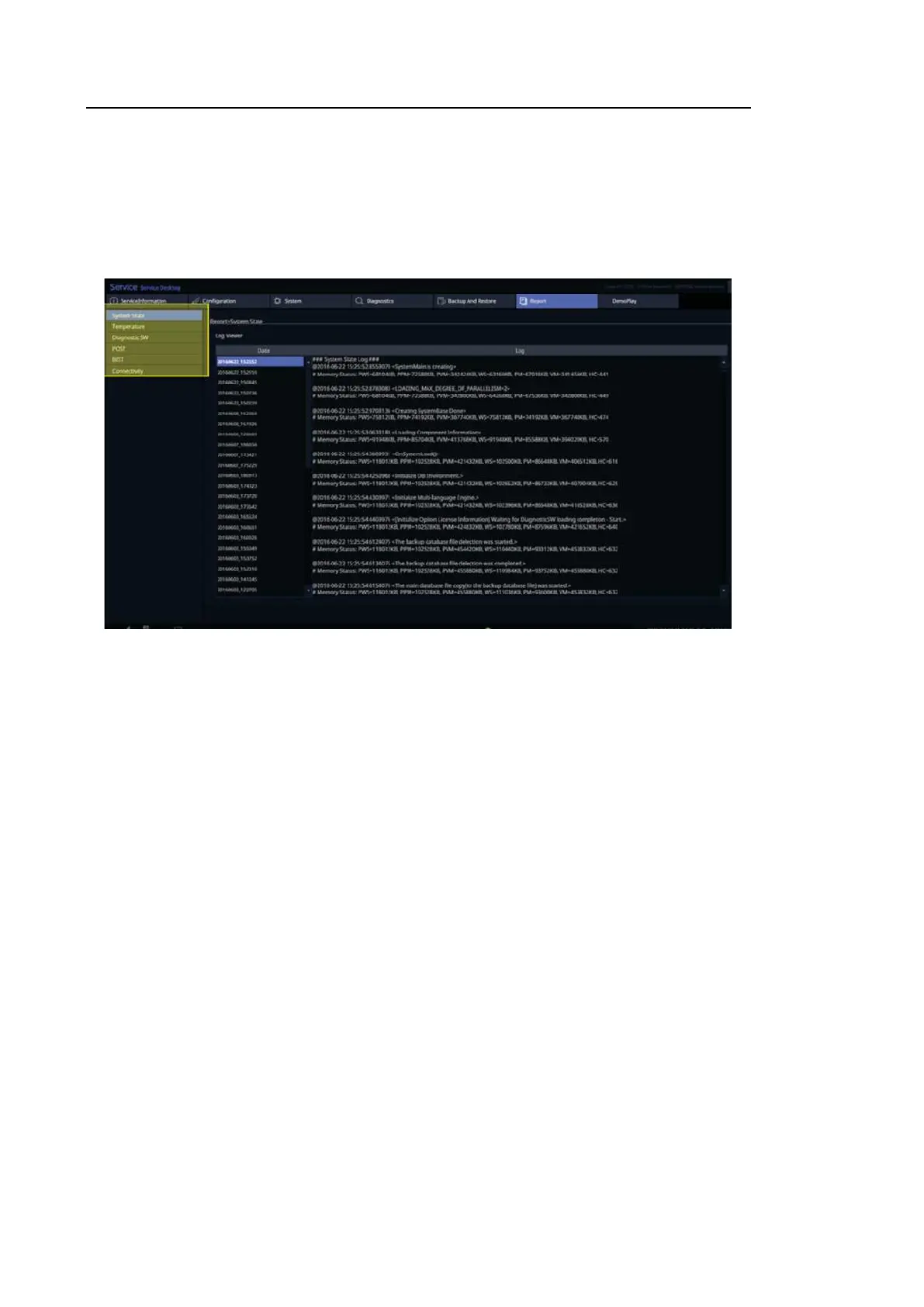
Report
S
hows
l
og informat
i
on
s
t
ored
i
n t
he s
y
s
t
em
regarding
S
t
at
e,
T
emperat
ure,
Diagnos
t
i
c
S
W,
P
OS
T
,
B
I
S
T
,
and Connec
t
i
v
it
y.
[
F
igure 6.
14
Report
s
c
reen]
215
217
Table of Contents
Main Page
Default Chapter
12
Table of Contents
12
Chapter 1 Introduction
18
Product Specifications
19
Product Configuration
22
Monitor
24
Control Panel
26
Console
33
Peripheral Devices
35
Probes
37
Accessories
39
Optional Accessories
40
Optional Functions
41
Chapter 2 Safety
42
Purpose of Use
43
Contraindications
43
Safety Information
44
Safety Symbols
44
Symbols
45
Labels
48
Electrical Safety
49
Prevention of Electric Shocks
49
ECG-Related Information
51
Esd
51
Emi
52
Emc
52
Mechanical Safety
59
Moving the Equipment
59
Precautions for Use
60
Biological Safety
63
ALARA Principle
63
Protecting the Environment
76
EU WEEE Directive
76
EU REACH Regulation
76
State of California Proposition 65 Warning (US Only)
76
Chapter 3. Installing Product
79
Transporting
79
Precautions During Transport
79
Brakes
79
Precautions on Ramps
79
Humidity and Temperature
80
Unpacking the Product
81
Dismantling the Product's Box
81
Accessories
82
Release of the Locking Mechanism
82
Installation Environment
83
Caution
83
Installing the Product
84
Installation Safety
84
Connecting Peripherals
86
System Power
89
Turning the Power on
89
Shutting down the System
89
System Settings
90
General System Settings
91
General
91
Display
95
Patient
96
Quick Preset
99
Ezexam
100
Imaging
103
Application/Preset
106
Application
108
Measurement Settings
109
Report
125
Annotation
131
Body Marker
135
Customize
136
Peripherals
140
Connectivity
143
Service
162
Help
162
Chapter 4. Product Inspection
163
Inspecting Functions
164
Basic Inspections
164
Detailed Inspections
165
Chapter 5. Product Structure
171
Overview
171
System Block Diagram
173
System Rack Design
174
Basic Structure of the Product
175
Electronic Structure
175
Ultrasound System Part
175
PC Part
176
User Interface Part
176
Power Part
176
Main Functions of PSA (Probe Select Assembly)
177
Ultrasound System Part
177
Beam Former Board
179
Back End Board
183
PC Part
188
PC Module
188
Rear IO Board
189
Software DSC
191
User Interface Part
192
Control Panel
192
Main Monitor
194
Touch-Screen
195
Display Layout
196
Power Part
197
Adm
197
Power Block Diagram
198
Specification
198
Interconnect Diagram
199
HS40 Interconnect Diagram
199
Cable Description
200
Chapter 6. Service Mode
203
How to Enter the Service Mode
203
Service Mode
203
Service Information
204
Configuration
205
Clock
205
Keyboard/Region
205
Tcp/Ip
206
User Account and User Account Management
208
Printer
209
System
210
Upgrade Software
210
System Serial Number
211
Window Explorer
212
Install Recovery System
213
Diagnostics
214
Control Panel Test
214
Keyboard Test
214
Power on Self Test
214
Built in Self Test
214
Monitor Test
214
Backup and Restore
215
Backup
215
Restore
215
Log Backup
215
Report
216
Demo Play
217
Enter Installation Key
218
Chapter 7. Troubleshooting
220
Power Issues
221
Power Does Not Turn on
221
Power Does Not Turn off
221
Power Turns off by Itself
221
Monitor
222
Nothing Is Displayed on the Screen
222
Screen Is Discolored
222
Error Messages
223
Error Occurs During Booting
223
Image
223
Mode: There Is no IMAGE ECHO or IMAGE FORMAT
223
Lines (Noise) Appear in 2D Mode Image
223
M, C, PW, CW Mode Trouble
223
USB Drive Unrecognized
224
Failed to Recognize the USB (Removable Device) Device
224
Trouble Shooting Tree
225
Preparation
231
Chapter 8. Disassembly and Assembly
232
Product Disassembly
232
Front Side Disassembly
232
Rear Side Disassembly
235
Control Panel Disassembly
236
Touch Panel Disassembly
237
Track Ball
238
Speaker Disassembly
239
Monitor Disassembly
240
Monitor ARM Disassembly
241
Installation of Optional Parts
242
Overview of Optional Parts
242
Option Parts
243
Installation of External Physical Keyboard
245
Installation of Gel Warmer
245
Installation of Endo Cavity Holder
246
Installation of Holder Chart
247
Installation of Rear Tray
247
Installation of Printer Tray (1/2)
248
Installation of Printer Tray (2/2)
248
Chapter 9 Probes
250
Probe List
250
Ultrasound Transmission Gel
257
Sheaths
258
Probe Safety Precautions
259
Cleaning and Disinfecting the Probe
261
Biopsy
270
Biopsy Kit Components
270
Using the Biopsy Kit
271
Assembling the Biopsy Kit
274
Cleaning and Disinfecting the Biopsy Kit
278
Chapter 10 Maintenance
280
Operational Environment
281
Product Maintenance
282
Cleaning and Disinfecting
282
Cleaning
282
Cleaning Air Filters
284
Accuracy Checks
285
Data Maintenance
286
User Settings Backup
286
Backing up Patient Information
286
Software
286
Chapter 11. Service Part List
287
Body Cover Parts
288
Control Panel Parts
291
Related product manuals
Samsung HS70A
271 pages
Samsung h60
686 pages
Samsung SONOACE R7
454 pages
Samsung WS80A
266 pages
Samsung RS80A
300 pages



 To Next Page