3 – 8 HS40 Service Manual
3.4. Installing the Product
3.4.1. Installation Safety
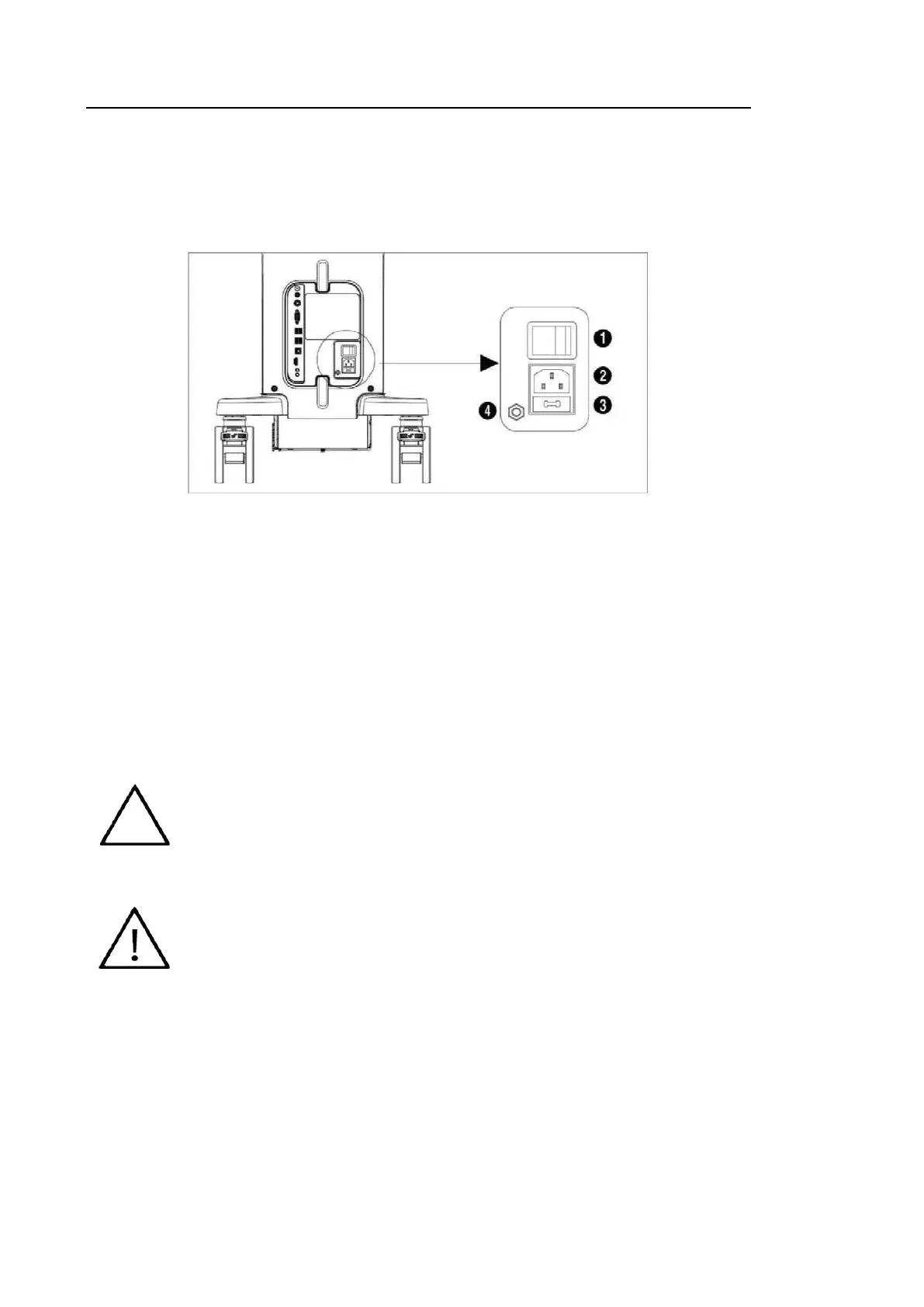
The power socket and equipotential terminal are located at the back of the product.
[Figure 3.3 Power Socket and Equipotential Terminal]
①
Power switch: Supplies power to the entire system or cuts off power Turn off the power.
②
Power inlet: Accepts the power cord, which connects to an external power supply.
③
Power fuse: Cuts off the power supply if overcurrent or overvoltage occurs.
④
Equipotential potential: This should be connected to the equipotential connector in the exam
room.
3.4.1.1. Power Cord Connection
Prior to connecting a power cord, verify that the voltage indicated on the power cord matches
the voltage rating of the installation point.
The product may be shipped with the power cable already connected to the
console.
If the product needs to be transported or stored for an extended period, the
temperature and humidity of the environment must be checked.
A sudden change in temperature may cause condensation and lead to
product failure.



 To Next Page