Chapter 1. Introduction 1 – 7
1.2.1. Monitor
Ultrasound images and other information are displayed on the color LCD monitor.
1.2.1.1. Screen Layout
The monitor displays ultrasound images, operation menus and a variety of other information.
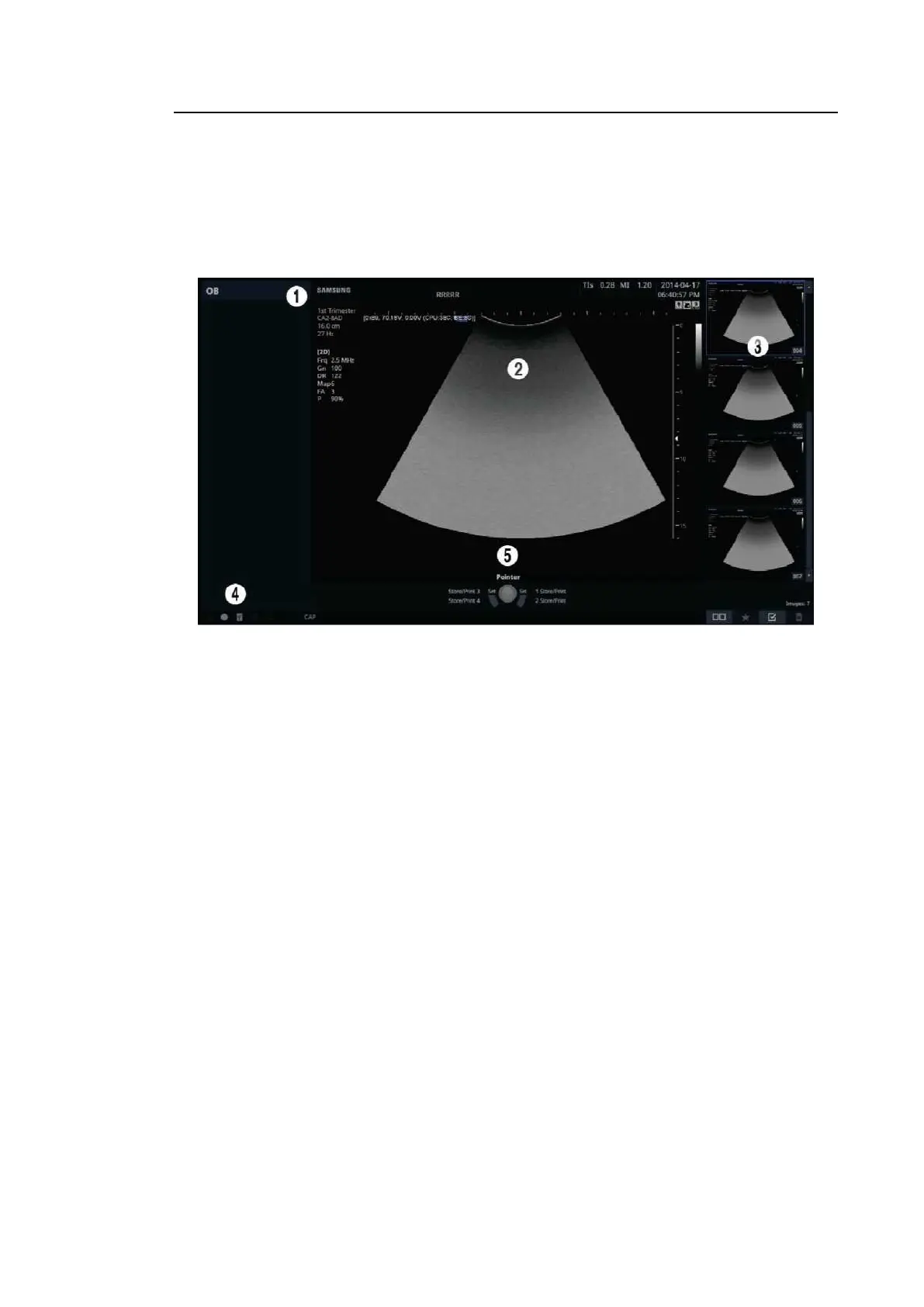
[Figure 1.3 Monitor Display]
① Title Area
Displays patient information, hospital name, application, frame rate, dept h, probe information,
acoustic output information, and the current date and time.
② Image Area
Displays ultrasound images. Image information, annotation, and measurement information
are also displayed.
③ Thumbnail Area
Images saved by pressing the preset Store button are shown in the thumbnails. When you
save Single screens, up to 4 images are shown in a list; for Quad screens, up to 12 images
are shown. Click it with the pointer to enlarge the preview image.
④ User Information and Status Information Area
Information that is useful to the user, such as current system status, image information,
selectable items, etc., is displayed.
⑤ User Key (User Defined Key) Area
Settings for User Defined Keys, including the positions of Set and Ex it buttons, are
displayed. You can change the setting of each button in Setup > Customize > Buttons.



 To Next Page