Confidential
Chapter 3 Connecting Cables
RF4402d Series Installation Manual v1.0 86
Copyright © 2018, All Rights Reserved.
Interface Cable Connection
Remove/Insert Optical Module
If the optical module needs to be removed or inserted before connecting the cable,
follow the below process.
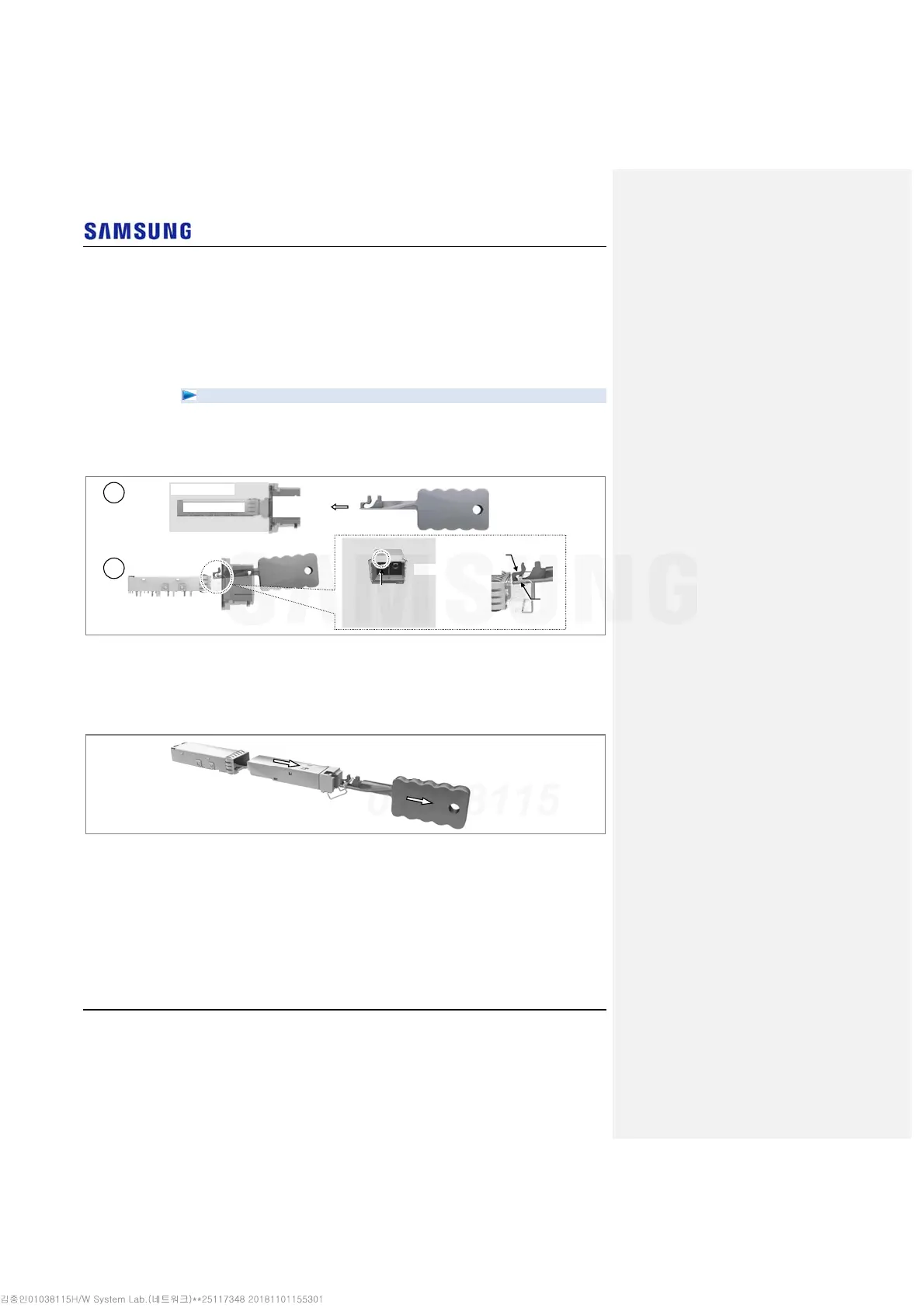
To remove Optical Module
1
Hang the Optic Transceiver Removal Tool’s hook on the optical module’s
bail within the system.
Figure 74. Optical Module Removal (1)
2
Completely remove the optical module from the optical module cage by
pulling the Optical Module Removal Tool.
Figure 75. Optical Module Removal (2)
Optical Module
Removal Tool
Optical Module
Optical Module Cage
Optical
Connector
O
tical Module
[System Inside]
Optical Module
Removal Tool’s Hook
Bail
[Front View]
Location to hang
the Optical Module
Removal Tool
2
1



 To Next Page