Confidential
Chapter 3 Connecting Cables
RF4402d Series Installation Manual v1.0 83
Copyright © 2018, All Rights Reserved.
To connect AC/DC Convertor AC Power cable
1
Make sure you have the following items:
Table 31. Parts and Tools for connecting AC/DC Convertor DC Power Cable
Category Description
Installation
Section
AC Distributor ~ AC/DC Convertor Power Input Port
Cable 12 AWG × 3C
Bend Radius 10 × OD
Connector AC Distributor Check specifications of AC distributor output terminal per site and
prepare fasteners
AC/DC Convertor JONHON, Push Pull Type, CT48J-1502TSCBM-07 to Open
Working Tools
Cable Cutter
Wire Stripper
Compressor
Heating Gun
Nipper
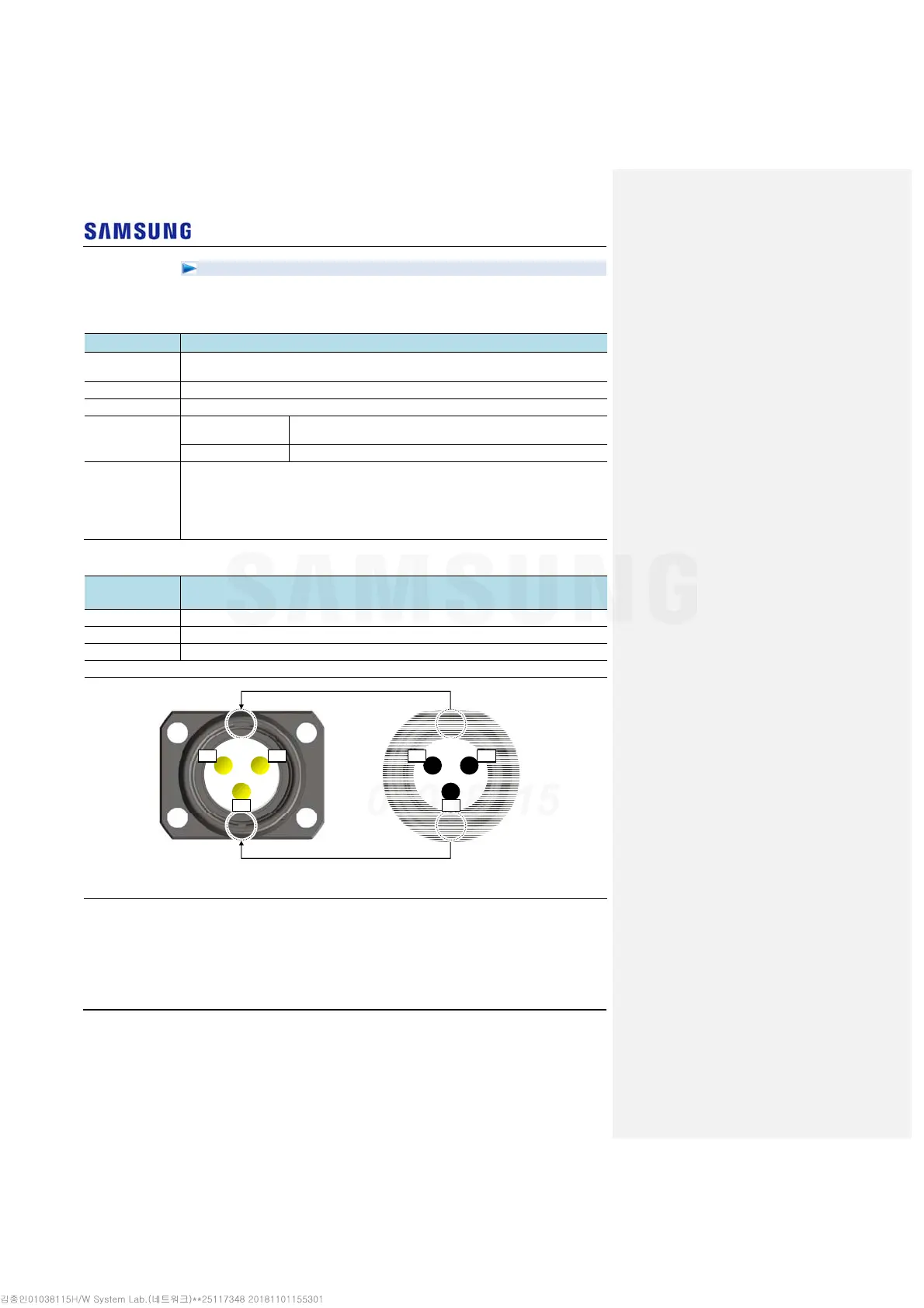
Table 32. AC/DC Convertor AC Power Cable Connector Pin Map
Power Connector
Pin No.
Color
L Brown
N Blue
PE Yellow/Green
* The color of the core wire can be changed according to the specification of the cable used.
[Cable side Connector]
[System side Connector]
Bump
Groove
Bump
Groove
PE PE
L NN L



 To Next Page